16
5 Operating Control and Displays
5.3 Main Menu
1. Use cursor keys to select a menu and press ENTER to confirm.
5.4 Information Menu Path
1. Use cursor keys to select path and press ENTER to confirm.
The display shows a menu overview.
5.4.1 Burner Details
Display operating hours
1. Use cursor keys to select menu and press ENTER to confirm.
The display shows the "System Information" menu window.
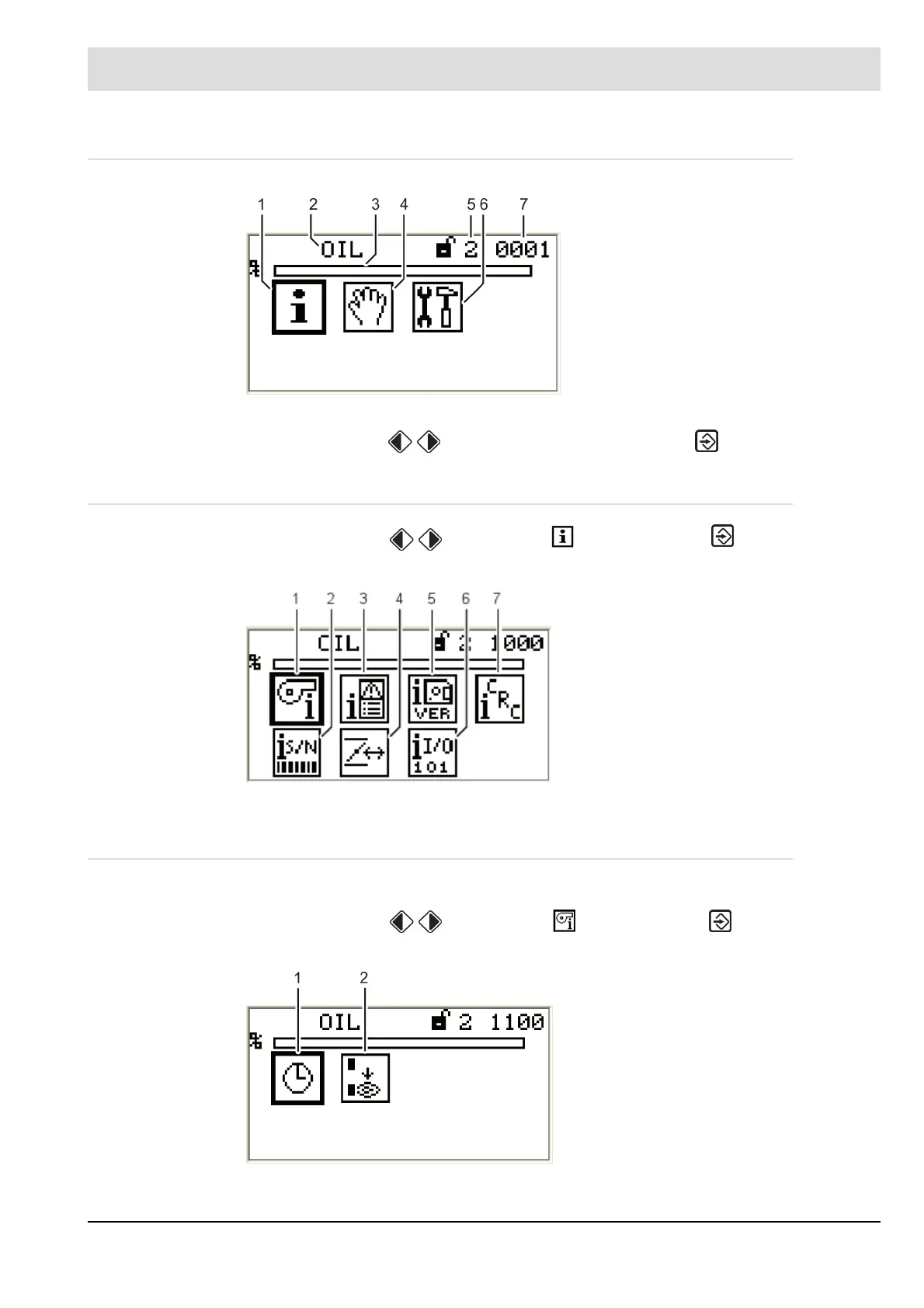
Fig. 5-2 Main menu
1 INFORMATION menu path [selected]
2 Display of fuel type
3 Bar graph of internal firing-rate in %
(0 - 100)
4 MANUAL menu path
5 Access level 2
6 SETTINGS menu path
7 Window number
Fig. 5-3 Display Menu overview
1 Burner information [selected]
2 Serial number
3 Fault history
4 Configuration of actual value of actuating
outputs (display only)
5 Software version
6 Digital inputs/outputs
7 Check sum display
Fig. 5-4 Display "System information"
1 Display operating hours [selected]
2 No. of burner start-ups



 To Next Page