26
5 Operating Control and Displays
5.6.2 Program Sequence
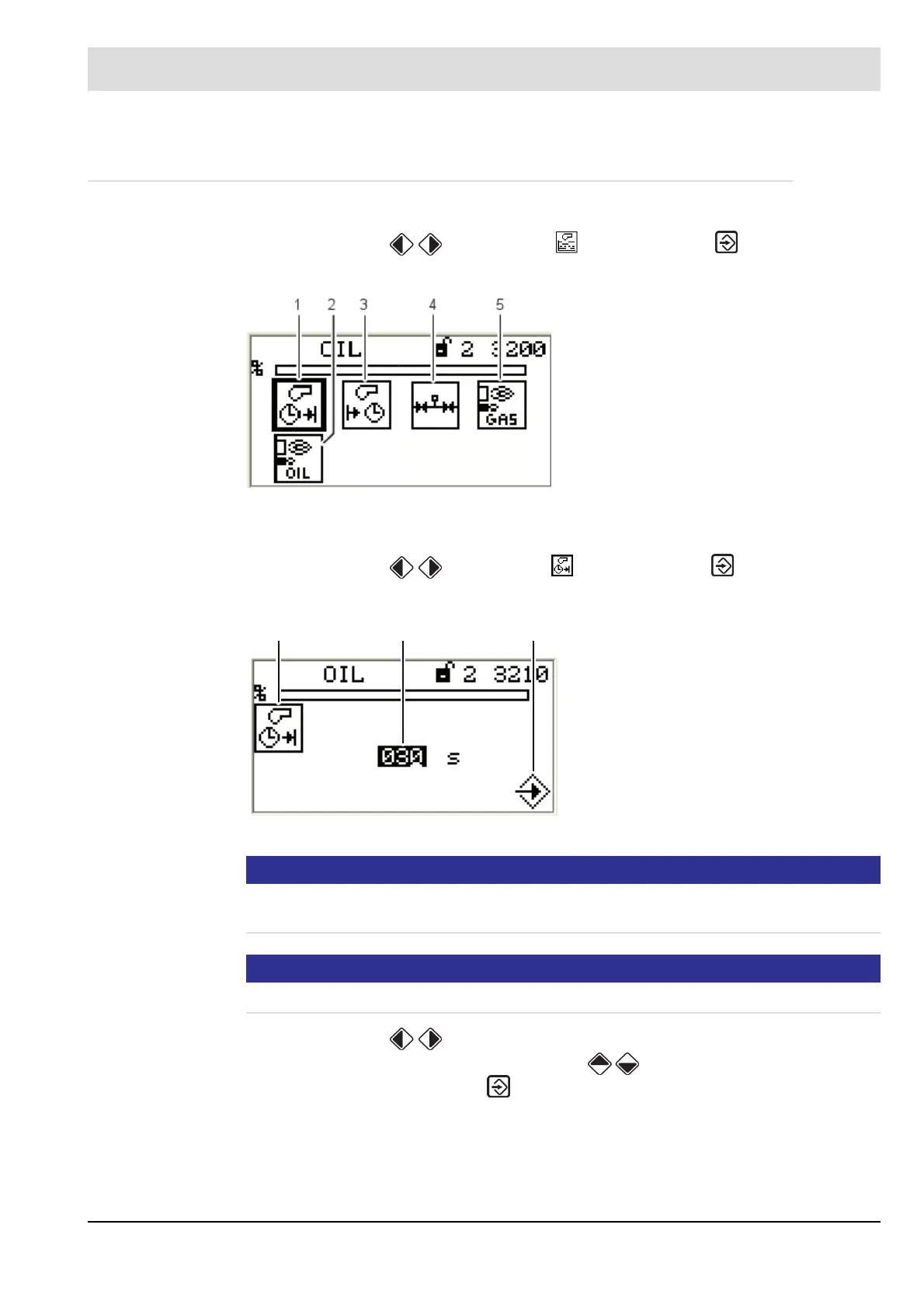
Configure program sequence
1. Use cursor keys to select menu and press ENTER to confirm.
The display shows the program sequence overview.
Set pre-ventilation period
1. Use cursor keys to select menu and press ENTER to confirm.
The display shows the pre-ventilation period menu.
NOTICE!
Pre-ventilation starts as soon as damper reaches pre-ventilation position and - if you use a
VSM - the last but one point of fuel/air ratio curve is passed.
NOTICE!
The second to last channel’s position must be lower than the position of the last curve point.
2. Use cursor keys to select the number you want to change.
3. Change the numerical value with cursor keys .
4. Confirm the entry with ENTER .
The countdown starts.
Fig. 5-25 Overview program sequence
1 Duration of pre-ventilation [selected]
2 Pilot burner oil operation
3 Duration of post-ventilation
4 Valve leakage test
5 Pilot burner gas operation
Fig. 5-26 Period of pre-ventilation menu
1 Pre-ventilation period pictogram
2 Setting pre-ventilation time
3 Accept value by pressing ENTER
1
2 3



 To Next Page