20
5 Operating Control and Displays
5.4.6 Positions of Actuators
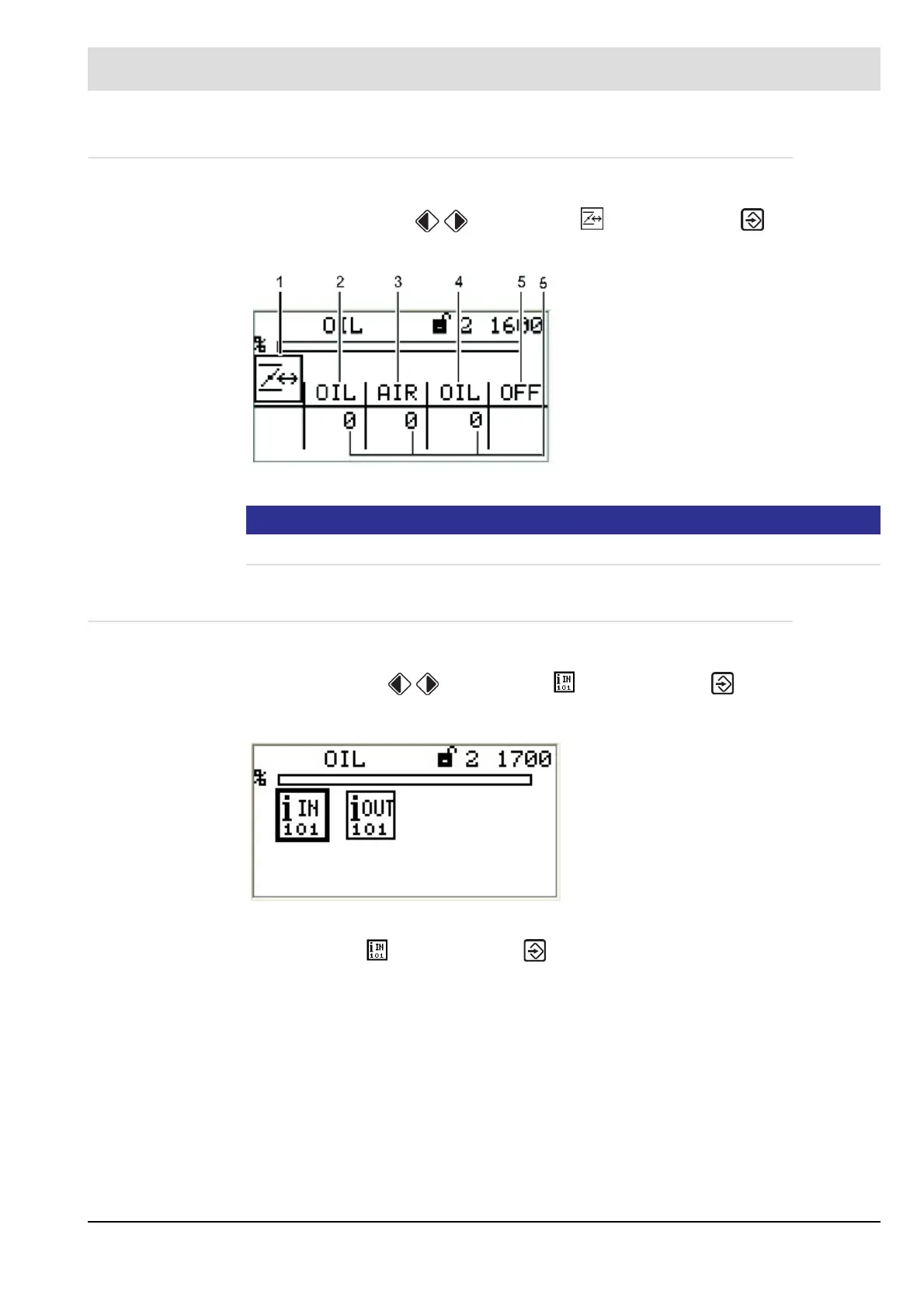
Display positions of actuators
1. Use the cursor keys to select menu and press ENTER to confirm.
The display shows the "Actuators" menu.
NOTICE!
The assignment of channels is depending on configuration settings!
5.4.7 Check Digital Inputs/Outputs
Check digital inputs
1. Use cursor keys to select menu and press ENTER to confirm.
The display shows the "Digital inputs/outputs" menu.
2. Select menu and press ENTER to confirm.
The display shows the 1
st
page of inputs":
Fig. 5-12 Actuators menu
1 Actuator pictogram
2 Actuator channel 1 (oil)
3 Actuator channel 2 (air)
4 Actuator channel 3 (oil)
5 Optional channel (OFF;
control of frequency converter)
6 Actuator’s actual position
Fig. 5-13 Digital inputs and outputs menu
1 Digital inputs pictogram [selected]
2 Digital outputs pictogram



 To Next Page