31
5 Operating Control and Displays
NOTICE!
You require access level 2 to make settings in this function!
Accept or discard the entry!
Configuration of actuating outputs
1. Use cursor keys to select menu and press ENTER to confirm.
The display shows the configuration of actuating outputs menu.
Curve setting of actuators
1. Use cursor keys to select menu and press ENTER to confirm.
NOTICE!
Pressing key and holding it longer than 2 s in this menu will cause a fault shut-down.
The display shows the curve setting menu.
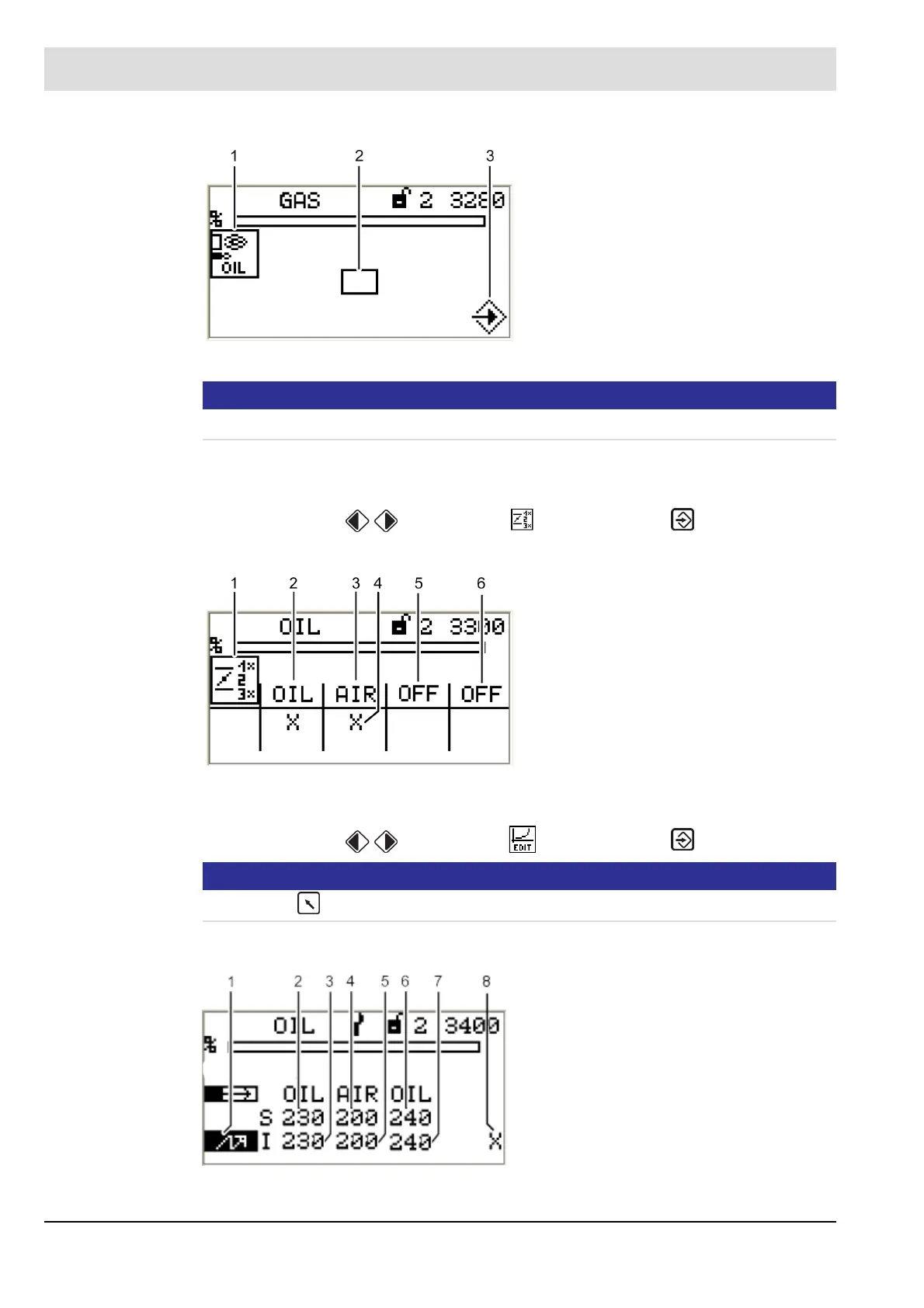
Fig. 5-36 Pilot burner in oil operation menu
1 Pilot burner in oil operation pictogram
2 Activate pilot burner in oil operation
3 Press ENTER to accept settings
Fig. 5-37 Configuration of actuating outputs menu
1 Actuator position pictogram
2 Display channel 1, oil
3 Display channel 2, air
4 Channel active
5 Display channel 3, off
6 Optional channel, off
Fig. 5-38 Curve setting menu
1 Ignition position firing-rate point
2 Setpoint channel 1, oil
3 Actual value channel 1, oil
4 Setpoint channel 2, air
5 Actual value channel 2, air
6 Setpoint channel 3, oil
7 Actual value channel 3, oil
8 Curve data for this firing-rate point
already existing



 To Next Page