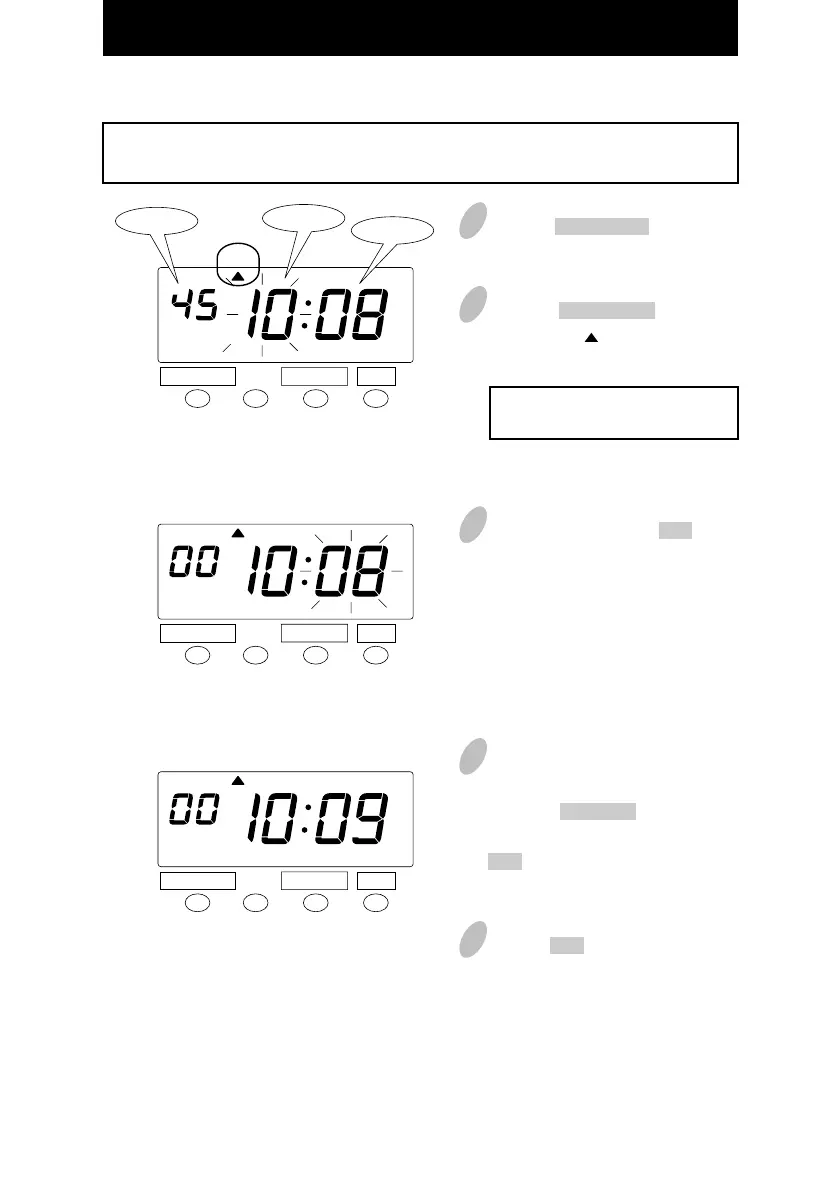
Setting the Time
CHANGE SET
CHANGE SET
CHANGE SET
1
Push the DATE/TIME button for 3
seconds.
3
In the example, push the SET button
because the hour is not to be
changed; now the hour of 10 o'clock
has been set.
At that moment, the flashing of the
display changes from "Hour" to
"Minute".
4
Changing the "Minute" (for example,
from 8 minutes to 9 minutes).
Push the CHANGE button to set
"Minute" at "09" and then push the
SET button. Now the minutes of 9
have been set.
TIME
TIME
TIME
Example
Change the time from 10:08 a.m. to 10:09 a.m.
2
Push the DATE/TIME button and
position the " " under the "TIME"
mark.
The flashing number can be
changed.
Minute
Second
Hour
DATE/ TIME
DATE/ TIME
DATE/ TIME
21
5
Push the SET button once again.
AM
AM
AM
18



 To Next Page