Setting the Print Format
1
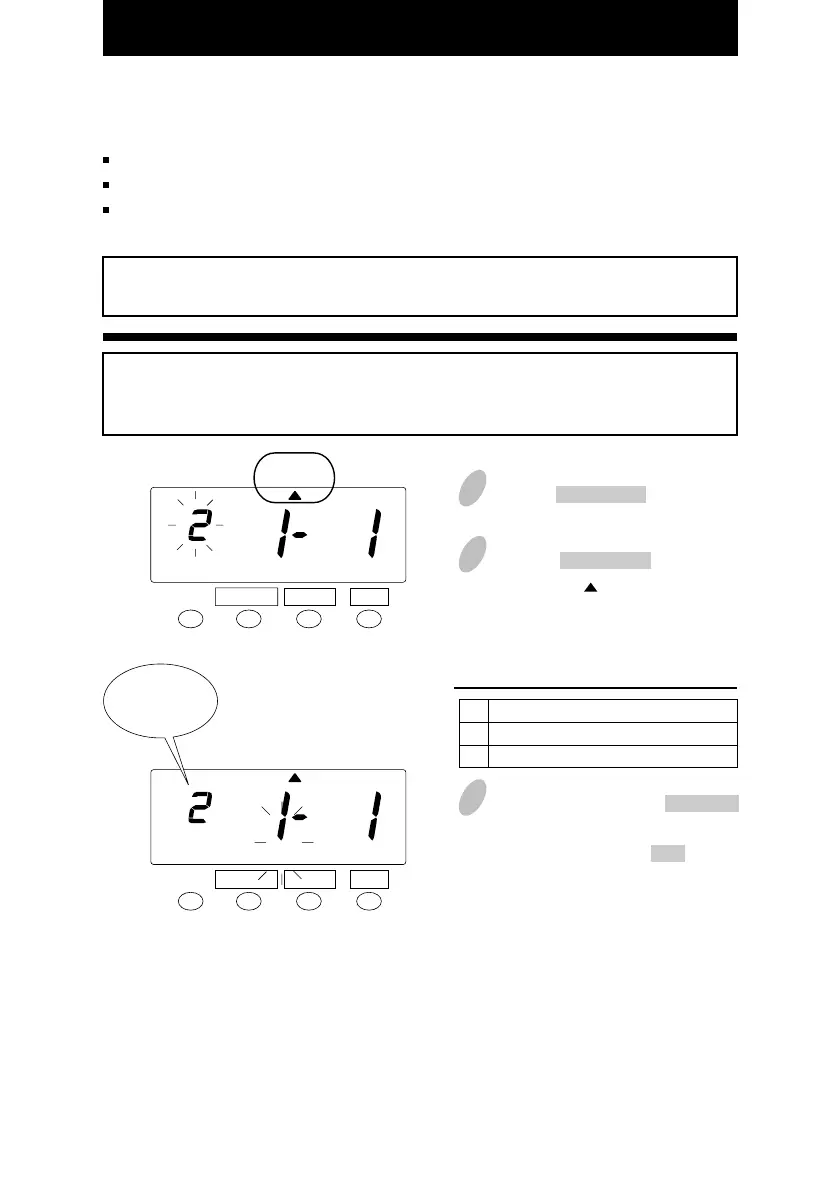
Push the FUNCTION button for 3
seconds.
3
In this example, push the CHANGE
button to set the left-side number at
"2" and then push the SET button.
At that moment, the flashing of the
display will change to the middle
number.
Order Option
Date
Day of the week
1
2
27
You can select the following "Print Format".
"Date" or "Day of the week" print format
"AM/PM" or "24 HR" hour print format
"Regular" or "Hundredths" minutes print format
When you have cards that you are using-------
If error " E-49 " appears when you try to change settings, then you must reset all cards
before proceeding. ( See "All cards reset" )
Example
"Day of the week" + "AM/PM" hour + "Regular" minutes
Example of printing ----- F
R 4:30P
Set the "Date/D.O.W." print format.
SET
FUNCTION CHANGE
2
Push the FUNCTION button and
position the " " under the "PRINT
FORMAT" mark.
PRINT
FORMAT
SET
FUNCTION CHANGE
PRINT
FORMAT
Date/D.O.W.
Print
format
24



 To Next Page