Setting the Rounding
29
Refer to "WHAT YOU CAN DO WITH THE 7000E" before setting.
If error " E-49 " appears when you try to change settings, then you must reset all cards
before proceeding. ( See "All cards reset" )
Example
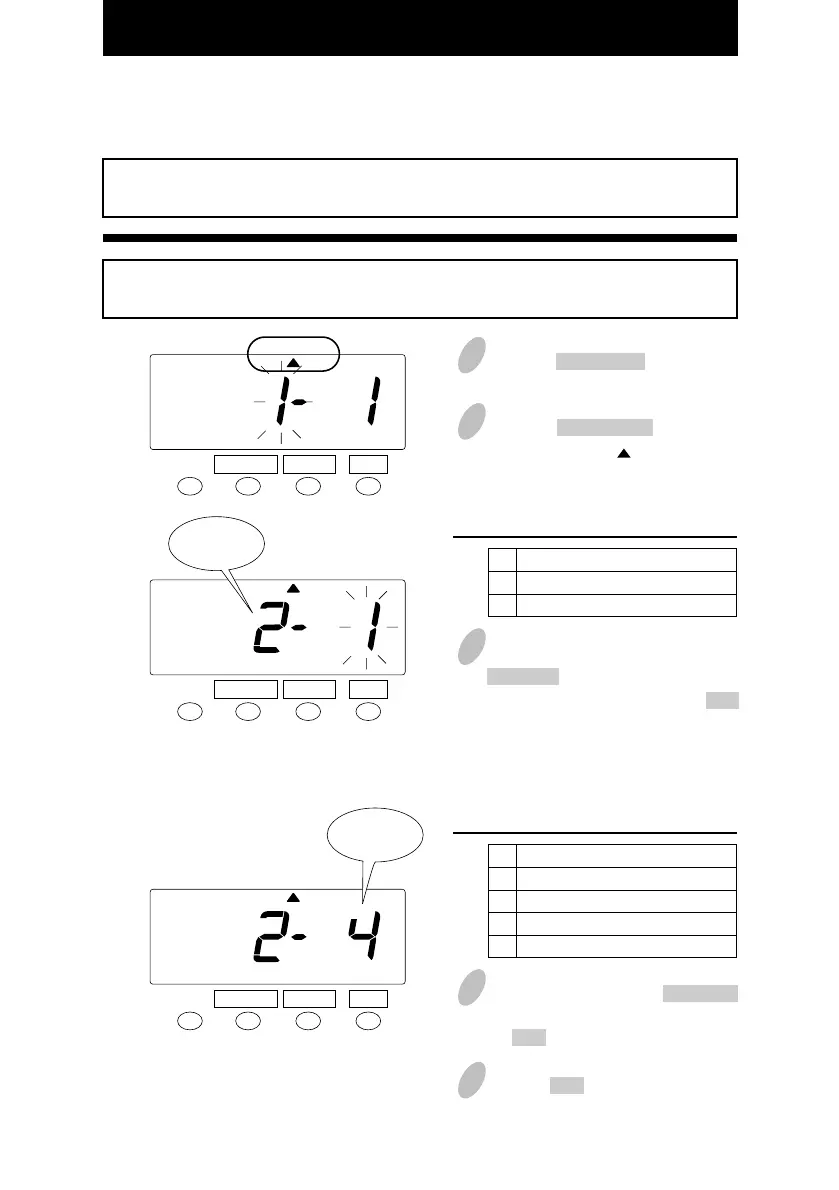
Types of rounding ----- Punch Rounding unit ----- 15 min.- 7 breakpoint
3
In the case of the example, push the
CHANGE button to set the left-side
number at "2" and then push the SET
button. At that moment, the flashing
of the display will change to the
right-side number.
1 Push the FUNCTION button for 3
seconds.
2
Push the FUNCTION button and
position the " " under the
"ROUNDING" mark.
Order Option
Hours (Hourly rounding)
Punch (Punch time rounding)
1
2
Set the "Types of rounding".
SET
FUNCTION CHANGE
4
In this case, push the CHANGE
button to set at "4" and then push
the SET button.
Order Option
None
6 minute 3 breakpoint
15 minute 3 breakpoint
15 minute 7 breakpoint
1
2
3
4
5
Push the SET button once again.
Set the "Rounding unit".
ROUNDING
SET
FUNCTION CHANGE
ROUNDING
SET
FUNCTION CHANGE
ROUNDING
Rounding
unit
Types of
rounding
26



 To Next Page