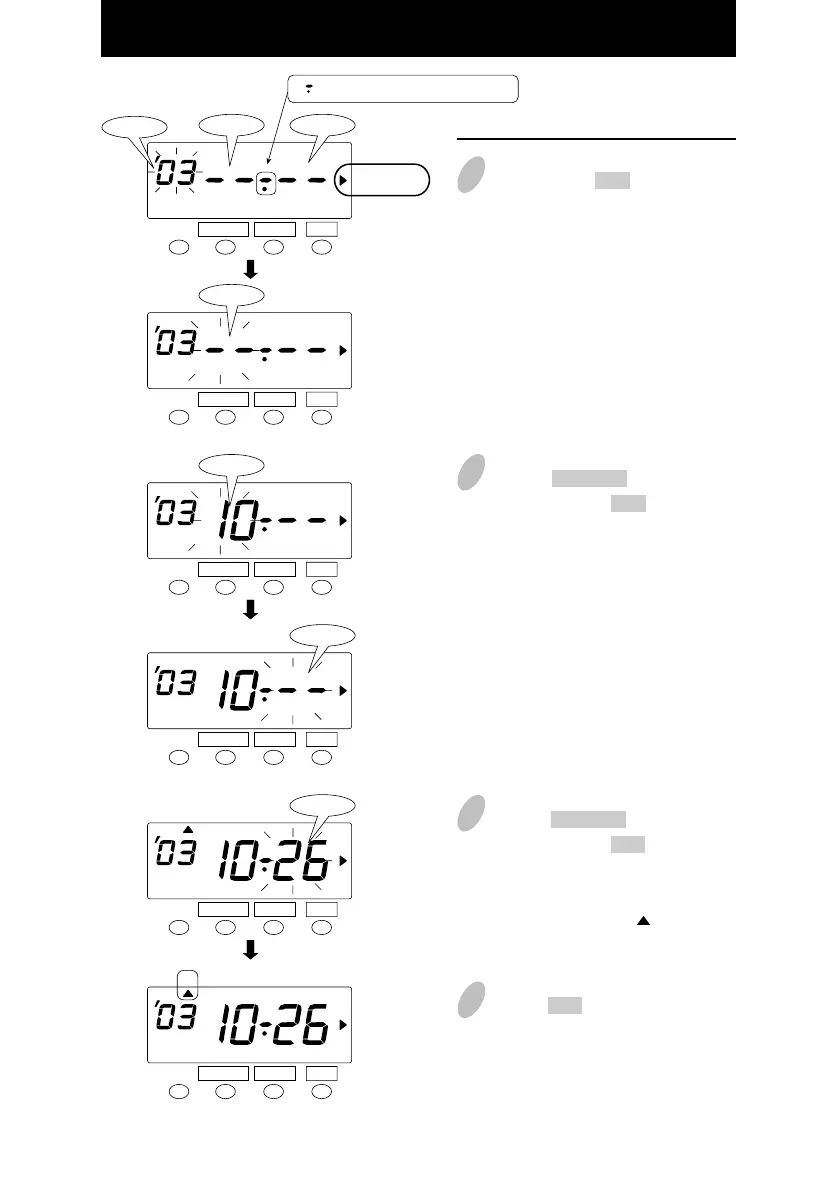
Set the "ending date".
6
Next, push the SET button. At that
moment, the flashing changes
"Year" to "Month".
7
Push the CHANGE button to set at
"10" and push the SET button.
At that moment, the flashing
changes from "Month" to "Date".
8
Push the CHANGE button to set at
"26" and push the SET button.
At that moment, "ending date" of
the display changes from flashing to
steady and the " " mark is
displayed under "SU".
SET
FUNCTION CHANGE
Month Date
Year
" " mark means "ending date".
SU
SU
SET
FUNCTION CHANGE
Month
SET
FUNCTION CHANGE
Month
SET
FUNCTION CHANGE
Date
SET
FUNCTION CHANGE
Date
SET
FUNCTION CHANGE
DAYLIGHT
SAVINGS
DAYLIGHT
SAVINGS
DAYLIGHT
SAVINGS
DAYLIGHT
SAVINGS
DAYLIGHT
SAVINGS
DAYLIGHT
SAVINGS
35
9
Push the SET button once again.
32



 To Next Page