13
LAUNCH
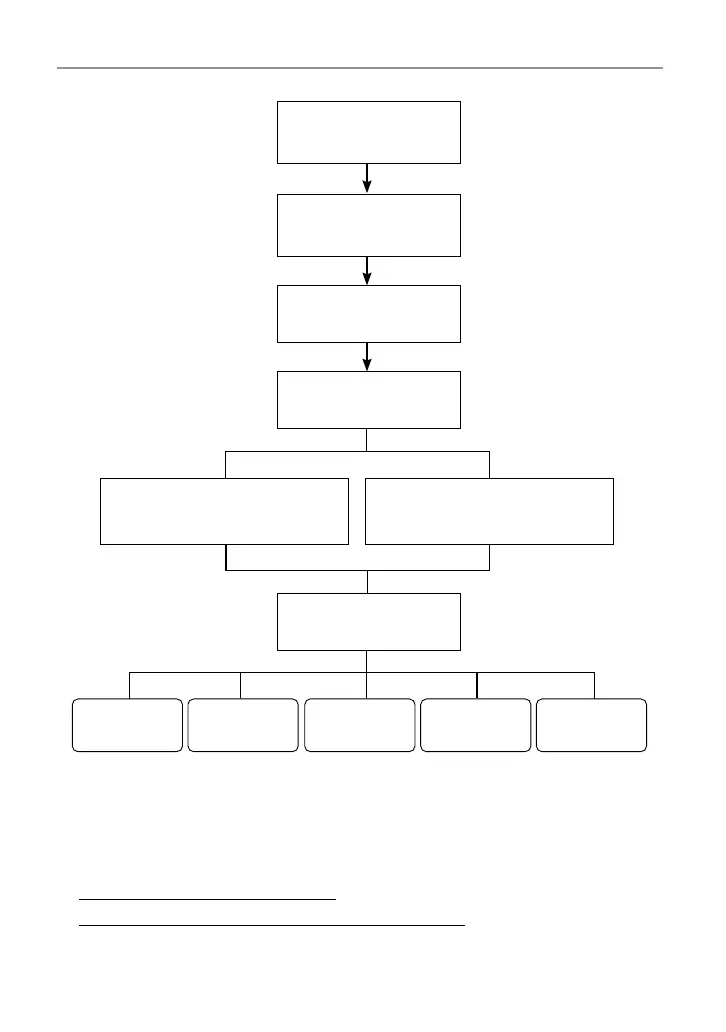
Select “Diagnose”
Automatic System Detection
(System Scan)
Manual System Detection
(System Selection)
Select Scan Mode
Select Test Function
Select Vehicle Model
Select Vehicle
Manufacturer
Read Data
Stream
Special
Functions*
Read Fault
Code
Clear Fault
Code
Read Version
Information
Take DEMO V15.34 as an example to demonstrate how to diagnose a vehicle.
*Note: Illustrations used in this manual are samples, the actual testing screen may vary
for each vehicle being tested. The following illustrations are based on the DEMO with
basic functions. Vehicle diagnostic software with full systems and full functions can be
purchased in the Mall.
1). Select diagnostic software version: Tap “DEMO” to go to Step 2.
2
).
Select vehicle model (varies with dierent versions): Select the desired
vehicle model.




 To Next Page