14
LAUNCH
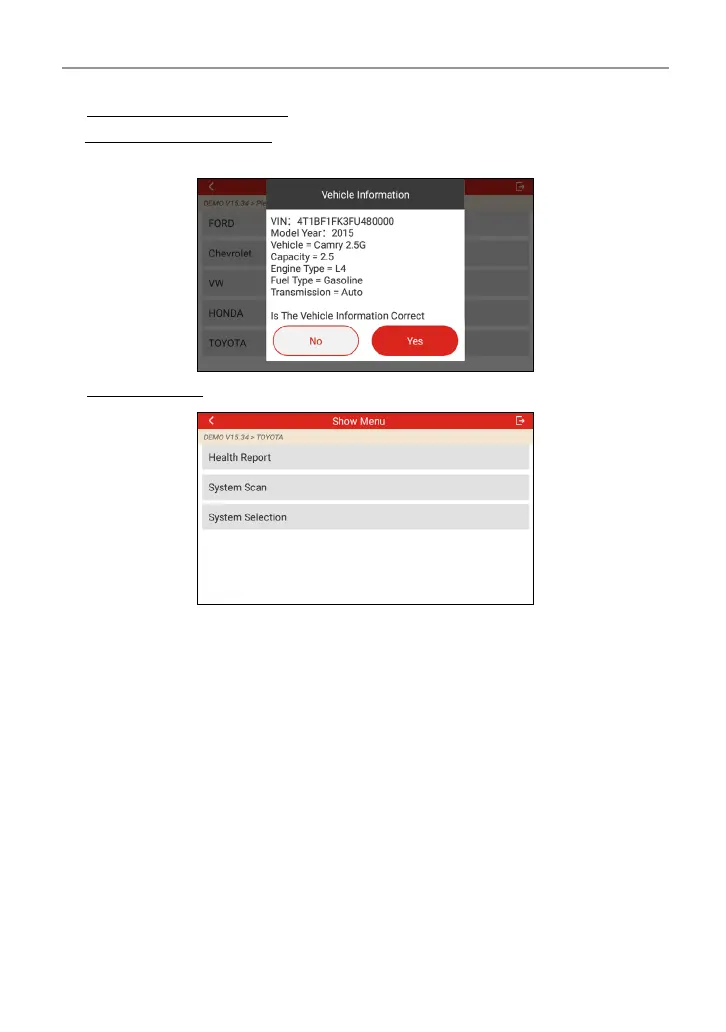
3). Turn the ignition key to ON: Set the ignition switch to on.
4). Read vehicle information: After reading the vehicle information, double check
if the vehicle information is correct or not. If yes, tap “Yes” to continue.
5). Select test item: Select the desired test item to proceed.
4.2.2.1 Health Report (Quick Test)
This function varies from vehicle to vehicle. It enables you to quickly access all
the electronic control units of the vehicle and generate a detailed report about
vehicle health.
Tap “Health Report” on the test item selection screen, the system starts scanning
the ECUs. Once the scanning is complete, the following screen will appear:




 To Next Page