15
LAUNCH
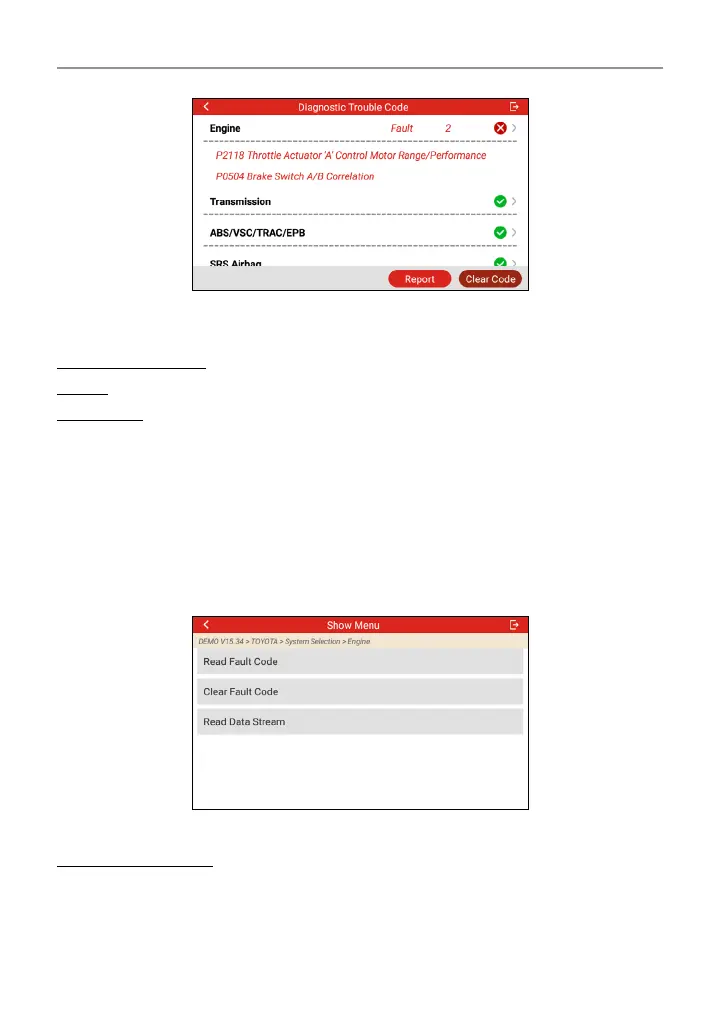
In above gure, the tested system with fault code is tagged with a red cross and
the system with OK displays with a green tick.
On-Screen Buttons:
Report: Tap to save the diagnostic result as a report.
Clear Code: Tap to clear the existing diagnostic trouble codes.
4.2.2.2 System Scan
This option allows you to quickly scan which systems are installed on the vehicle.
4.2.2.3 System Selection
This option allows you manually select the test system and function step by step.
Tap “System Selection” on the test item selection screen, and tap the desired
system (take “Engine” for example) to enter the test function selection screen.
*Note: Dierent vehicle has dierent diagnostic menus.
A. Read Fault Code
This function displays the detailed information of DTC records retrieved from the
vehicle’s control system.
Tap “Read Fault Code” on the test function selection screen, the screen will




 To Next Page