System Troubleshooting
PHOTON
+
System Guide 38
PHOTON
+
is not connected it will not be listed in the Device Manager
list.
If the LDS-Dactron Photon USB device driver is not listed and the
PHOTON
+
is plugged in then the driver may not be installed correctly. In
this case, try to reinstall, or update, the device driver. This may also be a
symptom that the PC USB port does not supply adequate voltage to the
PHOTON
+
.
NOTE: It has been found that some laptops such as
Toshiba 4030 CDT do
not have a USB 1.0 or 1.1 compliant interface and do not provide enough
power through the USB port. When this occurs, the computer can not
detect the
PHOTON
+
device.
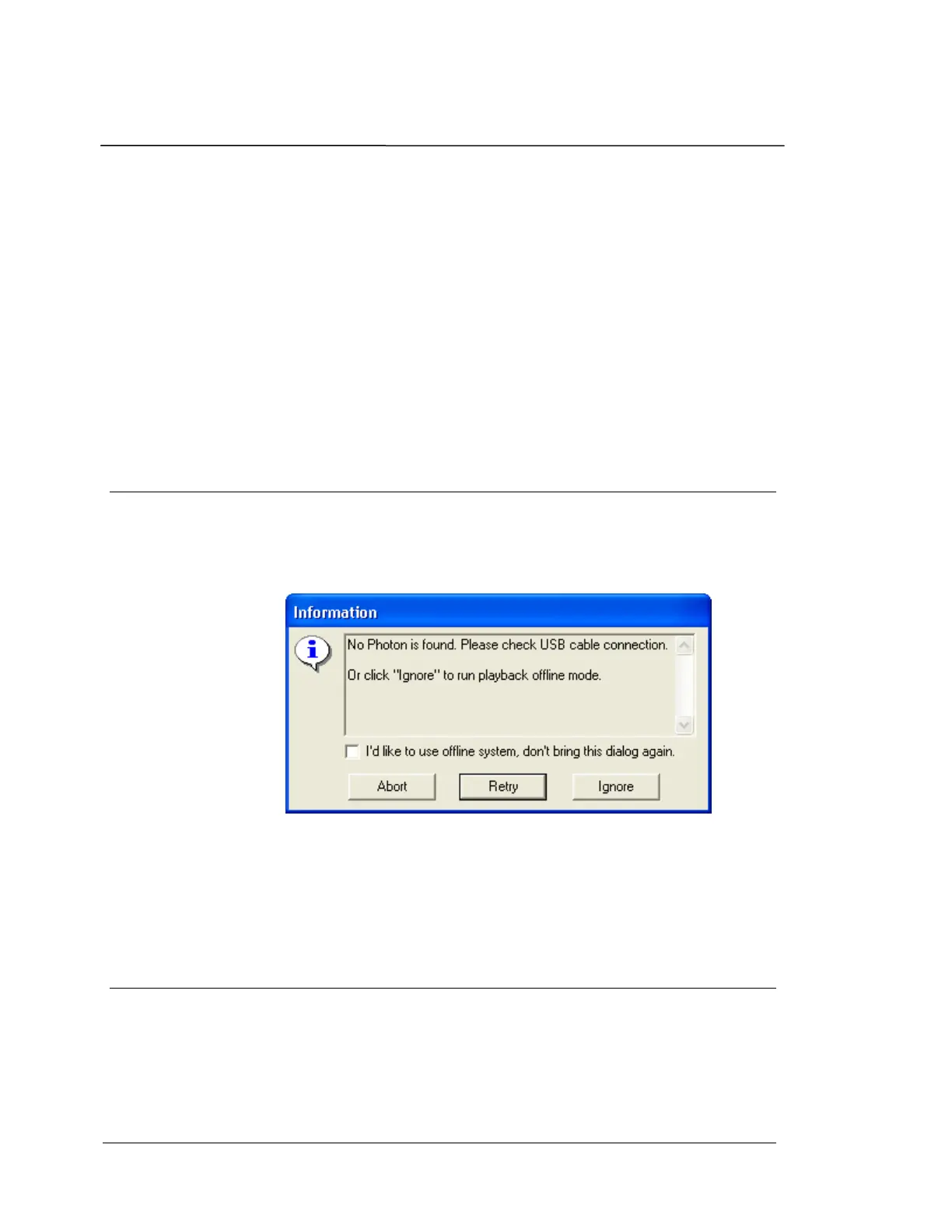
Failure to initialize the PHOTON
+
If the USB power from the PC is below the minimum requirements, or
the
PHOTON
+
is not properly connected to the USB port, the following
message will be displayed.
Follow the instructions provided to re-establish communication with the
PHOTON
+
. Selecting “Ignore” will initialize RT Pro Playback, for offline
data analysis.
USB cable disconnected while operating
software
If the USB cable is inadvertently disconnected between the PHOTON
+
and the PC while the software is running the following error message
will be displayed.


 To Next Page