Need help?
Do you have a question about the LDS Dactron PHOTON+ and is the answer not in the manual?
Describes the PHOTON* system's capabilities, performance, and applications for noise and vibration analysis.
Details the available hardware and software options, including real-time and post-processing functionalities.
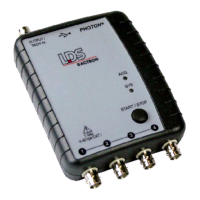
Explains the physical connectors for analog signals and output, as well as the USB port and status LEDs.
Provides general safety precautions for system operation, maintenance, and calibration, emphasizing user responsibility.
Highlights critical safety notices regarding hazardous voltages, environmental exposure, and unauthorized system access.
Details the system's power source via USB, recommended practices for stable operation, and potential power limitations.
Specifies the maximum USB cable length and the need for powered hubs when extending the connection.
Defines the allowable ambient temperature and humidity ranges for system operation and storage.
Provides instructions for original and commercial packaging to ensure safe system transport and handling.
Step-by-step guide for installing the necessary Windows drivers for the PHOTON* hardware via USB.
Guides users to install the associated RT Pro Dynamic Signal Analysis Series software on their computer.
Explains how to launch the RT Pro software and connect it to the PHOTON* system for analysis.
Details the procedure for updating the existing PHOTON* device driver through the Windows Control Panel.
Provides instructions for safely removing the PHOTON* device driver from the Windows operating system.
States that no specific maintenance is required for the PHOTON* system, with a warning against opening the unit.
Explains that calibration addresses offset and gain errors in input/output channels for accuracy.
Describes the use of the PHOTON*'s OUTPUT channel as a sine tone signal source for calibration.
Lists essential items for calibration, including BNC cables, adapter cables, an attenuator module, and a calibrated voltmeter.
Guides on installing the calibration software from the provided CD, requiring a license key.
Outlines the major steps for system calibration, from connecting hardware to validating results.
Details the process of measuring and entering DC offset and AC RMS values for the output channel.
Describes the automatic calibration of input channels using the calibrated output channel as a source.
Explains the process of re-measuring DC offset and RMS values to validate calibration accuracy.
Covers repeating the calibration and validation for the system's low-voltage input ranges (0.1V, 0.01V).
Details the validation process specifically for the low-voltage ranges to ensure accuracy.
Explains the generation of calibration reports and data files, and how to copy them for application use.
Addresses issues where the PHOTON* is not detected via USB before launching the application software.
Guides on verifying the presence and correct installation of the LDS-Dactron Photon USB device driver in Device Manager.
Troubleshoots problems related to the PHOTON* not initializing due to USB power or connection issues.
Provides guidance on handling error messages and re-establishing communication when the USB cable is disconnected during operation.
Identifies symptoms and causes of insufficient power from USB ports or hubs affecting PHOTON* operation.
Offers solutions for errors occurring due to missing application or DSP software modules.
Provides contact methods for obtaining support from LDS representatives or directly from LDS-Dactron.
Outlines the procedure for returning products for warranty service, including shipping responsibilities.
Details the version history of the manual, including the date and content updates for each version.
Provides an alphabetical listing of topics covered in the manual with corresponding page numbers.
 General
| Brand | LDS |
|---|---|
| Model | Dactron PHOTON+ |
| Category | Measuring Instruments |
| Language | English |

 To Next Page