A
A
C
C
S
S
8
8
0
0
6
6
D
D
i
i
g
g
i
i
t
t
a
a
l
l
A
A
C
C
S
S
e
e
r
r
v
v
o
o
d
d
r
r
i
i
v
v
e
e
M
M
a
a
n
n
u
u
a
a
l
l
R
R
e
e
v
v
1
1
.
.
0
0
Tel: (86)755-26434369 20 Website: www.leadshine.com
/Windows XP. And the selected PC should have 1 serial port at least for
communicating with the drive.
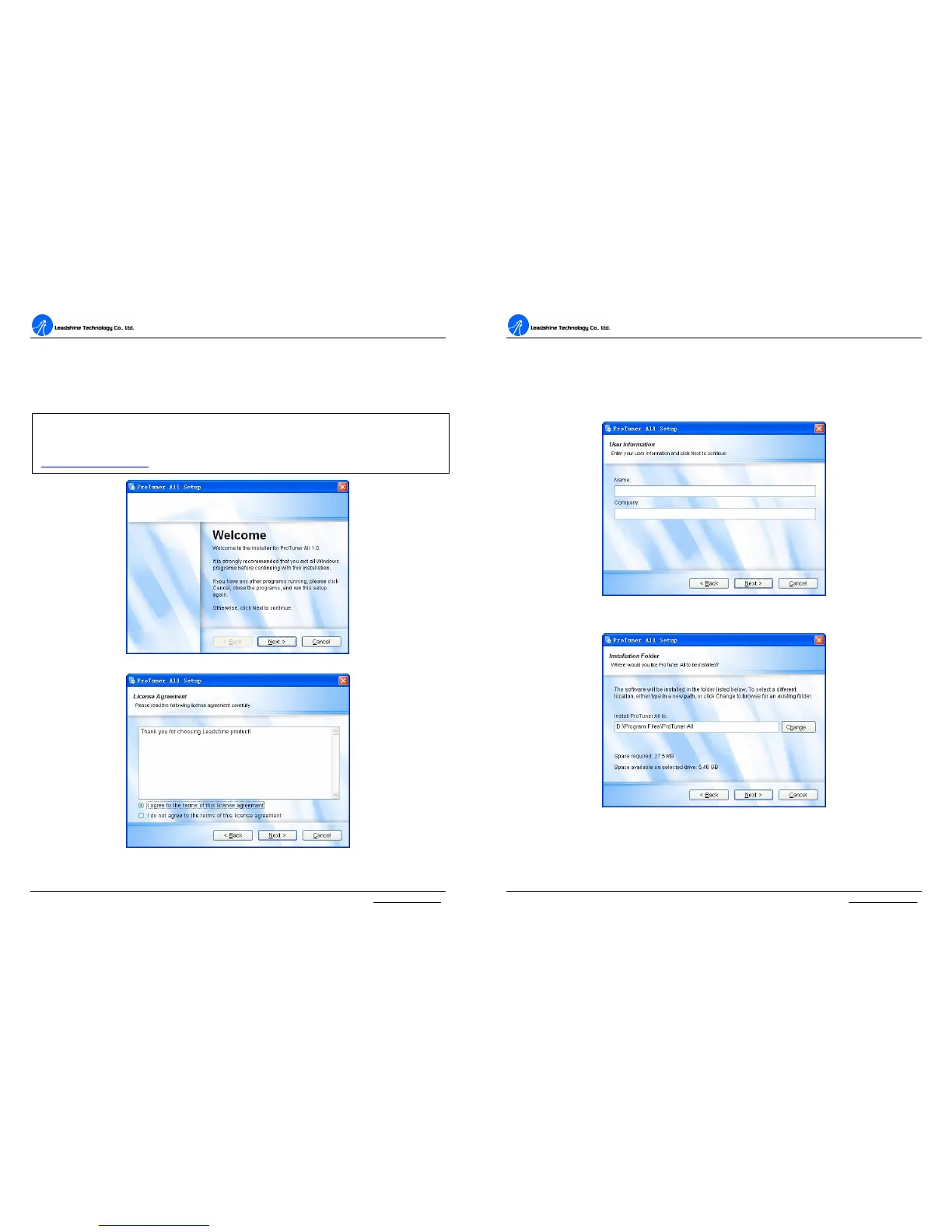
Double click “ProTuner_All_Setup_V1.0.exe” to begin installing the ProTuner. See
Figure 12. Click Next to enter the “License Agreement” window. See Figure 13.
Figure 12: Begin to install the ProTuner
Figure 13: License agreement
Note: ProTuner_All_Setup_V1.0.exe can be used for all Leadshine digital drives. User can
get it from either Leadshine CD or website. Please get the latest version from
http://www.leadshine.com.
A
A
C
C
S
S
8
8
0
0
6
6
D
D
i
i
g
g
i
i
t
t
a
a
l
l
A
A
C
C
S
S
e
e
r
r
v
v
o
o
d
d
r
r
i
i
v
v
e
e
M
M
a
a
n
n
u
u
a
a
l
l
R
R
e
e
v
v
1
1
.
.
0
0
Tel: (86)755-26434369 21 Website: www.leadshine.com
Choose “I agree to the terms of this license agreement” and click Next to continue
installation. The user can enter user’s information in the following window. See
Figure 14. After entering the user’s information, click Next to select installation folder,
where you would like to install the ProTuner. See Figure 15.
Figure 14: User’s information settings
Figure 15: Installation folder settings


 To Next Page