A
A
C
C
S
S
8
8
0
0
6
6
D
D
i
i
g
g
i
i
t
t
a
a
l
l
A
A
C
C
S
S
e
e
r
r
v
v
o
o
d
d
r
r
i
i
v
v
e
e
M
M
a
a
n
n
u
u
a
a
l
l
R
R
e
e
v
v
1
1
.
.
0
0
Tel: (86)755-26434369 42 Website: www.leadshine.com
Upload and Download Data
Download Data to EEPROM
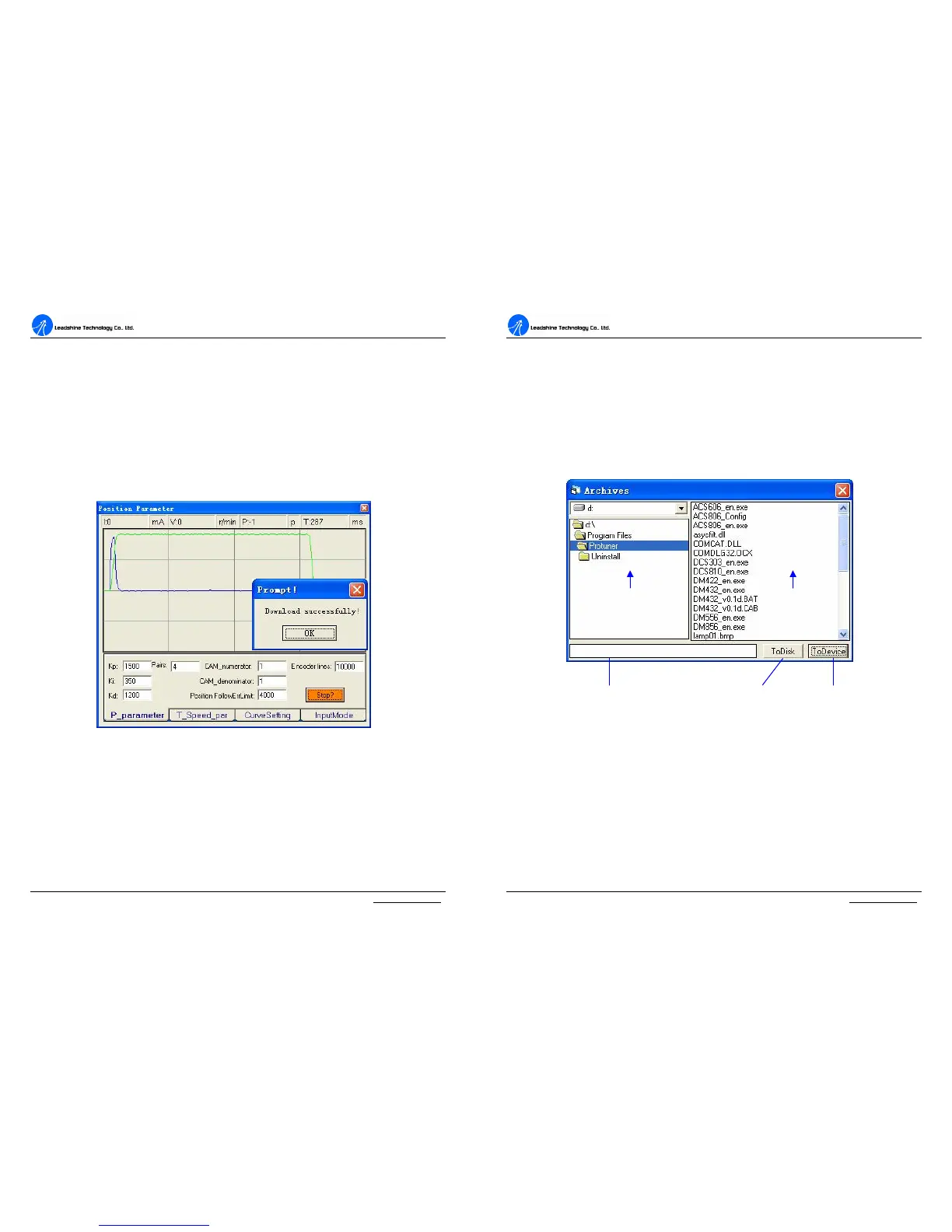
A built-in EEPROM in the ACS806 is used to save the configuration data. Every
time when you finish configuration or get satisfied parameters after tuning, don’t
forget to download the data to drive’s EEPROM by select Option->SaveToDrive.
ProTuner will indicate you by a message box as shown in Figure 44 if download is
successful. The EEPROM is a nonvolatile storage, so data in EEPROM will not lose
when power is off.
Figure 44: Download to Drive EEPROM
Upload the Data from EEPROM
ProTuner will read the data form the EEPROM automatically when a specific menu
is selected. For example, the Error Check window will display the last ten errors if
click Err_check in main menu bar.
A
A
C
C
S
S
8
8
0
0
6
6
D
D
i
i
g
g
i
i
t
t
a
a
l
l
A
A
C
C
S
S
e
e
r
r
v
v
o
o
d
d
r
r
i
i
v
v
e
e
M
M
a
a
n
n
u
u
a
a
l
l
R
R
e
e
v
v
1
1
.
.
0
0
Tel: (86)755-26434369 43 Website: www.leadshine.com
Save Data on Harddisk
ProTuner offers a tool to save all the configuration data on harddisk. This tool is
very useful when building machines with same motors and other components. Select
Option->Archives, the upload and download window will appear as figure 45. To
Save the current data on hardisk, enter a file name in the edit box and then click
‘ToDisk’ button. See figure 46 for more detail.
Figure 45: Upload and download window
Download Data to Device
When communication between ProTuner and the ACS806 is established, you can
open a configuration file and download the data from the file to the drive. See figure
47 for more details.
Select folder Files list in folder
File name and path Save on harddisk Download to EEPROM


 To Next Page