A
A
C
C
S
S
8
8
0
0
6
6
D
D
i
i
g
g
i
i
t
t
a
a
l
l
A
A
C
C
S
S
e
e
r
r
v
v
o
o
d
d
r
r
i
i
v
v
e
e
M
M
a
a
n
n
u
u
a
a
l
l
R
R
e
e
v
v
1
1
.
.
0
0
Tel: (86)755-26434369 44 Website: www.leadshine.com
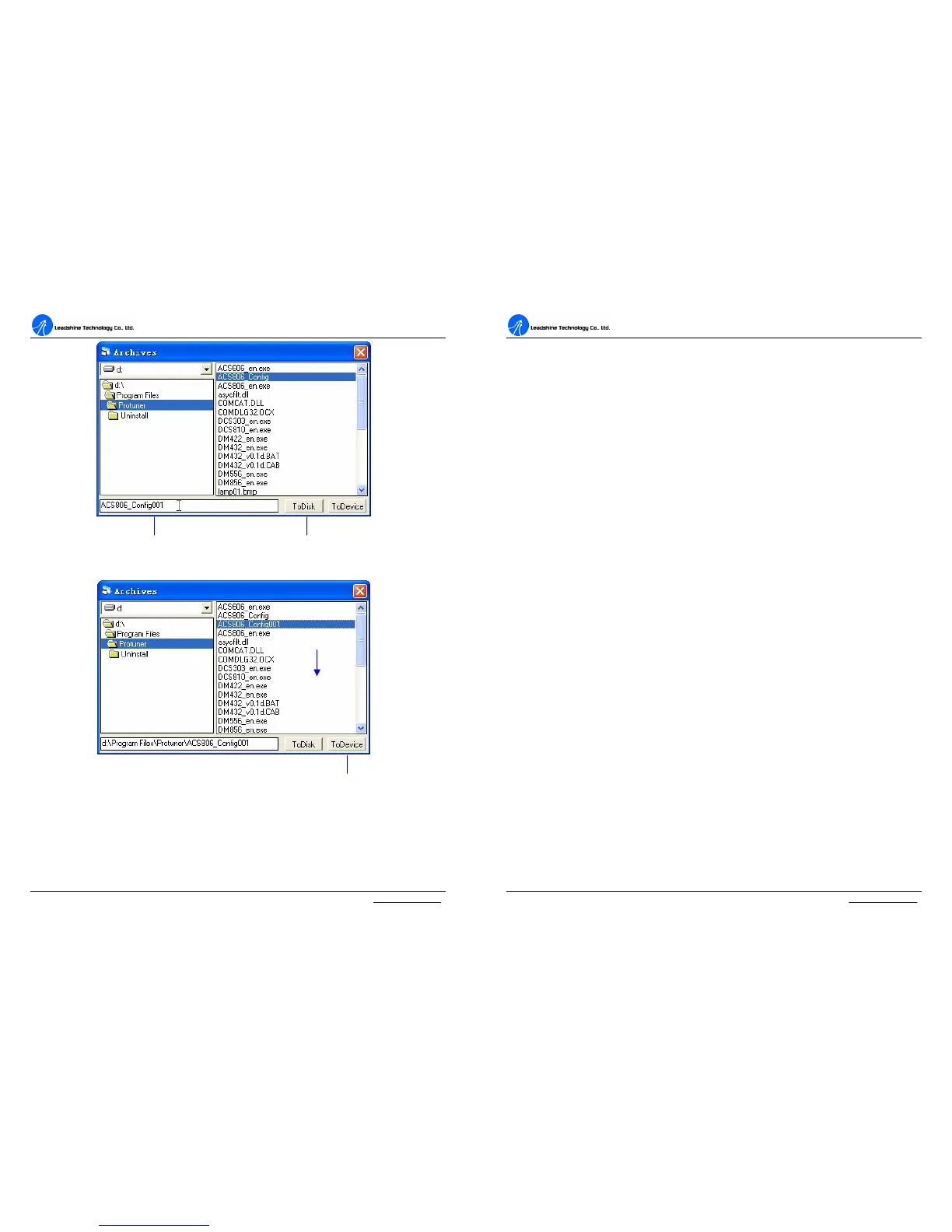
Figure 46: Save data to harddisk
Figure 47: Download data to the drive
Type the file name here Click to save data to file
Click to download
the data to the Drive
Select a config
file in the list
A
A
C
C
S
S
8
8
0
0
6
6
D
D
i
i
g
g
i
i
t
t
a
a
l
l
A
A
C
C
S
S
e
e
r
r
v
v
o
o
d
d
r
r
i
i
v
v
e
e
M
M
a
a
n
n
u
u
a
a
l
l
R
R
e
e
v
v
1
1
.
.
0
0
Tel: (86)755-26434369 45 Website: www.leadshine.com
Control Signal Input Mode
In InputMode tab of Position Parameter window, the user can configure control
signal input modes.
DirectionDef: Direction Definition. Used to change the default movement
direction to a specific input level (High or Low) in the DIR pins. Only active in
PUL/DIR mode.
CommandType: Command Type of control signal, including PUL/DIR and
CW/CCW. Set this parameter according to Command Type of motion controller.
ActiveEdge: Active Edge. The user can set the triggered edge of pulse command
signal in this panel. When the drive works in CW/CCW mode, no matter what level is
at fixed level terminal, the drive can works properly.
More Informaiton about ProTuner
T_Speed_Par tab
In Tuning->PositionLoop-> T_Speed_Par tab, the user can set velocity profile for
self motion test and tuning, including Maximum Speed, Acceleration, position move
Distance of trapezoidal velocity profile, and Interval, Repeat Times of self motion
test.
V_top: Maximum Speed. The maximum speed of trapezoidal velocity profile. Its
unit is RPM.
Accel: Acceleration. The acceleration of trapezoidal velocity profile. Its unit is (r/s)/s.
Length: Distance. The distance required to move. Its unit is pulse (count).
Interval: The interval between positive rotation and negative movement.
Repeat_times: The repeat times of positive and negative movement.


 To Next Page