A
A
C
C
S
S
8
8
0
0
6
6
D
D
i
i
g
g
i
i
t
t
a
a
l
l
A
A
C
C
S
S
e
e
r
r
v
v
o
o
d
d
r
r
i
i
v
v
e
e
M
M
a
a
n
n
u
u
a
a
l
l
R
R
e
e
v
v
1
1
.
.
0
0
Tel: (86)755-26434369 48 Website: www.leadshine.com
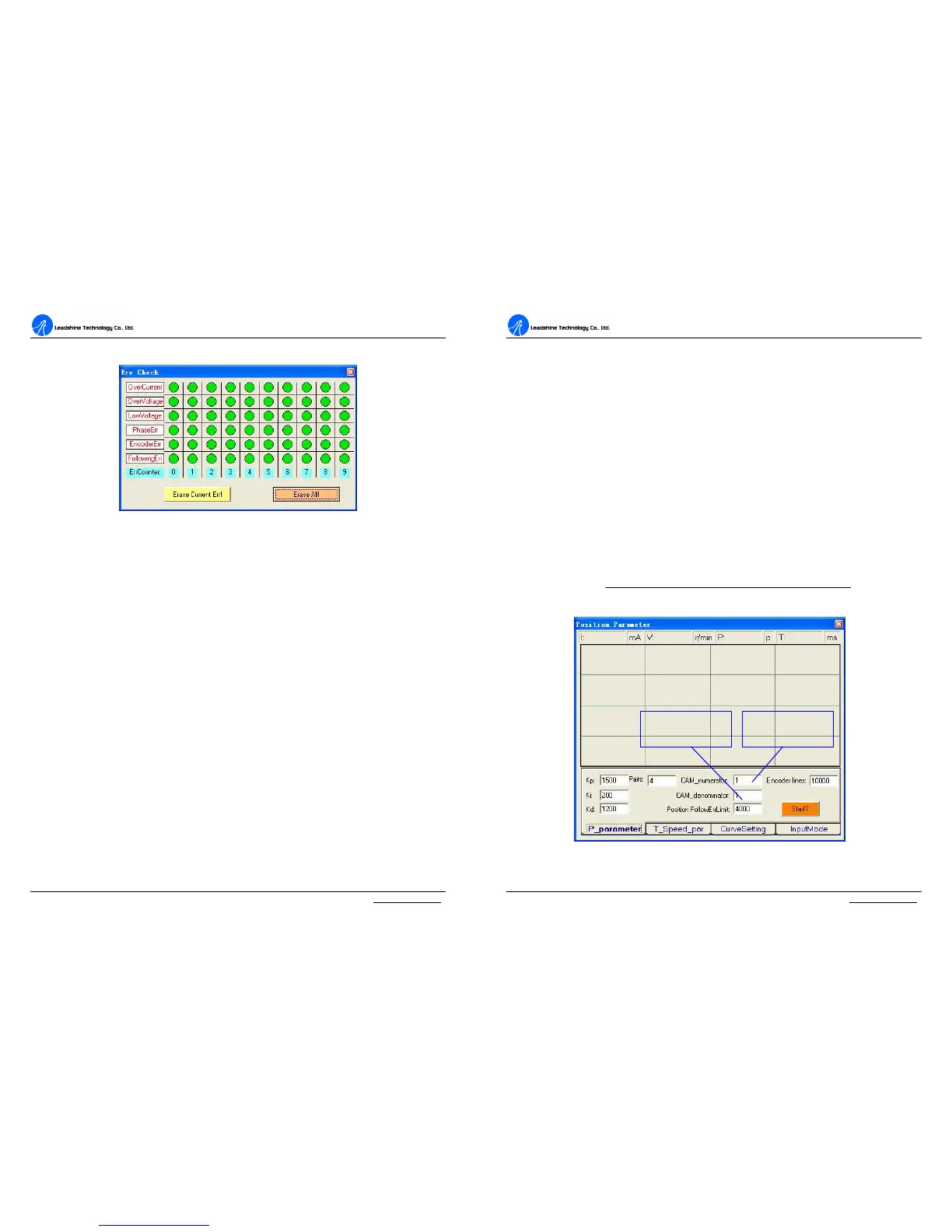
clicking Erase All! button.
Figure 49: Error check window
OverCurrent: Over-current Protection. Protection will be activated when
continuous current exceeds 24A.
OverVoltage: Over-voltage Protection. When power supply voltage exceeds 90±
1.5 VDC, protection will be activated.
LowVoltage: Under-voltage Protection. When power supply voltage is lower than
18±1.5 VDC, protection will be activated.
PhaseErr: Phase Error Protection. Motor power lines wrong & not connected and
encoder or hall sensors feedback signals wrong connected will activate this protection.
EncoderErr: Encoder Error Protection. No encoder/hall sensor feedback signals or
wrong encoder/hall sensor feedback signals will activate this protection.
FollowingErr: Position Following Error Limit Protection. When position
following error reaches Position Following Error Limit parameter setting in the
drive, this protection will be activated.
ErrCounter: Displays current error(s) and current error history.
Erase Current Err!: Erase Current Err button. The user can clear current error(s)
A
A
C
C
S
S
8
8
0
0
6
6
D
D
i
i
g
g
i
i
t
t
a
a
l
l
A
A
C
C
S
S
e
e
r
r
v
v
o
o
d
d
r
r
i
i
v
v
e
e
M
M
a
a
n
n
u
u
a
a
l
l
R
R
e
e
v
v
1
1
.
.
0
0
Tel: (86)755-26434369 49 Website: www.leadshine.com
by clicking this button.
Erase All!: Erase All! button. The user can clear all error(s) including error history
by clicking this button.
7.Using Tips
Change PPR by Electronic Gear
PPR(pulses per revolution) is the counts/pulses to make motor move one turn. If the
default PPR can not satisfy your application, a way to change it is setting electronic
gear in ProTuner as shown in figure 50. You can set this parameter in the position
tuning window by select Tuning->PositionLoop->P_parameter. For ACS806, the
actual PPR can be calculated by the following formula:
numeratorCAM
atordenoCAMresolutionEncoder
PPR
_
min__4


 To Next Page