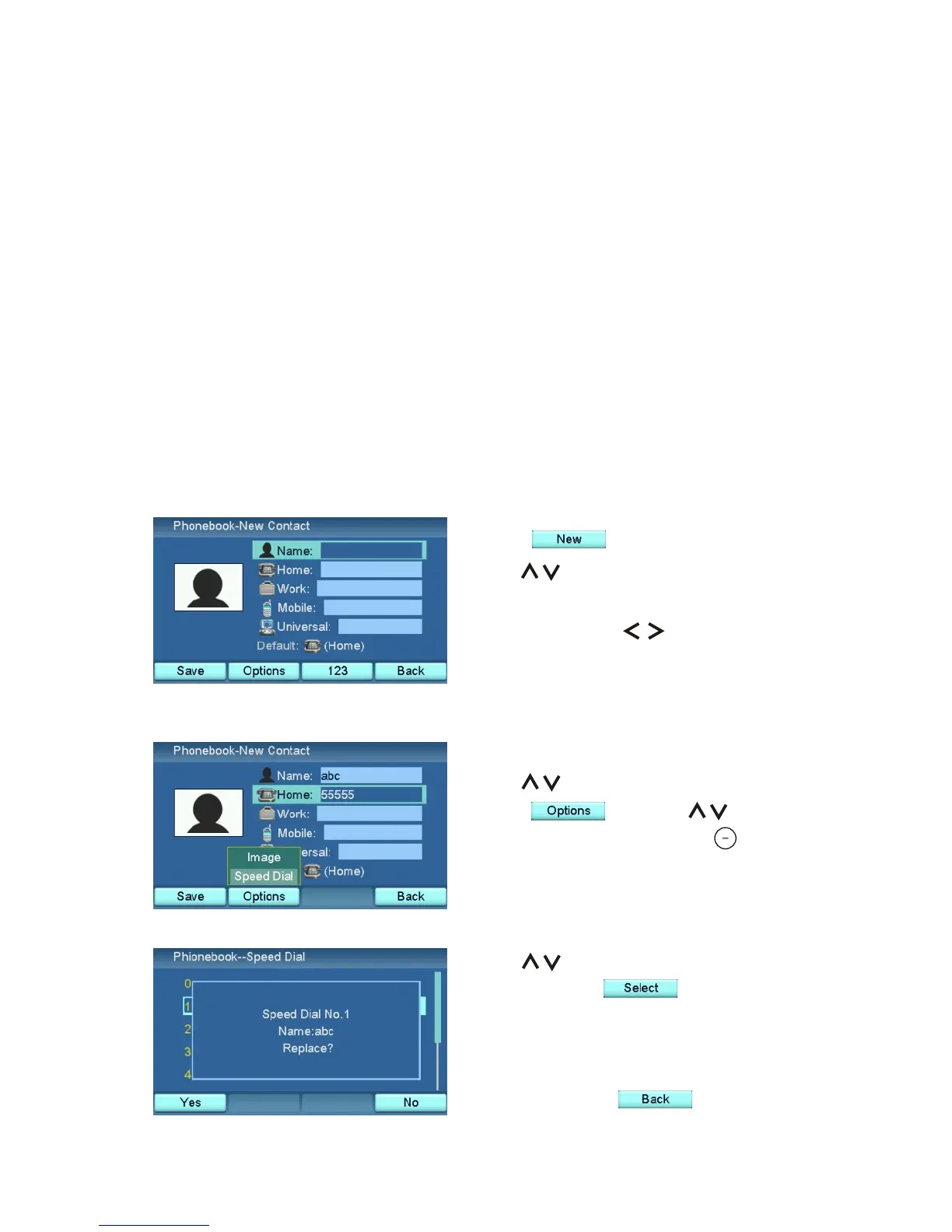
Press .
Use to select the field.
Input the name, at least one phone
number, and use to choose the
default phone number.
Phonebook
The Phonebook menu is the place where you store your contact information.
When you enter the Phonebook menu, you will see a contact list with names,
phone numbers and type of the phone number (IP or PSTN), or you will be
required to add a new contact if the phonebook is empty. The contact can be
created manually, or transferred from the Call List. Each contact can store
four numbers with the type indication. Select one of the four numbers as the
default. The Phonebook is capable of storing 100 contacts.
To navigate and make selections in the Phonebook menu and its sub-menus,
use the navigation keys and soft keys as described previously.
Create a Contact
Use to choose the Speed Dial
number. Press to add the
phone number to Speed Dial. If the
chosen number is already used, you
will be asked if you would like to
replace it. Press when done.
Set Up Speed Dial
Use to choose a phone number.
Press , and use to
choose "Speed Dial". Press .
XTP8886 User's Manual 29



 To Next Page