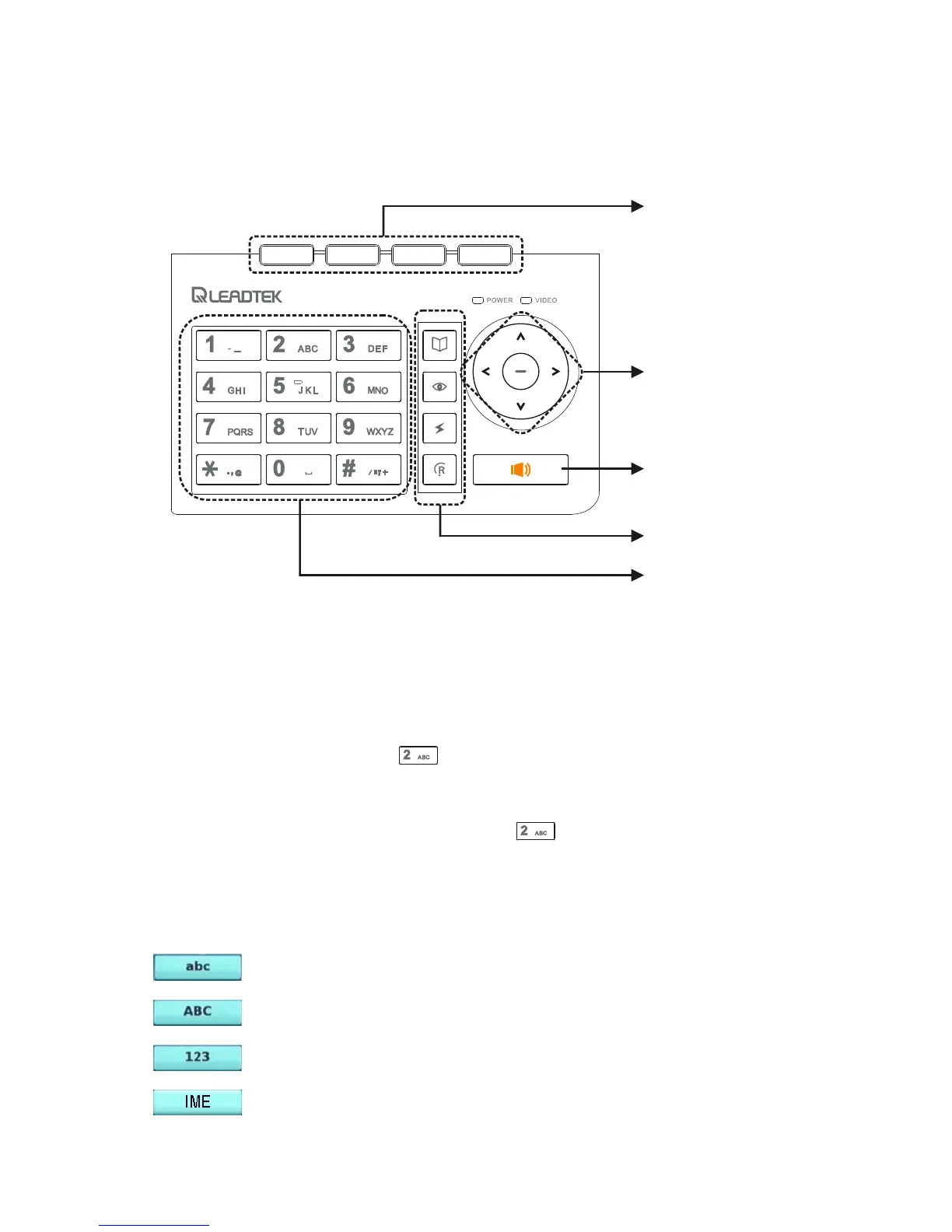
Numeric / Alphabet / Symbol Keys
Front view (cont.'d)
Keypad
Soft keys
Navigation keys
Speakerphone
key
Feature keys
Numeric /
Alphabet /
Symbol keys
The numeric / alphabet / symbol keys are used for entering numbers, letters
and symbols. In a situation where only a number is expected, for example,
when dialing a phone number, pressing a key will enter the corresponding
digit. For example, pressing will enter the number 2. In a situation
where alphabet or symbol or both are allowed - when entering a URL address
for example - you will need to press the same key repeatedly to reach the
character you want. For example, pressing two times will enter the
letter A. To enter alphabets in lower or upper case, you need to be in lower
case mode or upper case mode, respectively. A soft key is used to switch
between the two modes. The current mode is indicated by one of the
following icons shown on the LCD screen.
: Current mode is lower case.
: Current mode is upper case.
: Current mode is numeric.
4
: Current mode is smart input method.



 To Next Page