15
No: IS-0685 – Rev. 2
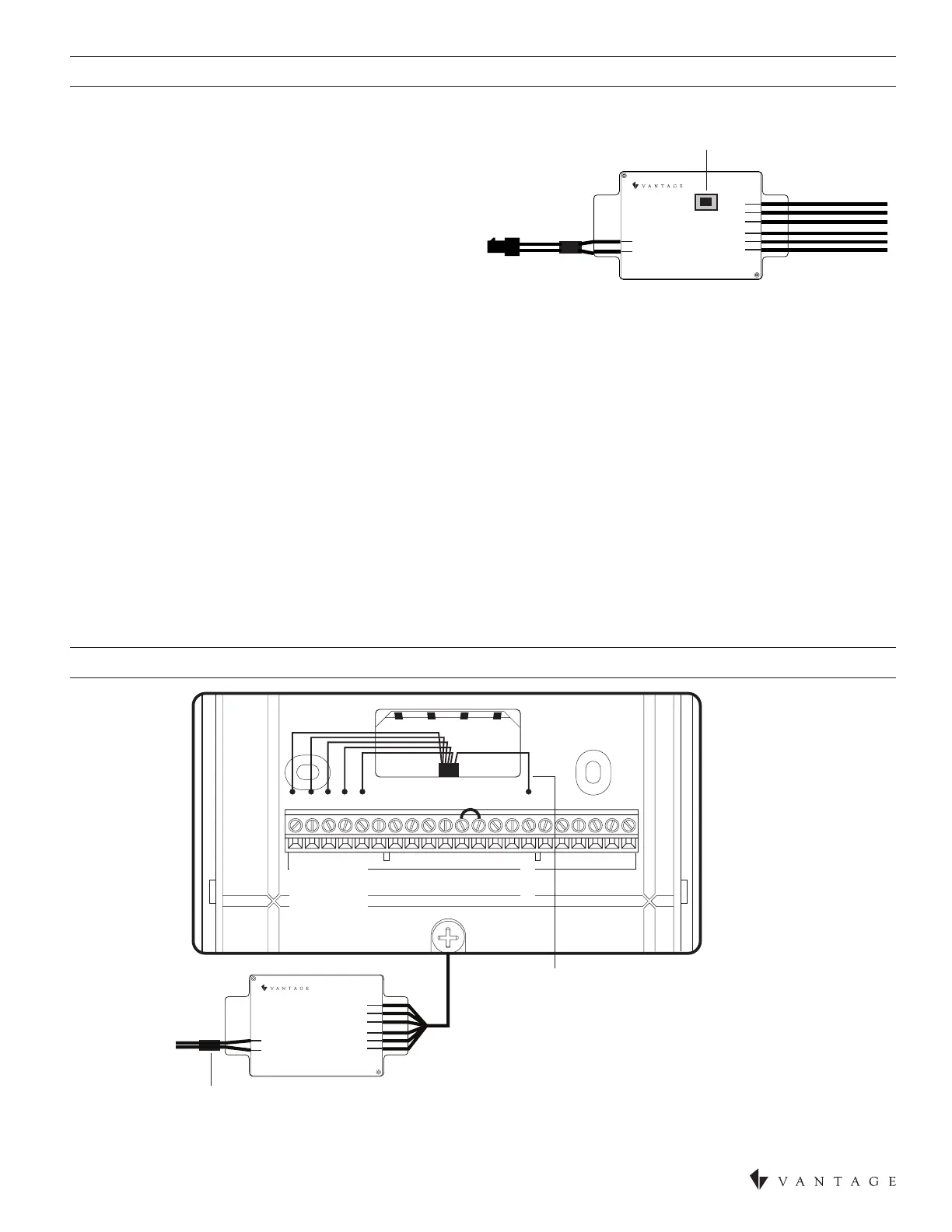
MOUNTING THE CC-WLINT OR CC-RLINT
WIRING TO CC-WLINT OR CC-RLINT FOR HVAC OR HUMIDITY CONTROL
B+ A+ B- A- CBOYY2 GRCRHW2W RS2S1T1T2RSB RSA
Station
Bus
(No Polarity)
(White) C
(Black ) R
(Blue) B+
(White-Blue) B-
(Orange) A+
(White-Orange) A-
B+ (Dark Blue)
A+ (Orange)
B- (Blue/White)
A- (Orange/White)
C (White)
R (Black)
The R terminal must be powered from an
external 24VAC source or by jumping power
from RC or RH to R. The R terminal must only
have power from a single source.
NOTE: If on model CC-RLINT
this side is the antenna; do
not cut, strip, or bend antenna
CC-WLINT
or
CC-RLINT
CONFIGURATION
When the CC-WLINT or CC-RLINT is properly connected and
powered the status LED will have a two blink pattern for the
WireLink model or a three blink pattern for the RadioLink model
which typically means it is not congured. NOTE: The LCD screen
does not indicate that it is not congured. From Design Center, with
the station highlighted, click on the Congure Stations button on
the toolbar menu and wait for the station to display the following
scrolling message, PRESS HOLD TO CONFIGURE / VANTAGE
CONFIGURATION. Press and release the HOLD button, wait
for one or two seconds, and verify that the serial number was
populated in Design Center. Repeat if necessary.
Station
Bus
(No Polarity)
CONFIGURE BUTTON
Two additional ways to congure: 1) Follow the steps above but press the congure button on the CC-WLINT or CC-RLINT
station. The button is located on the same side as the LED lights, near the middle of the board as illustrated below. The button may
be pressed by pressing the shrink-wrap directly over the button. 2) The station may also be congured by typing the serial number in
the project le, using this method the station will automatically be congured when the system is programmed. Once congured the
status LED on the CC- WLINT or CC-RLINT will blink evenly.
STATUS LED DIAGNOSTIC INFORMATION FOR CC-WLINT OR CC-RLINT
During setup and conguration the CC-WLINT or CC-RLINT LED will blink at different intervals. The STATUS LED blinks evenly or
ashes 2, 3, 4, 5, or 6 times followed by a pause to indicate status information.
ONE EVEN BLINK: The CC-WLINT or CC-RLINT is correctly congured on programmed system.
TWO BLINKS: CC-WLINT or CC-RLINT is operating correctly but is not congured.
THREE BLINKS: CC-WLINT or CC-RLINT is not communicating with the Controller. For the CC- WLINT, verify that station bus wiring
conforms to Vantage guidelines. For the CC-RLINT, verify that the serial number is correct in the software and is in communication
range with the RadioLink Enabler.
FOUR BLINKS: CC-WLINT or CC-RLINT Factory problem. Please contact the factory.
FIVE BLINKS: CC-WLINT (only) Conguration mode.
SIX BLINKS: Thermostat is not connected to the base after system has been programmed.


 To Next Page