28
No: IS-0685 – Rev. 2
THERMOSTAT FEATURES
TROUBLESHOOTING: DISPLAY IS BLANK
TROUBLESHOOTING: TEMPERATURE SETTINGS DO NOT CHANGE
TROUBLESHOOTING: HEATING SYSTEM DOES NOT RESPOND
TROUBLESHOOTING: COOLING SYSTEM DOES NOT RESPOND
TROUBLESHOOTING: FAN DOES NOT TURN ON IN A HEAT CELL
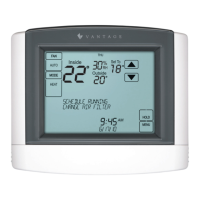
• Large touch screen with adjustable backlight
• Message center provides feedback and instructions
• Thermostat can be removed from the wall for easy
programming (batteries must be installed)
• Front battery door access for fast, easy replacement
• Displays room temperature, room humidity, temperature
setting, and optional outdoor temperature
• Air lter, humidier, dehumidier, and HVAC service
indicators
• Programmable fan control with fan circulation mode
• Check circuit breaker and reset* if necessary.
• Make sure power switch at heating & cooling system is on.
• Make sure furnace door is closed securely.
*CAUTION: Thermostat power must be cycled after a reset for the CC-WLINT or CC-RLINT stations to operate correctly.
Make sure heating and cooling temperatures are set to acceptable ranges:
• Heat: 40° to 90°F (4° to 32°C)
• Cool: 50° to 99°F (10° to 37°C)
i.e.: “HEATING” appears on screen
• Check for 24VAC at the equipment on the secondary side of the transformer between power and common. If voltage is not
present, check the heating equipment to nd the cause of the problem.
• Check for 24VAC between the heat terminal (W) and the transformer common. If 24VAC is present, the thermostat is functional.
Check the heating equipment to nd the cause of the problem.
• Check for loose or broken wires between the thermostat and the heating equipment.
i.e.: “COOLING” appears on screen
• Check for 24VAC at the equipment on the secondary side of the transformer between power and common. If voltage is not
present, check the cooling equipment to nd the cause of the problem.
• Check for 24VAC between the cooling terminal (Y) and the transformer common. If 24VAC is present, the thermostat is
functional. Check the cooling system to nd the cause of the problem.
• Check for loose or broken wires between the thermostat and the cooling equipment.
• Check System Setting 09 (Fan Control), to make sure the fan control is properly set to match the type of system (see page 9).
• Easy to use temperature control can override program
schedule at any time
• Progressive recovery ensures proper temperature at the
start of a program event
• Built in compressor protection prevents damage to your
equipment
• Battery back-up
• System test mode
• Universal system compatibility
• Congurable to control a humidier or dehumidier
TROUBLESHOOTING


 To Next Page