4
MONO input channel
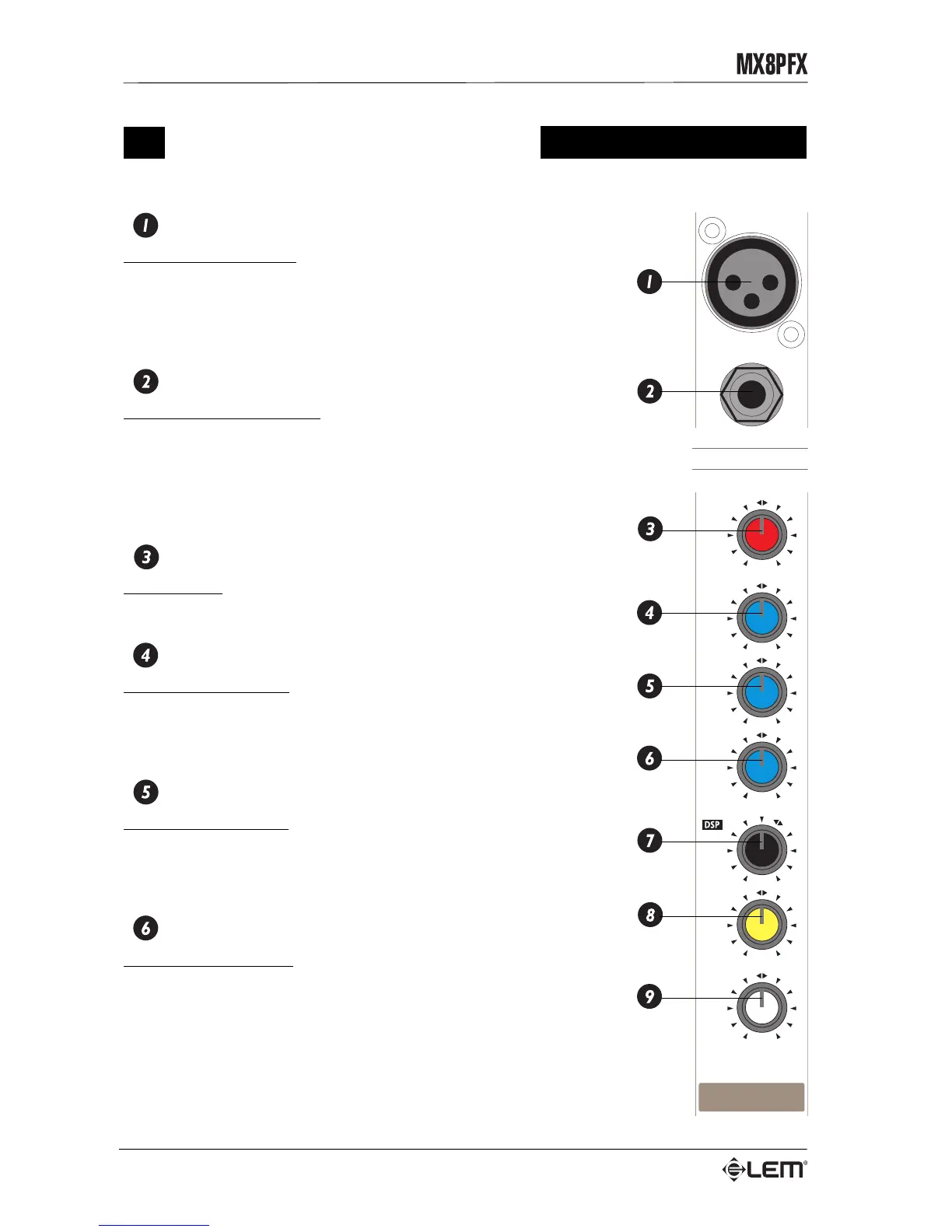
MIC INPUT
Balanced XLR connector: receives the microphone input signal on the
channel. This input is for use with microphones, but can also accept a
wide range of balanced or unbalanced low impedance signals.
Do not connect keyboards, recorders or other equipment with a line
signal, as the signal level would be too high and probably distorted.
LINE INPUT
Balanced JACK connector: receives the line input signal on the
channel. This input can receive balanced or unbalanced high-impedance
signals from equipment with a high-level output (all instruments
excluding microphones).
Do not connect a microphone to this input: the signal would not be
sufficiently amplified and will probably be poor and disturbed.
GAIN
Gain control: regulates the amplification of external signals
(microphones, instruments, etc.) fed into the channel.
HIGH
HIGH frequency control: gives a 15dB boost or cut at 12 kHz with a
“SHELVING” curve. If you want a brighter, clearer sound, turn the pot
to the right (+15). If on the other hand, the sound is annoyingly treble
or metallic, turn it to the left (-15).
MID
LOW frequency control: gives 15dB boost or cut at 2.5 kHz with a
“PEAKING” curve. If you want a sound more ‘detailed’ in the mid range,
turn the pot to the right (+15). If on the other hand, the sound is too
‘harsh’, turn it to the left (-15).
LOW
LOW frequency control: gives 15dB boost or cut at 80Hz with a
“SHELVING” curve. Using this control, a more “full-bodied” sound can
be obtained, or “booming” or unpleasant effects due to excessive low
frequencies can be eliminated.
MONO input channel
POST
AUX
-5dB
-55dB
LEFT
+15
+15
+15
-15
-15
-15
10
MIC
LINE
10
0
0
RIGHT
2.5kHz
LEVEL
PAN
80Hz
LOW
MID
12 kHz
HIGH
GAIN
1
LINE
MIC
1


 To Next Page