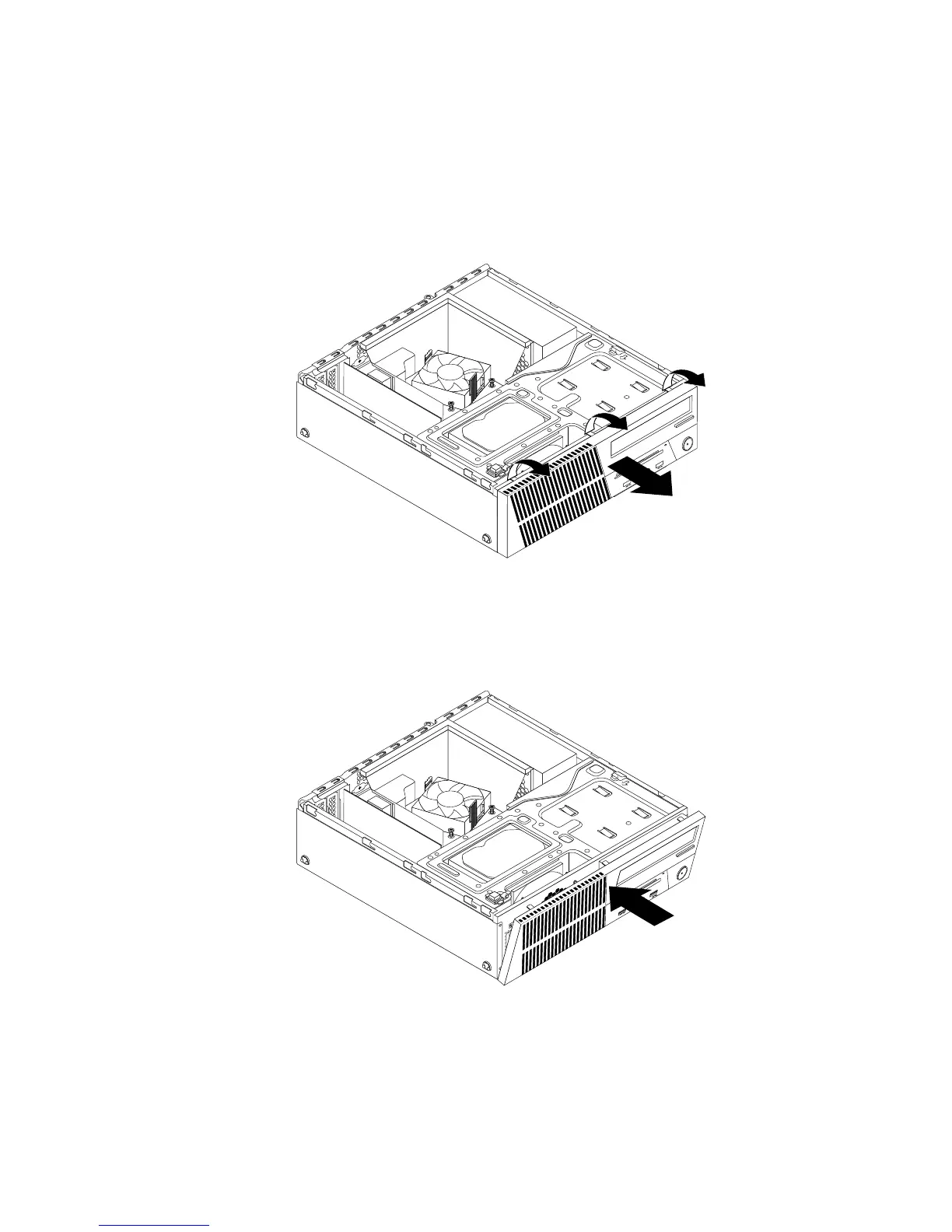
Toremoveandreinstallthefrontbezel,dothefollowing:
1.Removeallmediafromthedrivesandturnoffallattacheddevicesandthecomputer.Then,disconnect
allpowercordsfromelectricaloutletsanddisconnectallcablesthatareconnectedtothecomputer.
2.Removethecomputercover.See“Removingthecomputercover”onpage36.
3.Releasethethreeplastictabsonthetopofthefrontbezelandpivotthefrontbezeloutwardtoremove
itfromthecomputer.
Figure13.Removingthefrontbezel
4.Toreinstallthefrontbezel,alignthethreeplastictabsonthebottomofthefrontbezelwiththe
correspondingholesinthechassis,andthenpivotthefrontbezelinwarduntilitsnapsintoposition.
Figure14.Installingthefrontbezel
Whattodonext:
•Toworkwithanotherpieceofhardware,gototheappropriatesection.
•Tocompletetheinstallationorreplacement,goto“Completingthepartsreplacement”onpage103.
Chapter5.Installingorreplacinghardware37



 To Next Page