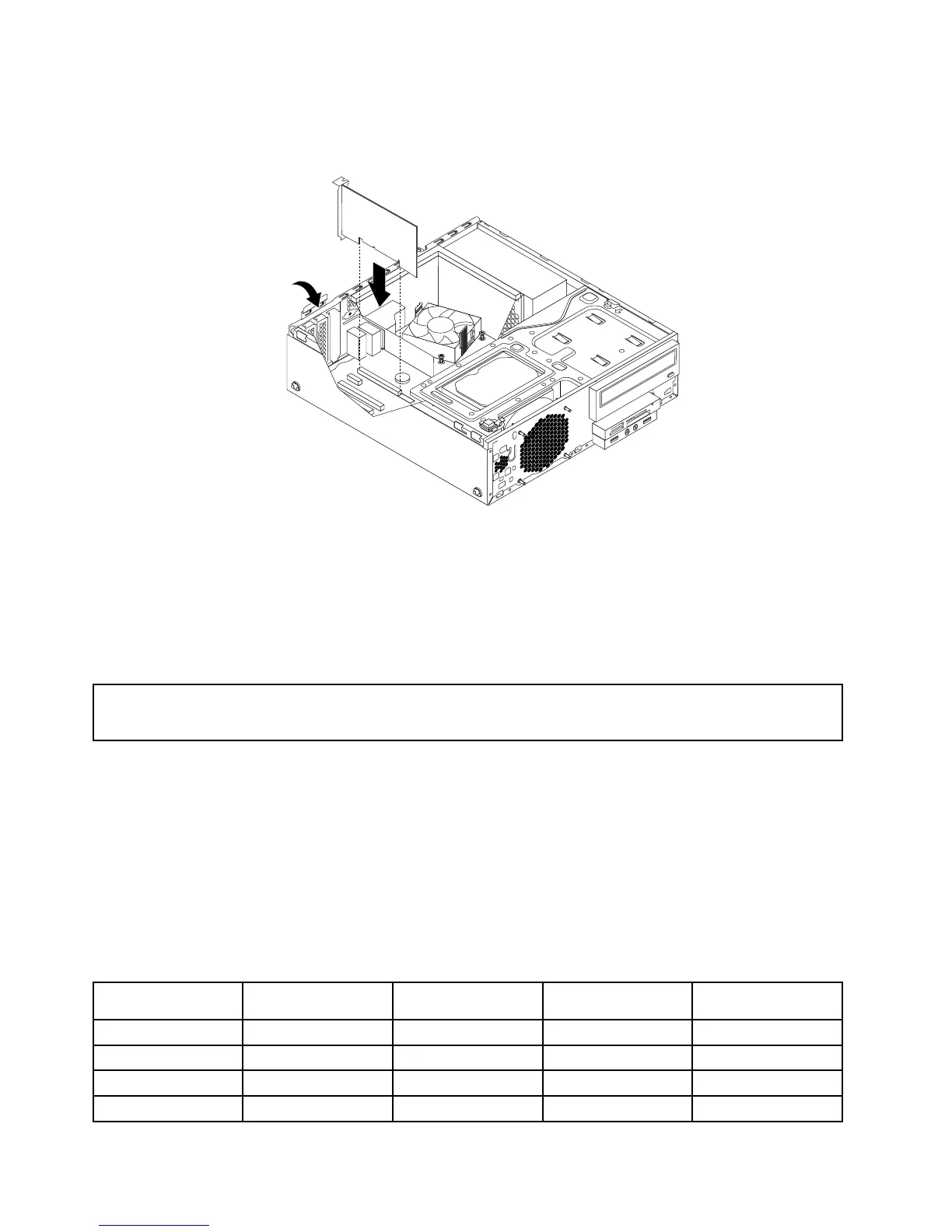
6.Installthenewcardintotheappropriatecardslotonthesystemboardandrotatethecardretainertothe
closedposition.See“Locatingpartsonthesystemboard”onpage14.
Figure17.InstallingaPCIcard
Whattodonext:
•Toworkwithanotherpieceofhardware,gototheappropriatesection.
•Tocompletetheinstallationorreplacement,goto“Completingthepartsreplacement”onpage103.
Installingorreplacingamemorymodule
Attention:
Donotopenyourcomputerorattemptanyrepairbeforereadingandunderstandingthe“Importantsafetyinformation”
onpagev.
Thissectionprovidesinstructionsonhowtoinstallorreplaceamemorymodule.
YourcomputerhasfourmemoryslotsforinstallingorreplacingDDR3UDIMMsthatprovideuptoa
maximumof32GBsystemmemory.Wheninstallingorreplacingamemorymodule,use2GB,4GB,or8
GBDDR3UDIMMsinanycombinationuptoamaximumof32GB.
Thefollowingtableprovidesinformationaboutthememorymoduleinstallationrulesthatyoushould
considerwheninstallingorremovingamemorymodule.The“X”markindicatesthememoryslotsintowhich
thememorymodulesshouldbeinstalledindifferentsituations.Thenumbers1,2,3,and4indicatethe
installationsequence.Tolocatethememorymoduleslots,see“Locatingpartsonthesystemboard”
onpage14.
UDIMMDIMM1DIMM2DIMM3
DIMM4
OneUDIMM
X
TwoUDIMMsX,1X,2
ThreeUDIMMsX,3X,1X,2
FourUDIMMsX,3X,2X,4X,2
40ThinkCentreM83,M93/pUserGuide




 To Next Page