Toinstallorreplaceamemorymodule,dothefollowing:
1.Removeallmediafromthedrivesandturnoffallattacheddevicesandthecomputer.Then,disconnect
allpowercordsfromelectricaloutletsanddisconnectallcablesthatareconnectedtothecomputer.
2.Removethecomputercover.See“Removingthecomputercover”onpage36.
3.Removethefrontbezel.See“Removingandreinstallingthefrontbezel”onpage36
4.Locatethememoryslots.See“Locatingpartsonthesystemboard”onpage14.
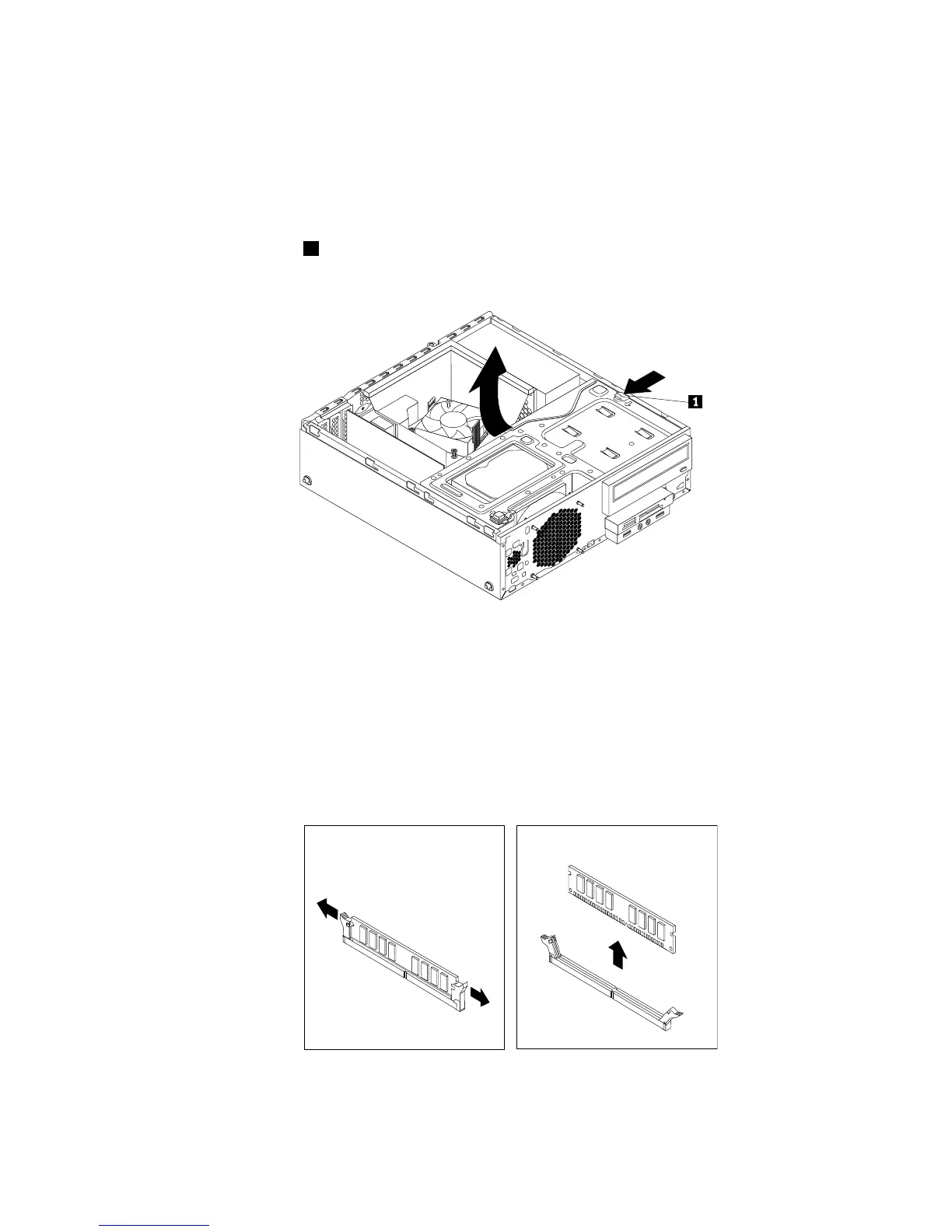
5.Presstheretainingclip1inthedirectionasshownandpivotthedrivebayassemblyupwardatthe
sametime.
Figure18.Pivotingthedrivebayassemblyupward
6.Removetheheatsinkfanduct.See“Replacingtheheatsinkandfanassembly”onpage65.
7.Dependingonyourcomputermodel,youmightneedtoremovethePCIExpressx16graphicscardfor
easieraccesstothememoryslots.See“InstallingorreplacingaPCIcard”onpage38.
8.Dependingonwhetheryouareinstallingorreplacingamemorymodule,dooneofthefollowing:
•Ifyouarereplacinganoldmemorymodule,opentheretainingclipsandgentlypullthememory
moduleoutofthememoryslot.
Figure19.Removingamemorymodule
Chapter5.Installingorreplacinghardware41




 To Next Page