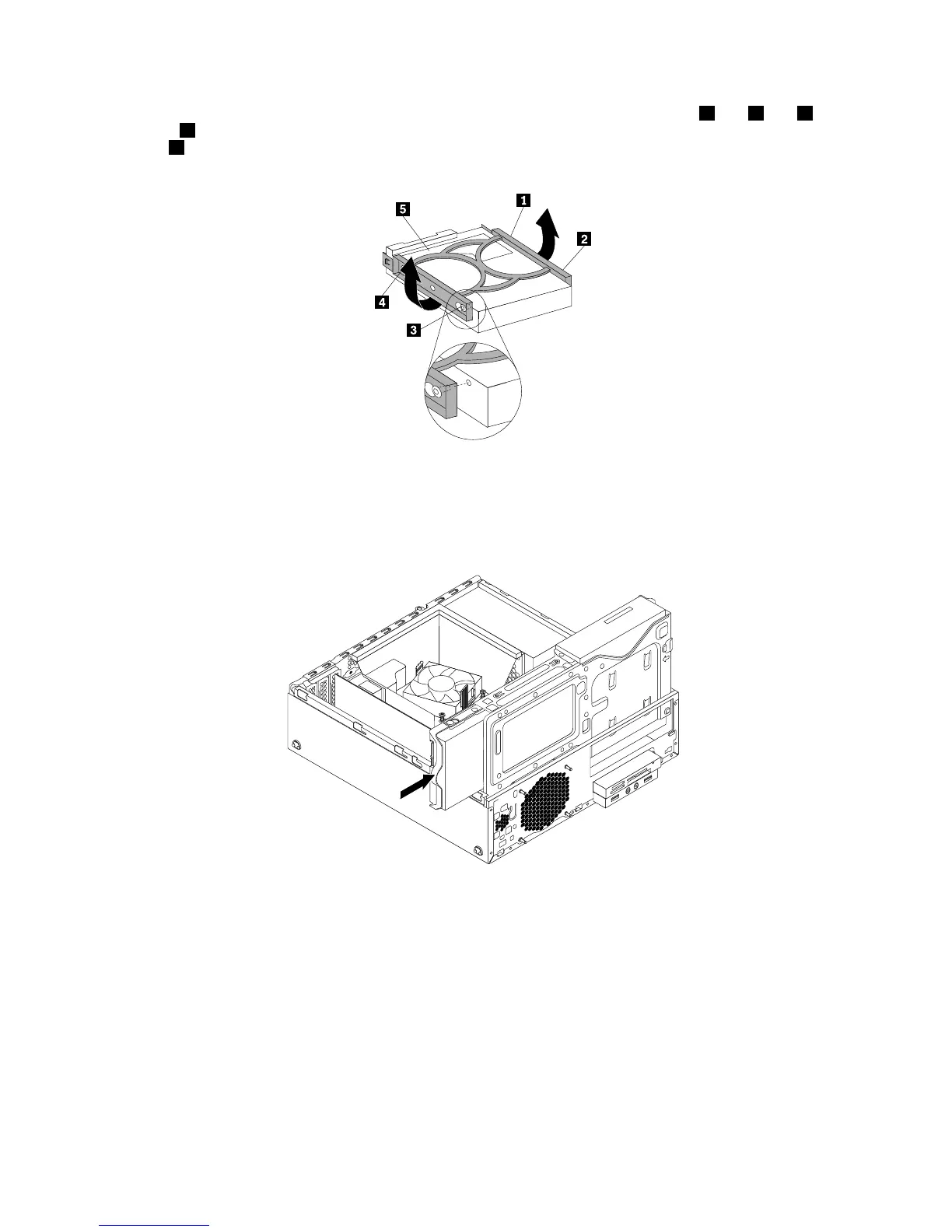
9.Toinstallanewharddiskdriveintothebluebracket,exthebracketandalignpin1,pin2,pin3,
andpin4onthebracketwiththecorrespondingholesintheharddiskdrive.Donottouchthecircuit
board5onthebottomoftheharddiskdrive.
Figure72.Installingtheharddiskdriveintothebracket
10.Slidethenewprimaryharddiskdrivewithbracketintotheprimaryharddiskdrivebayuntilitsnaps
intoposition.
Figure73.Installingtheprimaryharddiskdrive
11.Connectthesignalcableandthepowercabletothenewprimaryharddiskdrive.
Whattodonext:
•Toworkwithanotherpieceofhardware,gototheappropriatesection.
•Tocompletetheinstallationorreplacement,goto“Completingthepartsreplacement”onpage103.
Installingorreplacingthesecondaryharddiskdrive
Thissectionprovidesinstructionsonhowtoinstallorreplacethesecondaryharddiskdrive.
Note:Thesecondaryharddiskdriveisonlyavailableinsomemodels.
74ThinkCentreM83,M93/pUserGuide




 To Next Page