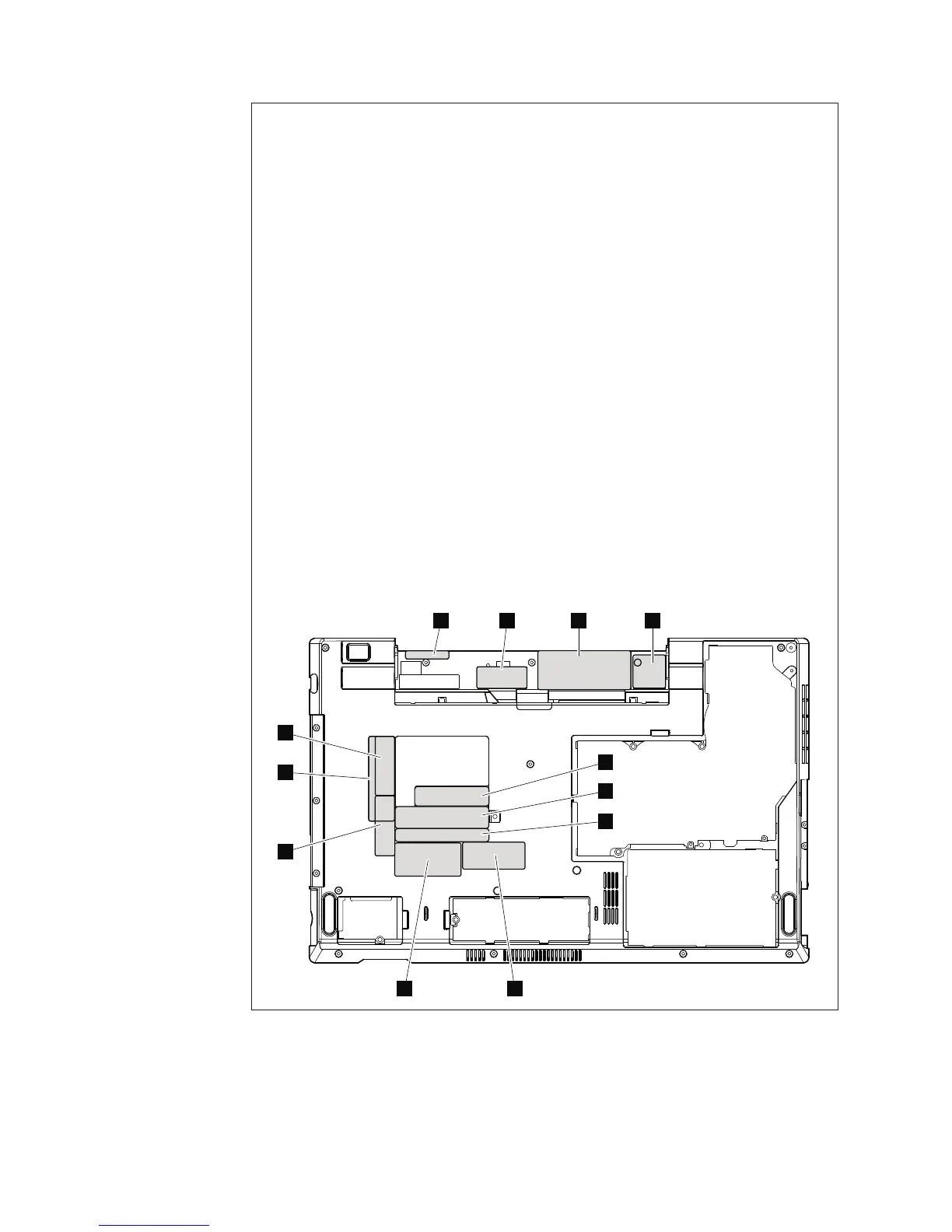
Note: Applying labels to the base cover
The new base cover FRU is shipped with a kit containing labels of several kinds.
When you replace the base cover, you need to apply the following labels:
4 Battery word label
6 Homologation label
Following labels need to be peeled off from the old base cover, and need to be
put on the new base cover.
1 MAC address label
2 Wireless WAN MAC address label
3 Windows license label (COA)
5 Serial number label
7 FFC label
8 SIRM label
9 SIM ICC ID label
10 Brazil Anatel BG label
11 Israel label (SIM model)
12 Brazil Anatel Bluetooth label
For some models, you also need to apply one or two FCC labels. Check the old
base cover; if it has one or two FCC labels, find duplicates of them in the label
kit and apply them to the new base cover.
For the location of each label, refer the following figures:
For ThinkPad Edge 15″ and E50:
2 3
89
41
5
6
7
10
12
11
122 ThinkPad Edge 14″, Edge 15″, E40, and E50 Hardware Maintenance Manual













 To Next Page