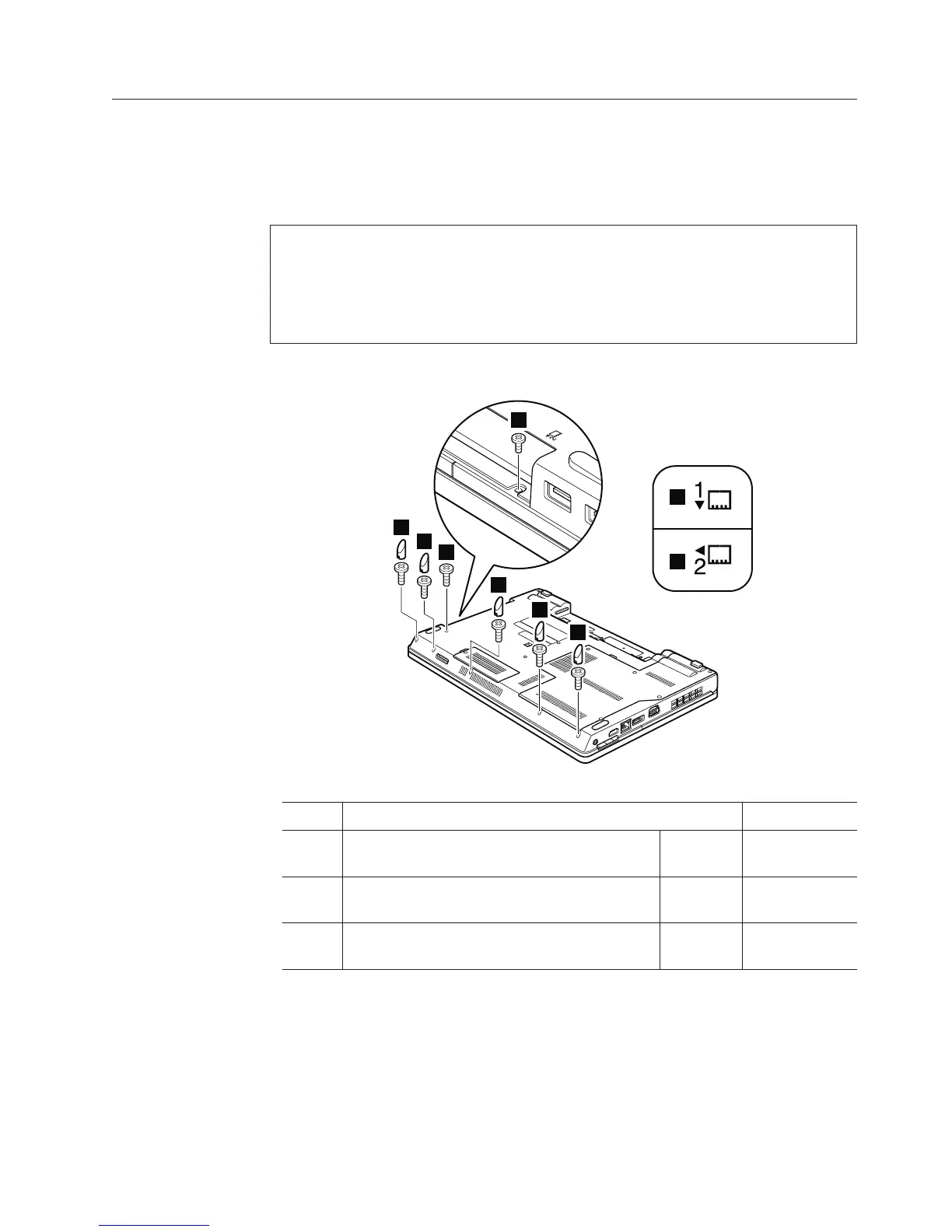
1100 Palm rest assembly with cables
For access, remove these FRUs in order:
v “1010 Battery pack” on page 78
v “1030 Optical drive or travel cover” on page 80
Table 18. Removal steps of palm rest assembly with cables
1
1a
1
1
1
1
1
2
2
Step Screw (quantity) Color Torque
1 M2 × 8 mm, wafer-head, nylon-coated (5) Black 0.181 Nm
(1.85 kgfcm)
1a M2 × 5 mm, wafer-head, nylon-coated (1) Black 0.181 Nm
(1.85 kgfcm)
2 M2 × 3 mm, wafer-head, nylon-coated (1) Black 0.181 Nm
(1.85 kgfcm)
Note:
In models with the fingerprint reader, the sensor is attached to the palm rest
FRU. If the fingerprint reader has any defects, you can replace it by the
procedures given in this section, which are the same for a palm rest with or
without a fingerprint reader.
Removing and replacing a FRU 93













 To Next Page