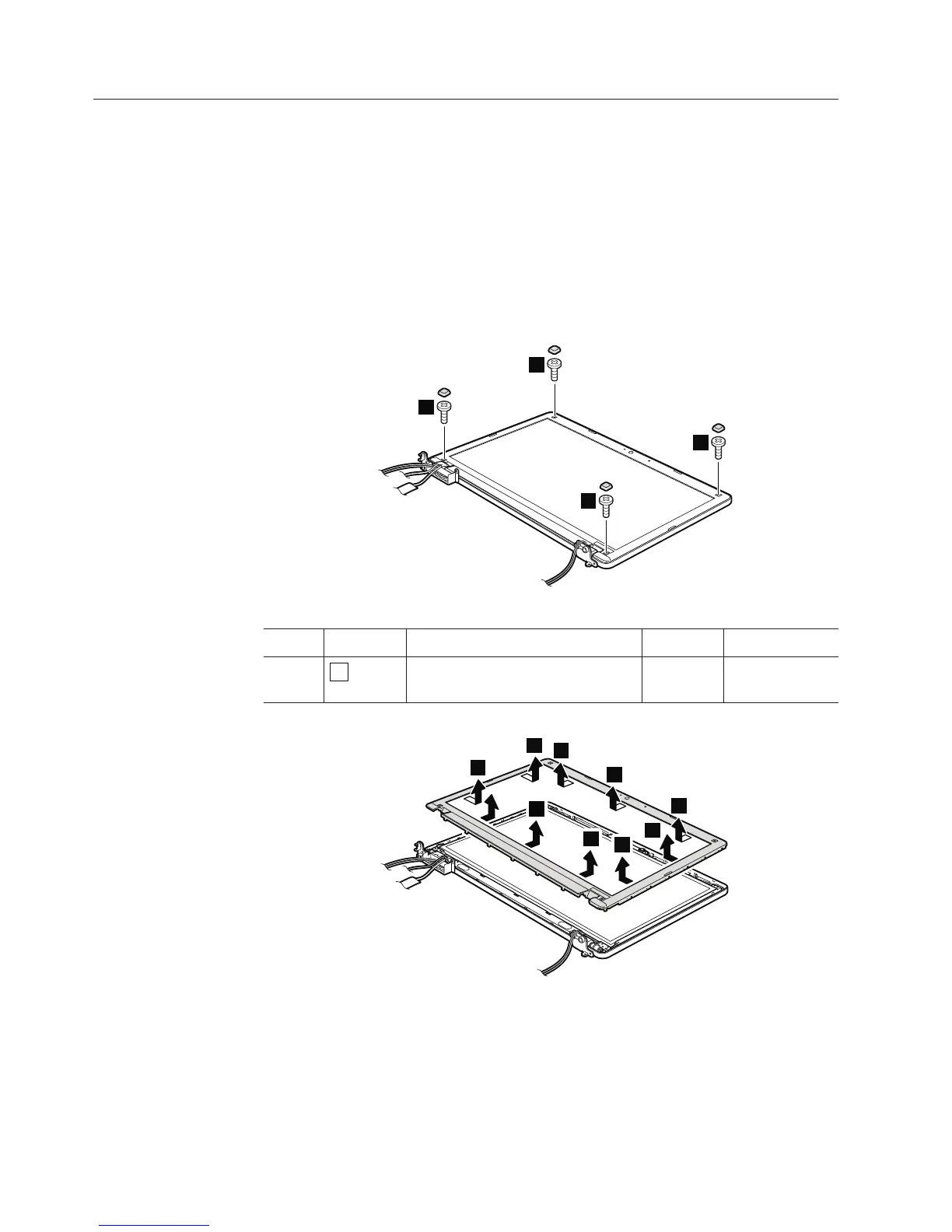
2010 LCD front bezel
For access, remove these FRUs in order:
v “1010 Battery pack” on page 78
v “1090 Wireless WAN slot cover and PCI Express Mini Card for wireless WAN”
on page 90
v “1100 Palm rest assembly with cables” on page 93
v “1110 PCI Express Mini Card for wireless LAN” on page 96
v “1140 Keyboard” on page 100
v “1150 Keyboard bezel” on page 103
v “1160 LCD unit” on page 106
Table 32. Removal steps of LCD front bezel
1
1
1
1
Step Screw cap Screw (quantity) Color Torque
1
M2 × 5 mm, wafer-head,
nylon-coated (4)
Black 0.181 Nm
(1.85 kgfcm)
2
2
2
2
2
2
2
2
2
When installing: Make sure that all the latches are attached firmly. Then secure
the bezel with the screws.
124 ThinkPad Edge 14″, Edge 15″, E40, and E50 Hardware Maintenance Manual













 To Next Page