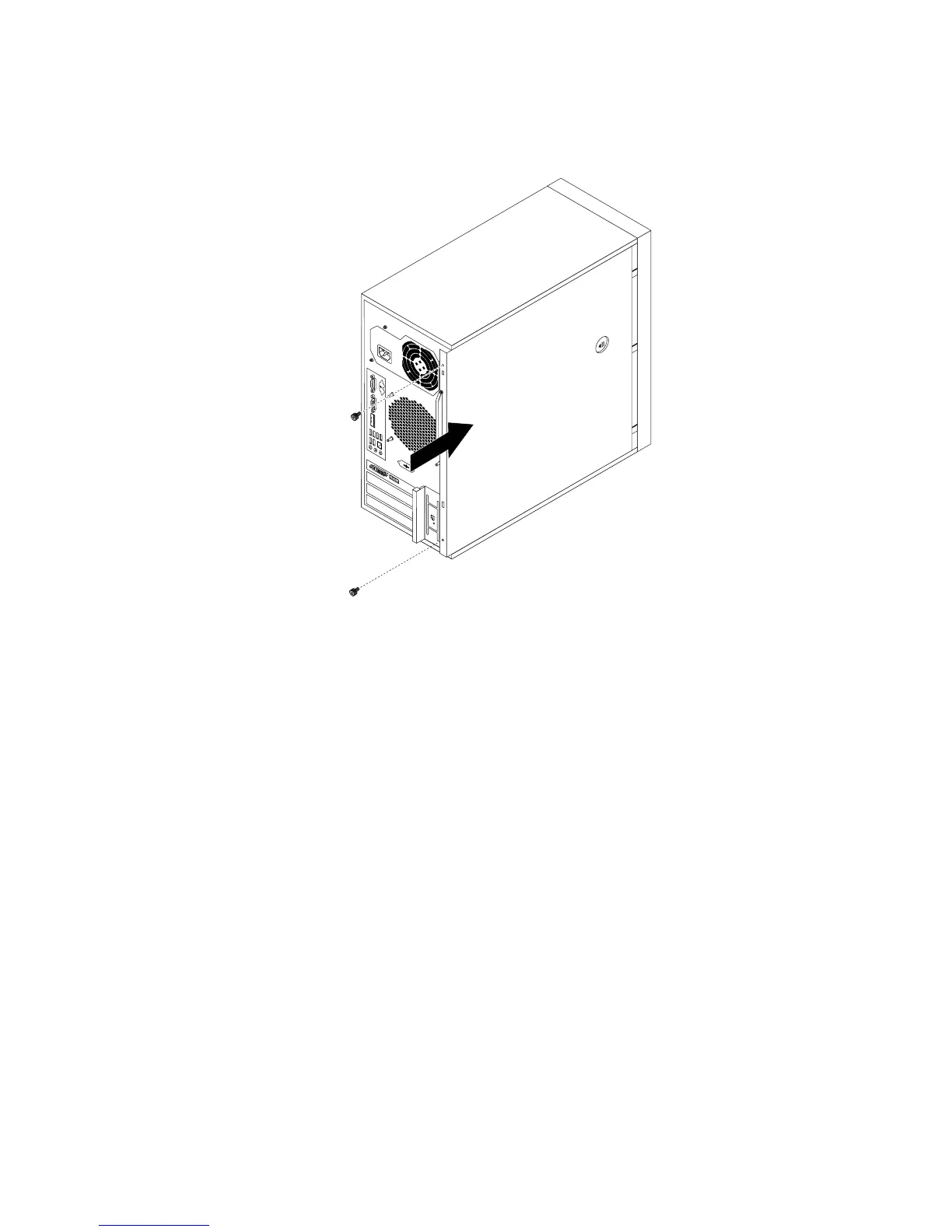
4.Positiontheservercoveronthechassissothattherailguidesonthebottomoftheservercoverengage
therailsonthechassis.Then,slidethecovertothefrontoftheserveruntilitsnapsintoposition.
Figure42.Reinstallingtheservercover
5.Installthescrewstosecuretheservercover.
6.Locktheservercoverifyouhaveaservercoverlock.See“Integratedcablelock”onpage53or
“Padlock”onpage53.
7.Reconnecttheexternalcablesandpowercordstotheserver.See“Frontview”onpage11and“Rear
view”onpage12
.
8.Dependingonthepartsyouinstalledorreplaced,youmightneedtoconrmtheupdatedinformationin
theSetupUtilityprogram.RefertoChapter6“Conguringtheserver”onpage55
.
Note:Inmostareasoftheworld,LenovorequiresthereturnofthedefectiveCustomerReplaceableUnit
(CRU).InformationaboutthiswillcomewiththeCRUorwillcomeafewdaysaftertheCRUarrives.
Connectingthecables
Attention:Topreventdamagetoequipment,connectthepowercordsaftercompletingtheparts
replacement.
Iftheservercablesandconnectorpanelhavecolor-codedconnections,matchthecolorofthecable
endwiththecoloroftheconnector.Forexample,matchabluecableendwithabluepanelconnector,a
redcableendwitharedconnector,andsoon.See“Rearview”onpage12
foranillustrationoftheI/O
connectorsontherearoftheserver.
Turningontheserver
Whentheserverisconnectedtoanacpowersourcebutisnotturnedon,theoperatingsystemdoesnot
run,andallcorelogicexceptfortheserviceprocessor(theintegratedmanagementmodule)isshutdown;
Chapter5.Installing,removing,orreplacinghardware51














 To Next Page