5 XClarity Controller network connector
Used to attach an Ethernet cable to manage the system using XClarity Controller.
7 Ethernet connectors
Used to attach an Ethernet cable for a LAN. Each Ethernet connector has two status LEDs to help you
identify the Ethernet connectivity and activity. For more information, see “Rear view LEDs” on page 24.
8 VGA connector
Used to attach a VGA-compatible video device, such as a VGA monitor.
9 NMI button
Press this button to force a nonmaskable interrupt (NMI) to the processor. By this way, you can blue screen
the server and take a memory dump. You might have to use a pen or the end of a straightened paper clip to
press the button.
10 Serial-port-module slot
Used to install a serial port module. The serial port module is available on some models. For instructions on
how to install the serial port module, see “Install the serial port module” on page 83.
11 12 13 14 15 16 PCIe slots
Your server has six PCIe slots on the system board for you to install appropriate PCIe adapters. For
information about the PCIe slots, see “Specifications” on page 5.
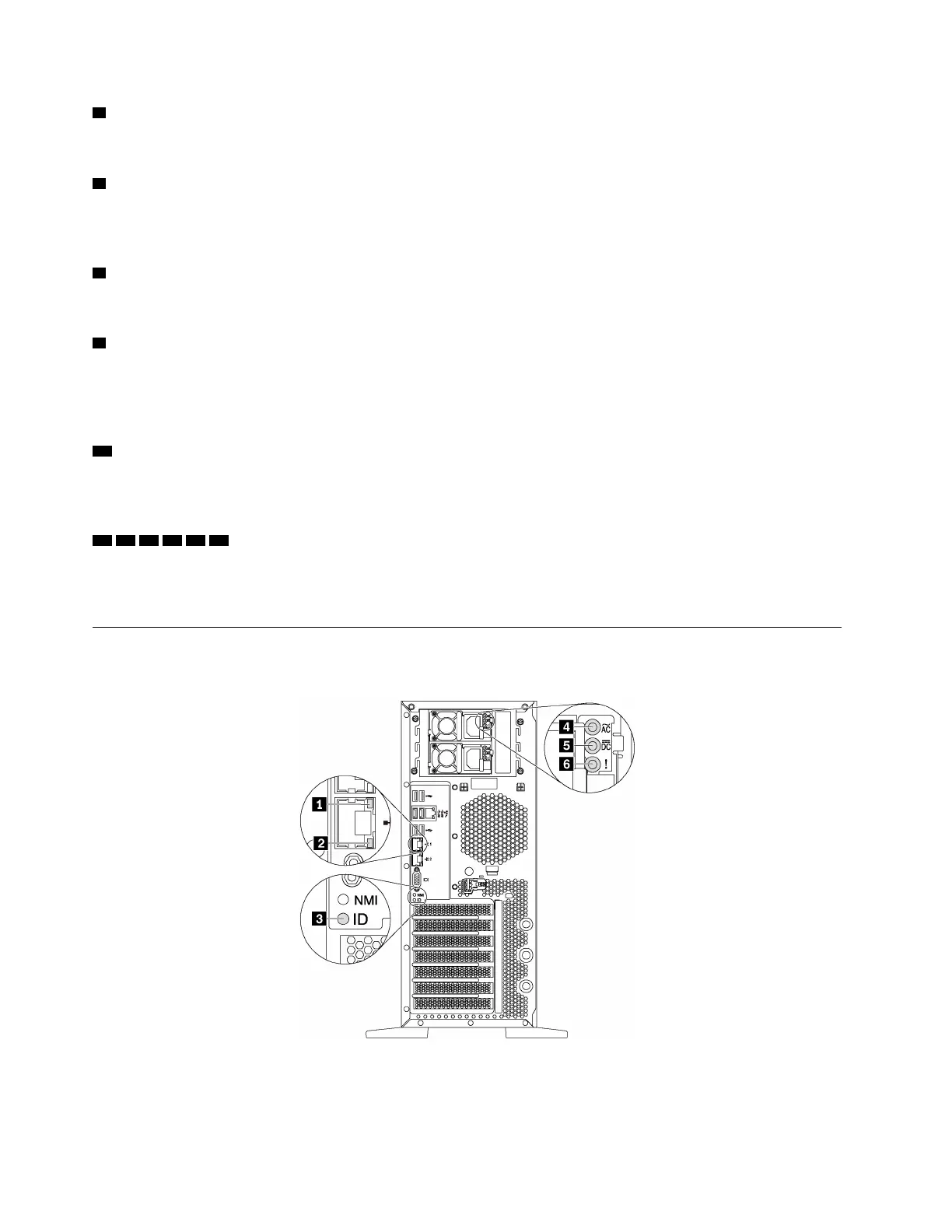
Rear view LEDs
The illustration in this section shows the LEDs on the rear the server.
Figure 9. Rear view LEDs of the server
24 ThinkSystem ST550 Setup Guide






 To Next Page