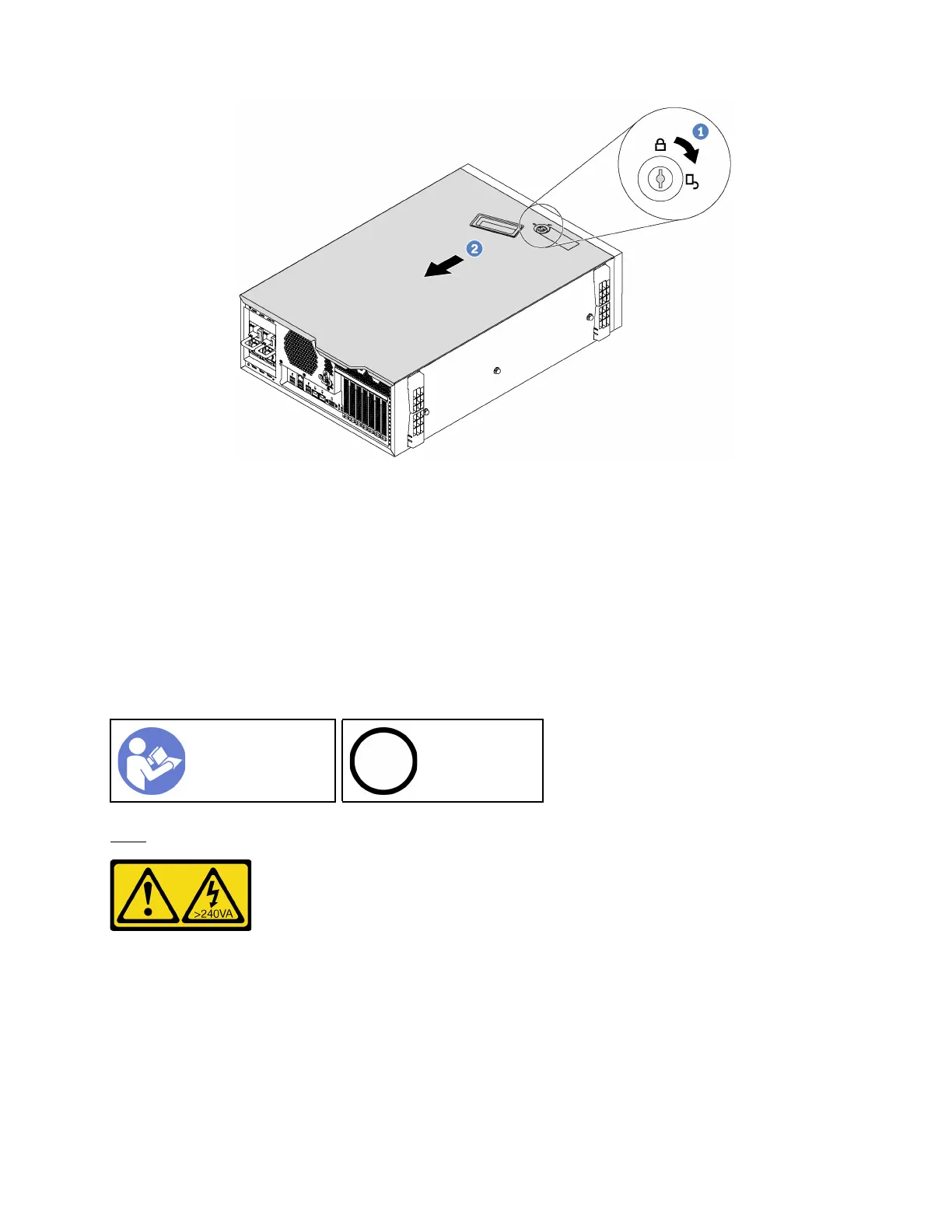
Figure 28. Server cover removal
Step 1. Use the key attached on the rear of the server to turn the cover lock to the open position.
Step 2. Slide the server cover toward the rear of the server until the server cover is disengaged from the
chassis. Then, lift the server cover off the chassis and place it on a flat clean surface.
Attention: For proper cooling and airflow, install the server cover before turning on the server.
Operating the server with the server cover removed might damage server components.
Remove the air baffle
If you intend to install hardware options in the server, you must first remove the air baffle from the server.
“Read the
installation
Guidelines” on
page 58
“Power off
the server
for this task”
on page 109
S033
CAUTION:
Hazardous energy present. Voltages with hazardous energy might cause heating when shorted with
metal, which might result in spattered metal, burns, or both.
Chapter 3. Server hardware setup 61






 To Next Page