3.3 Accessing IP Camera for login with the default IP address.
If select “Get IP address automatically”, after the IP Camera restarts, users
can search it through the installer program: DeviceSearch.exe, which can be
found in “DeviceSearch” folder in the supplied CD.
NOTE: Please make the record of the IP Camera’s MAC address, which
can be found in the label of the camera, for identification in the future.
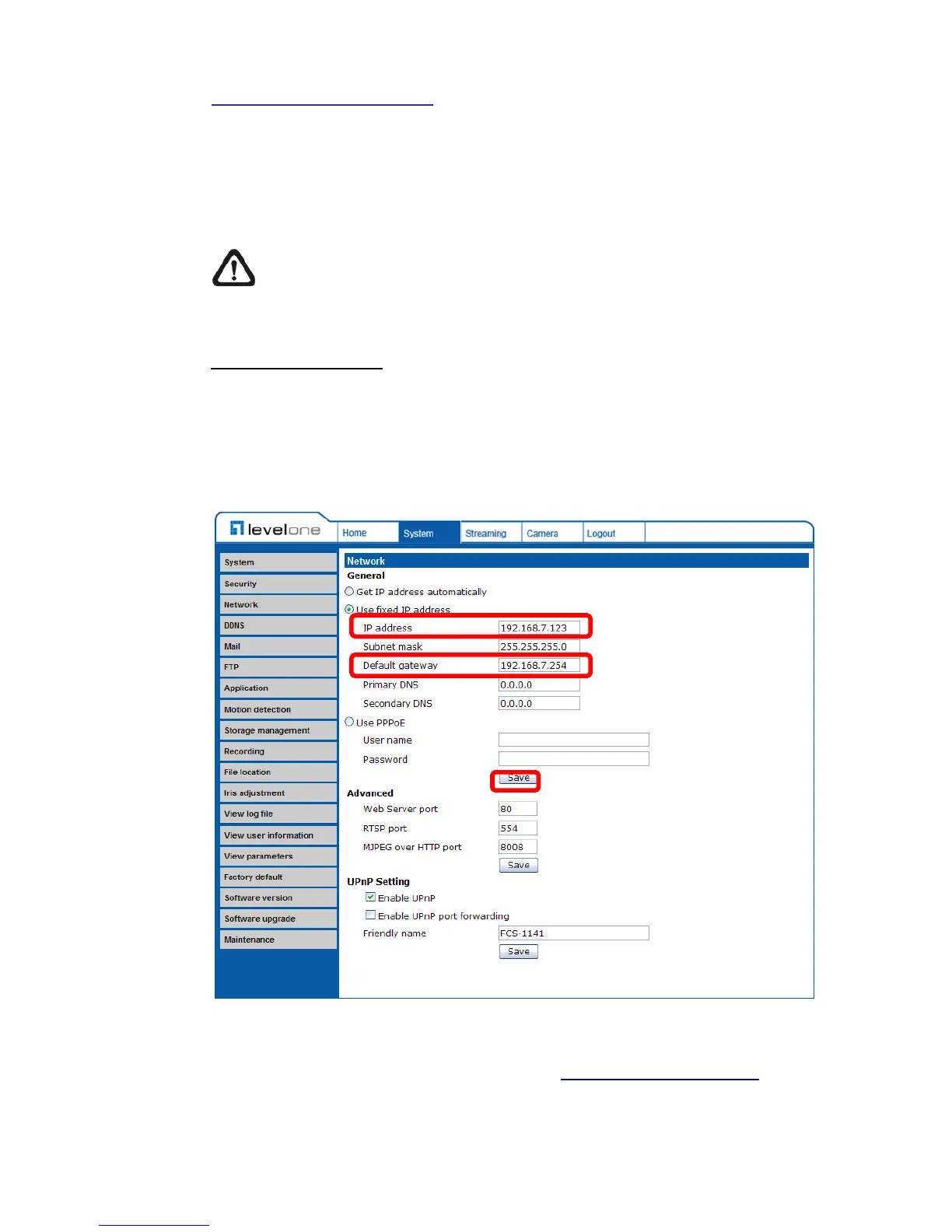
Use fixed IP address
To setup static IP address, select “Use fixed IP address” and move the cursor
to the IP address blank (as indicated below) and insert the new IP address, ex.
192.168.7.123; then go to the Default gateway (explained latter) blank and
change the setting, ex. 192.168.7.254. Press “Save” to confirm the new setting.
When using static IP address to login to the IP Camera, users can access it
either through “DeviceSearch” software (see 3.3 Accessing IP Camera) or input
the IP address in the URL bar and press “Enter”.















 To Next Page