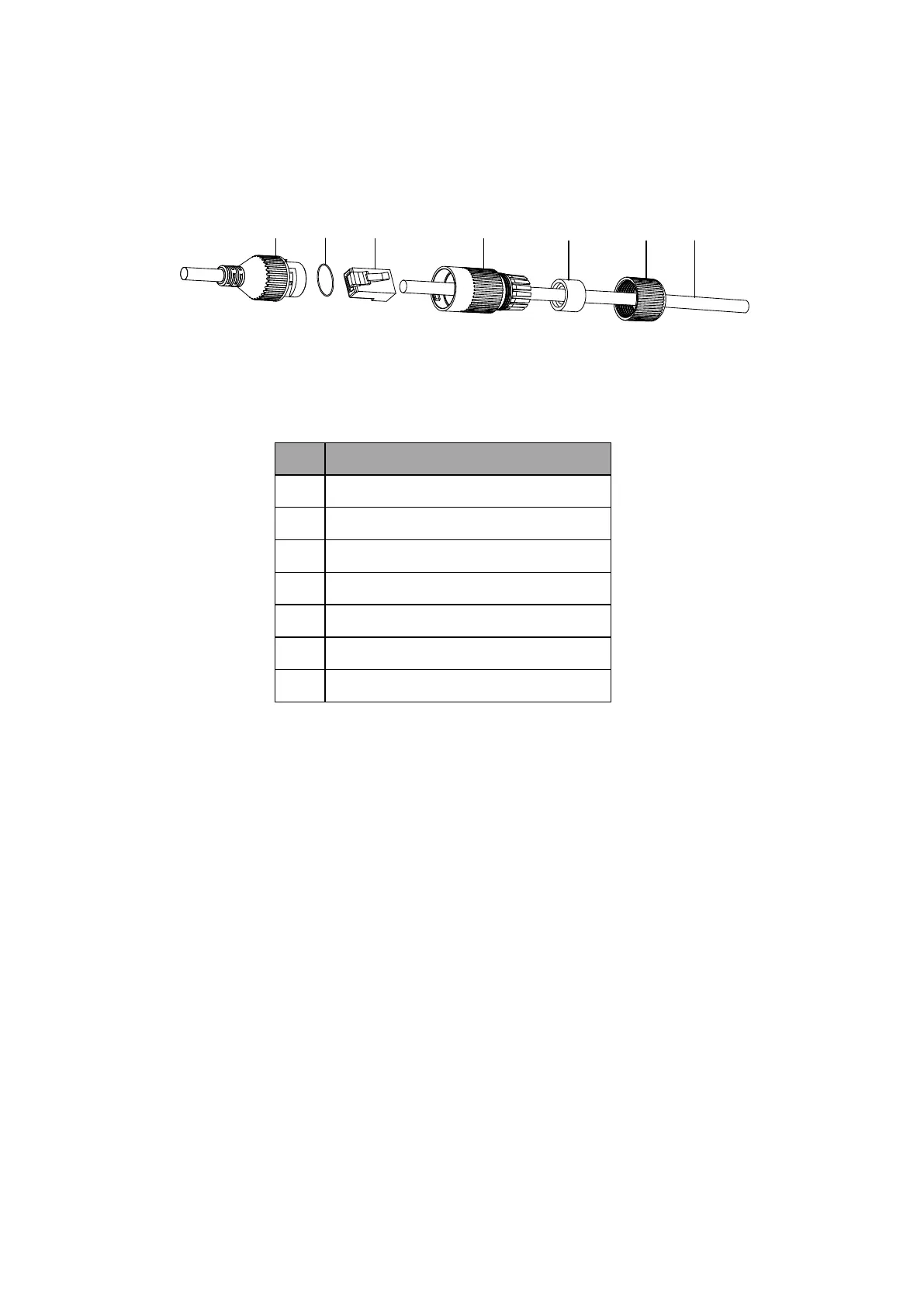
Appendix B. Network Cable Water-proof Jacket Installation (Optional)
Purpose:
If the camera is installed outdoor, you can adapt the water-proof accessory for the network cable after the camera is secured on
the installation surface.
①
②
③
④
⑤
⑥ ⑦
Water-proof Accessory Components
Components
No. Components
1 Camera’s Network Interface Socket
2 O-Type Gasket
3 Network Plug
4 Waterproof Endcap
5 Waterproof Rubber Gasket
6 Lock Nut
7 Network Cable from Router/Switch
Steps:
1.
Feed the plugless network cable ⑦ through the lock nut ⑥, waterproof rubber gasket ⑤ (rubber gasket
inset ridge must face waterproof endcap), and the water-proof endcap ④ in order.
Crimp an RJ-45 network plug ③onto the end of the cable,
2.
taking care to insert the twisted pairs of wires in correct order.
Place the O-type gasket ② onto the end of the camera’s 3.
network interface socket ①.
Insert the network plug ③ into the camera’s network interface4.
socket①.















 To Previous Page