84
Remote Administration
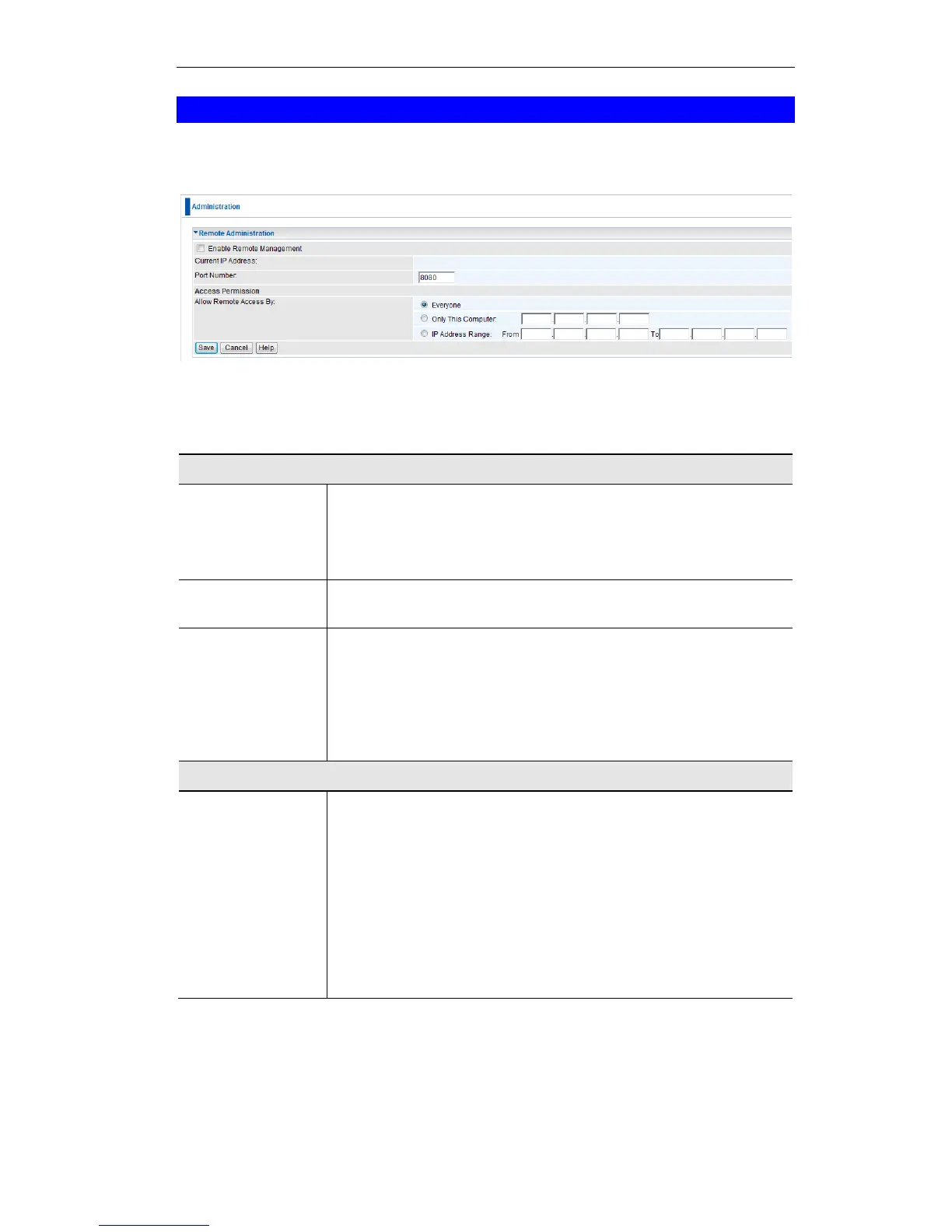
If enabled, this feature allows you to manage the Wireless ADSL Router via the Internet.
Figure 68: Remote Administration Screen
Data - Remote Administration Screen
Check to allow administration/management via the Internet. (To
connect, see below).
If Disabled, this device will ignore Administration connection at-
tempts from the Internet.
This is the current address you will use when accessing this device
from the Internet. To connect, see details and an example below.
Enter a port number between 1 and 65535. The default for HTTP
(Web) connections is port 80, but using port 80 will prevent the use
of a Web "Virtual Server" on your LAN. So using a different port
number is recommended. The default value is 8080.
The port number must be specified in your Browser when you con-
nect. See the following section for details.
Select the desired option.
Everyone - allow access by everyone on the Internet.
Only This Computer - allow access by only one IP address.
Enter the desired IP address.
IP Address Range - allow access from a range of IP addresses
on the Internet. Enter a beginning and ending IP address to define
the allowed range.
For security, you should restrict access to as few external IP ad-
dresses as practical.
To connect from a remote PC via the Internet
1. Ensure your Internet connection is established, and start your Web Browser.
2. In the "Address" bar, enter "HTTP://" followed by the Internet IP Address of the Wireless
ADSL Router. If the port number is not 80, the port number is also required. (After the IP















 To Next Page