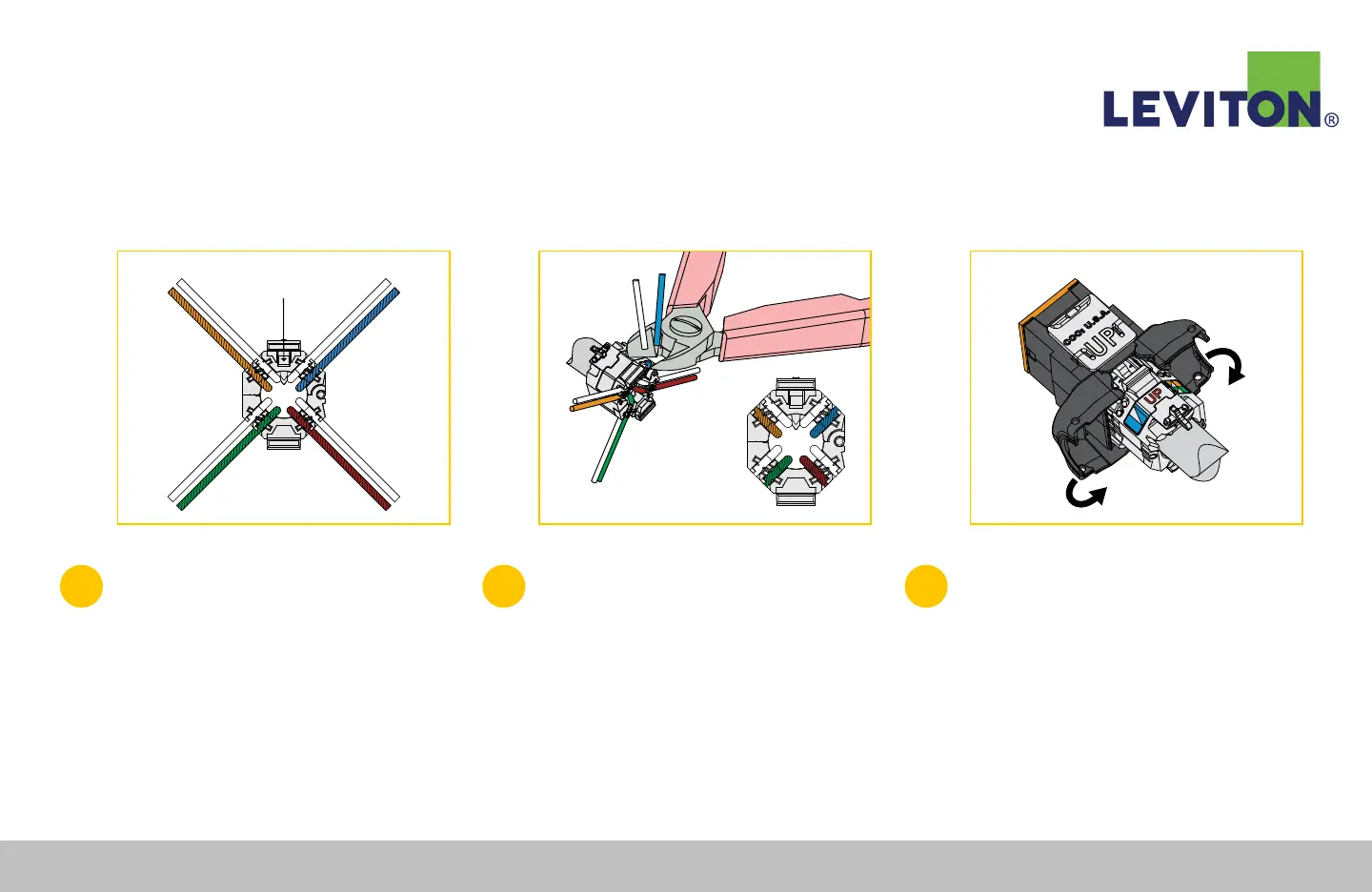
4
Check polarity by making sure the white
wire of each pair will be closest to the
guide pinhole in the face of the wire
managers (Figure D).
5
Using a flush cutter, trim all pairs flush
with sides of wire manager.
Note: Wire ends must be cut flush: use of snips or side
cutter is not recommended and may cause test failures
(Figure E).
6
Align the prepared wire manager with
the rear of the connector, matching “UP”
on the wiring label to “UP” molded into
the connector retaining tab (Figure F).
Close connector doors to complete the
termination. To rewire, depress the connector
door-release tabs simultaneously.
Guide Pin Hole
Figure D Figure E Figure F
Atlas-X1™ UTP Connector Termination Instructions Continued
Leviton Network Solutions
|
(800) 722 2082
|
+1 (425) 486 2222
|
leviton.com/ns 75
Atlas-X1™ UTP Connector Termination Instructions


 To Next Page