eXtreme
®
Cat 6A Connector Termination Instructions
1
Remove about 3" (76 mm) of cable jacket and center spline
(sti plastic separator inside Cat 6A cable).
2
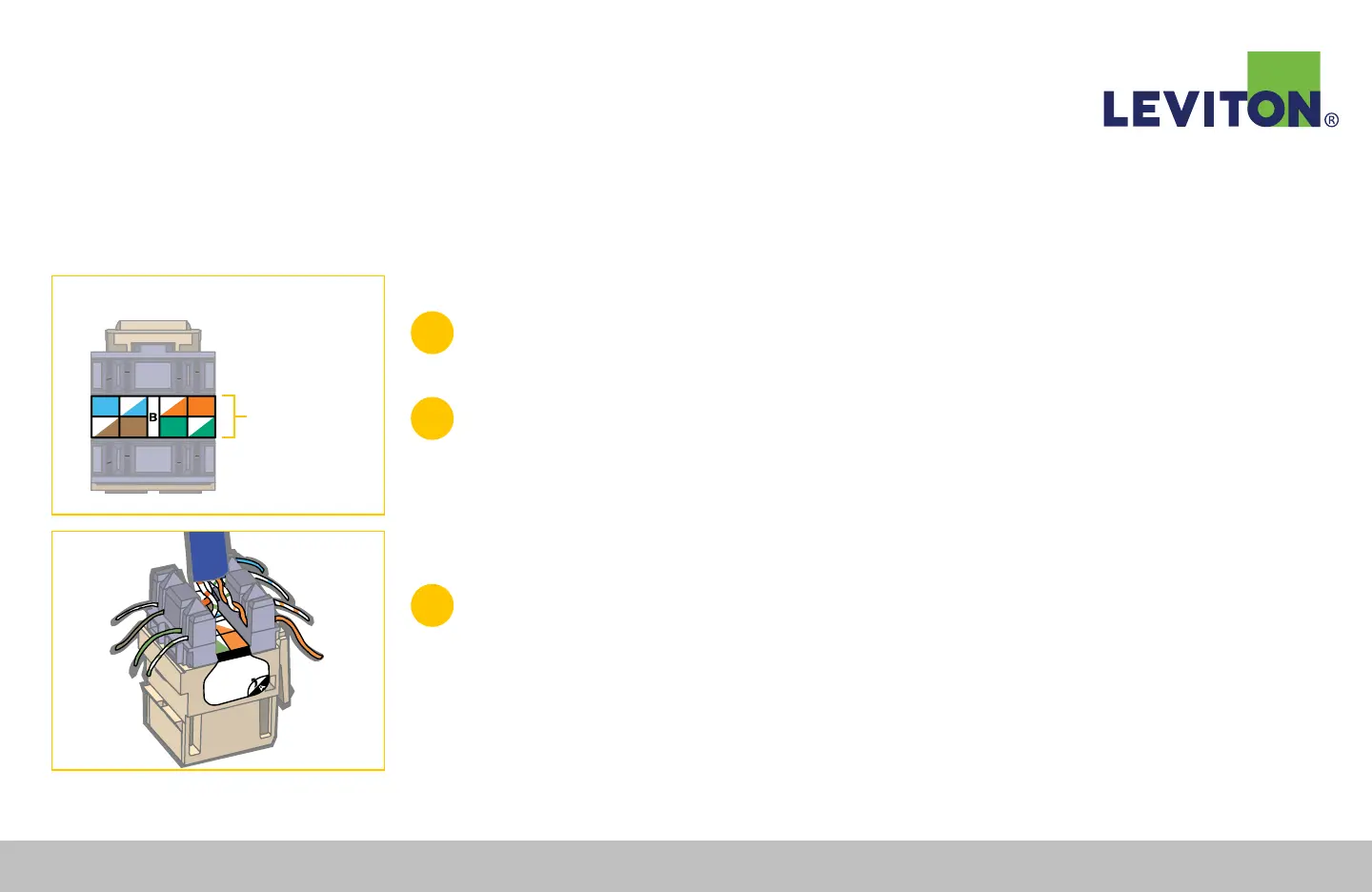
Determine whether to use wiring scheme T568A or T568B.
Note: the associated color codes and connector pin number on the label located
between the IDC connector slots (Figure A). Peel back label for T568A wiring.
Figure A
T568A or T568B
eXtreme
®
CAT 6A
Figure B
3
Leave the cable jacket within ⅛" (3 mm) of the connector side, then route
the wires for termination using the selected wiring scheme (Figure B).
Route cable perpendicular to the IDC field. Ensure there is enough slack in
the twisted pairs, and do not place the cable jacket into the termination field.
Continued...
Leviton Network Solutions
|
(800) 722 2082
|
+1 (425) 486 2222
|
leviton.com/ns 78
eXtreme
®
Cat 6A Component- and Channel-Rate Connector Termination


 To Next Page