Atlas-X1™ UTP Connector Termination Instructions
1
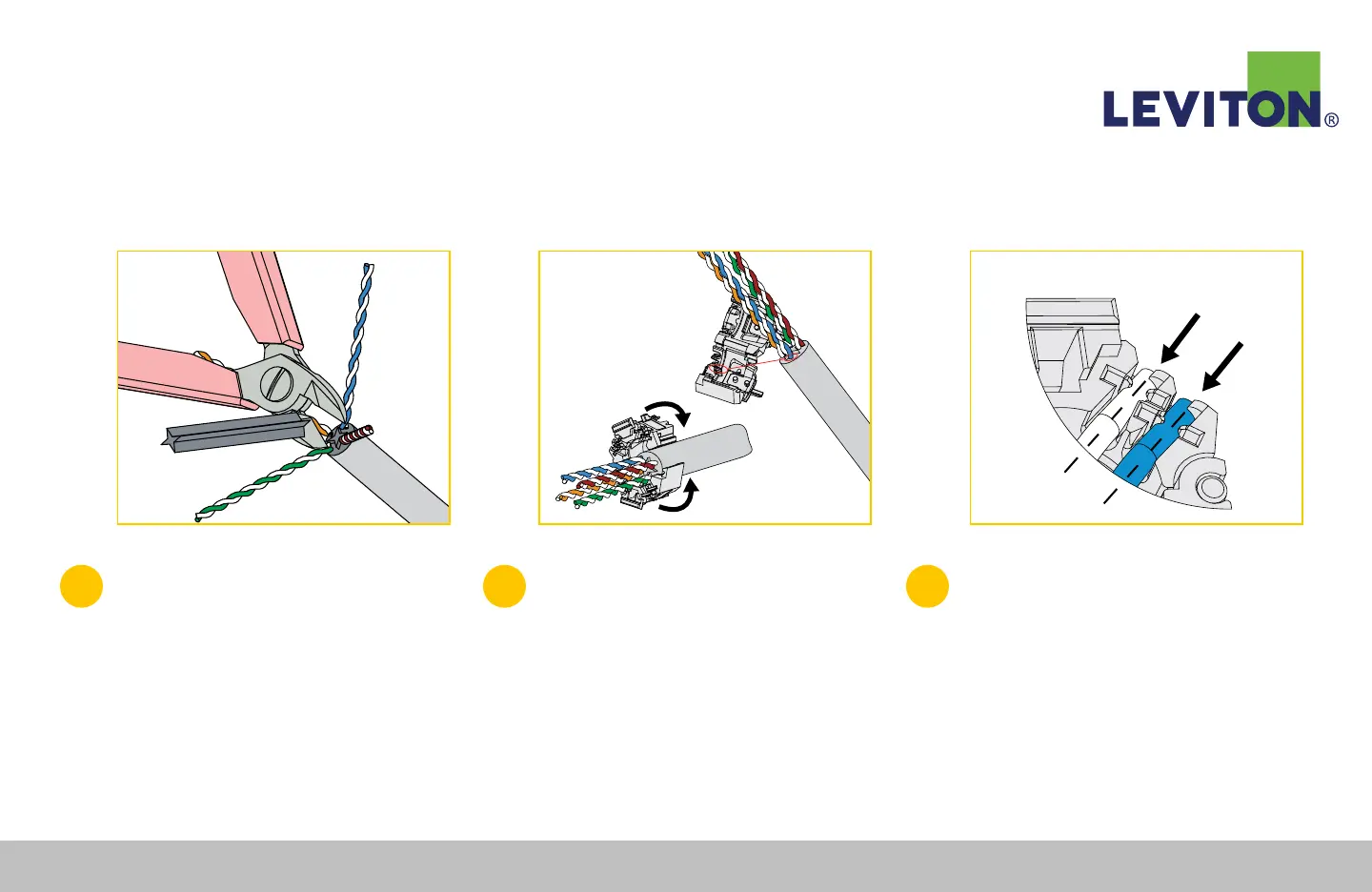
Using a cable stripper, remove 1.5 inches
(38 mm) of cable jacket. At the strip point
of the cable, use flush cutters to carefully
remove strip string, Mylar
®
tape, cross-
shaped pair separator, or any other cable
fillers or spacers where applicable. (Figure A).
2
Line up the wire manager with the blue pair
indication on the label in line with the blue
pair of the cable. Ensure that the end of
the cable jacket is at the cable jacket stop
inside the wire manager and click the wire
manager closed (Figure B).
3
Observing pair polarity and T568A or T568B
wiring pattern, seat the four pairs into the
wire manager.
Note: Pairs must be completely and securely seated into
wire manager wire channels (Figure C).
Figure A Figure B Figure C
Continued...
Leviton Network Solutions
|
(800) 722 2082
|
+1 (425) 486 2222
|
leviton.com/ns 74
Atlas-X1™ UTP Connector Termination Instructions


 To Next Page