User Manual for BPS-i100
www.levitronix.com
PL-4036-00, Rev03, DCO# 21-057
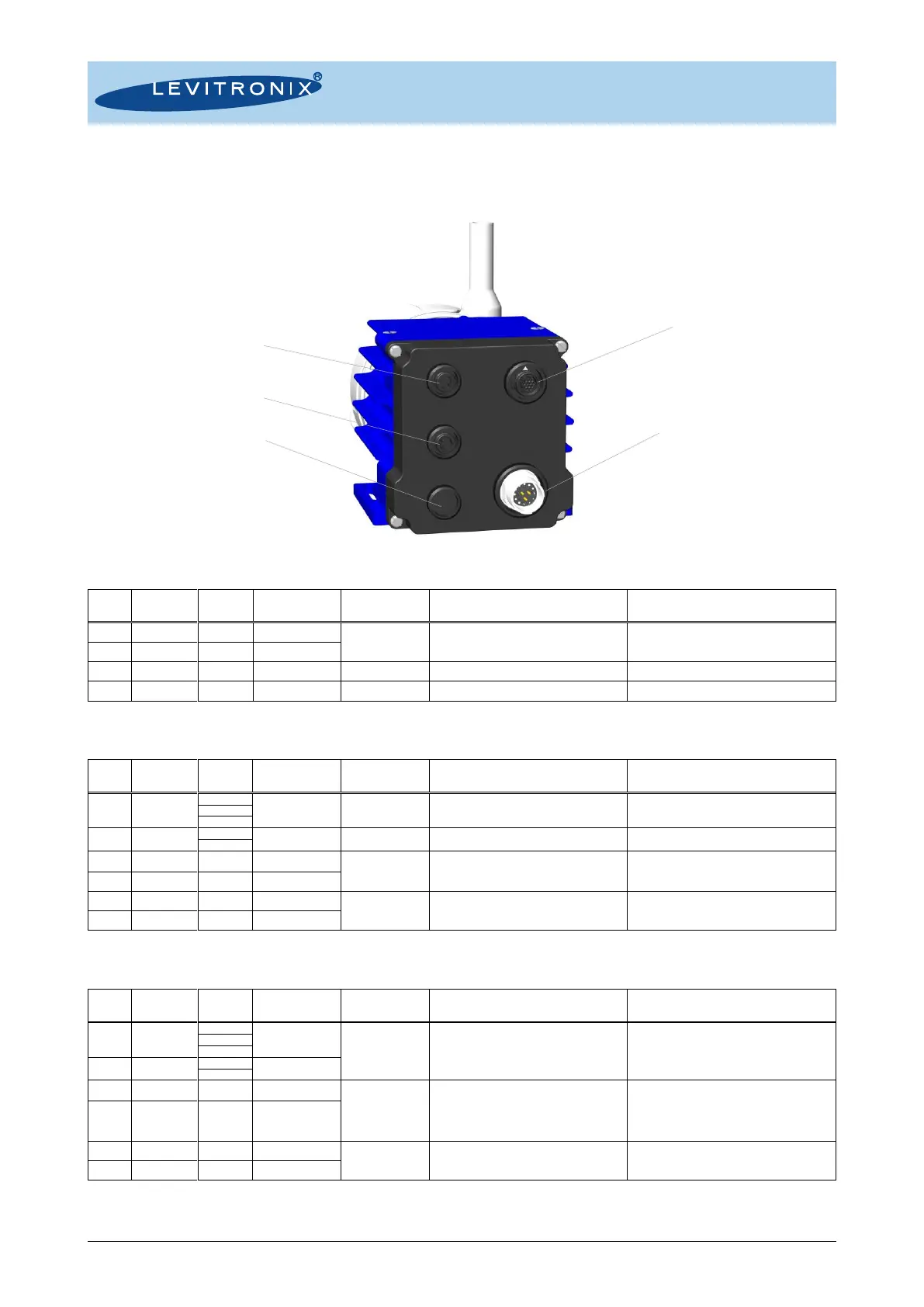
4.2 Electrical Installation of EasyConnect Model
4.2.1 Overview of Connections and Designations
Figure 27: Electrical connections to EasyConnect driver IPD-100.4/5
Specifications
Typical Levels
Voltage: 24 VDC ±10%
Power: 100 W
“P -“ shall be connected to earth
Wire of compatible cables is cut.
Wire of compatible cables is cut.
Wire of compatible cables is cut.
Wire of compatible cables is cut.
Table 10: Power supply connector of EasyConnect driver
1: Wire colors of compatible cables: ICP-2.1-xx. 2: Designations for standard firmware. For other firmware refer to relevant documentation.
For remote control with other devices.
Usage of Levitronix
®
Service Software with a
RS485 to USB adaptor cable.
Internal bus needed to connect pumps for serial
pumping.
Table 11: Fieldbus IN connector of EasyConnect driver
1: Wires of compatible cables: ICS-1.1-xx and ICS-1.2-xx
24VDC 10%, 200 mA
(Max. current is together with Pout of PLC
connector in Table 13)
For supply of external devices (displays etc.).
Internally protected.
For remote control with other devices.
Usage of Levitronix
®
Service Software with a
RS485 to USB adaptor cable.
Feed through for multi-pump arrays (for
example serial pumping, see Figure 6)
Internal bus needed to connect pumps for serial
pumping.
Table 12: Fieldbus OUT connector of EasyConnect driver
1: Wires of compatible cables: ICS-1.1-xx and ICS-1.2-xx



 To Next Page