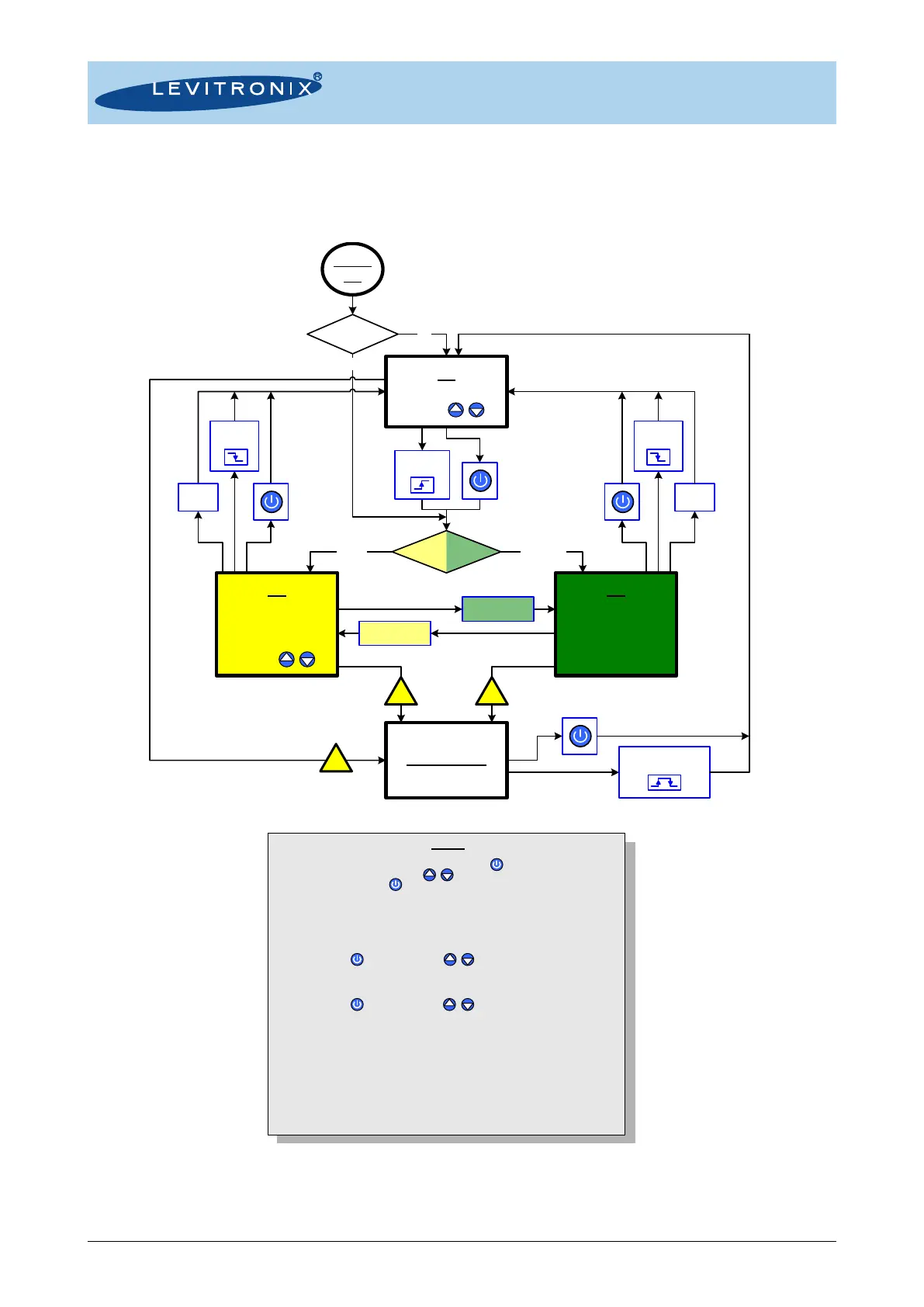
5.1.4 Detailed State Diagram
Figure 34 shows the detailed state diagram, which can be controlled with the manual buttons or the signals
of the PLC interface connector.
Figure 35: State diagram of stand-alone model
- Description is for standard firmware.
- For other configurations refer to alternate firmware documentation.
Power
On
System Error
Menu
From every system state, you reach the menu pushing > 4s.
Browse through the menu tabs using / .
The menu is exited pushing > 2s.
The menu has no influence on the system state (except change of speed control mode)
Menu tabs:
1. Set Speed control
- Mode: (Button à Analog In)
- Auto-start: (Off à On)
(select with , change values with / )
2. Set Timer
- Mode (Off à Single à Repeat)
- Time (hh mm ss)
(select with , change values with / )
3. Read system information
- Temperature
- Axial position
- DC-link voltage
4. Read system information
- BNG currents
- DRV currents
5. Read actual errors, warnings and messages
6. Read history of errors, warnings and messages
7. Read firmware information
Off
Set setpoint speed
pressing / .
Button Analog In
ON
(Speed Mode)
AnalogControl
Setpoint speed set by
analog input.
ON
(Speed Mode)
ButtonControl
Set setpoint speed
pressing / .
Timer
expired
!
Error
!
Error
!
Error
Enable
input = 0V
Enable
input = 0V
Enable
input = 24V
Enable input pulse
300-700ms
Timer
expired
Mode: Analog In
(Menu Tab 1)
Mode: Button
(Menu Tab 1)
On
Auto-Start
(Menu Tab1)
Speed Ctrl Mode
(Menu Tab1)
Off



 To Next Page