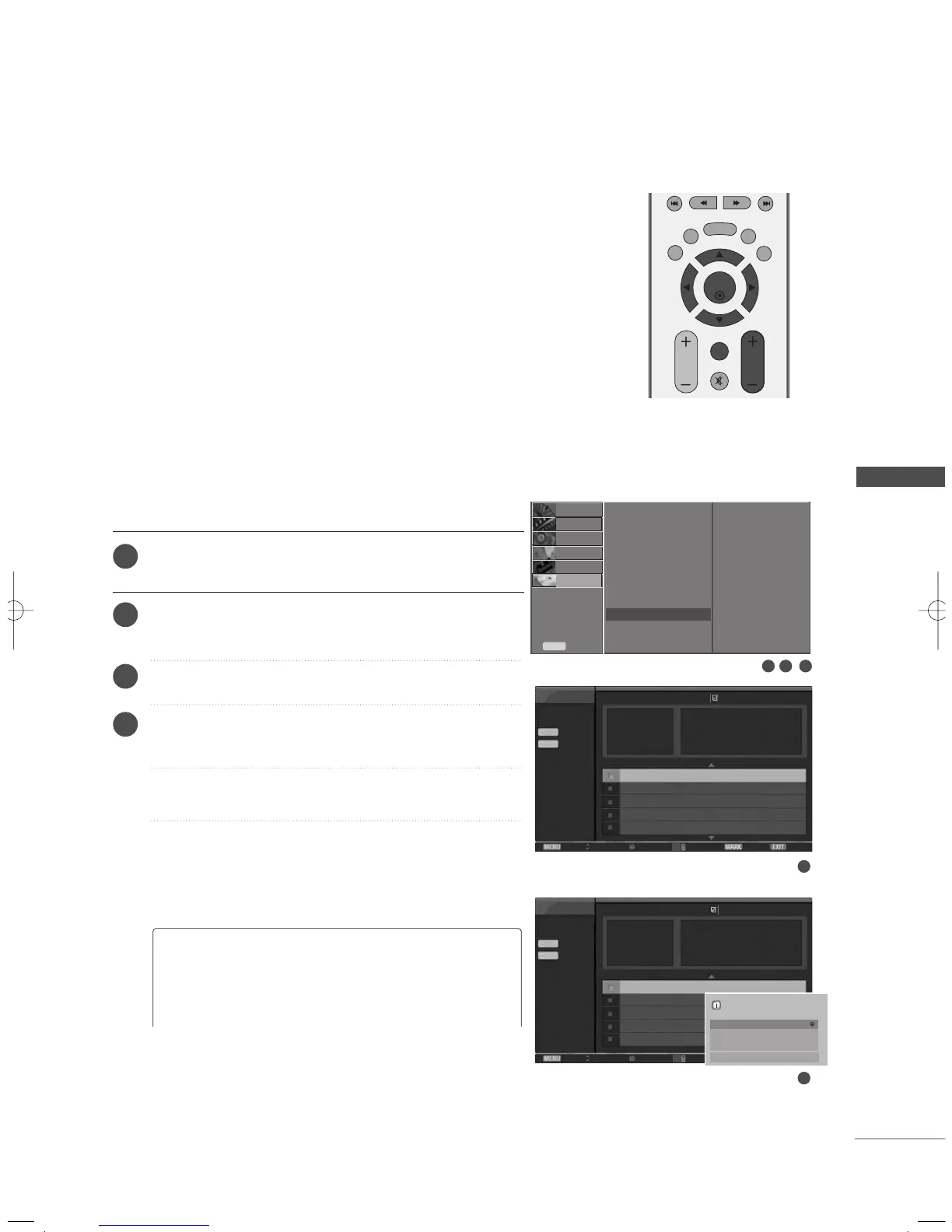
Press the
MMEENNUU
button and then use
DD
/
EE
button to
select the
TTIIMMEE MMAACCHHIINNEE
menu.
Press the
GG
button and then use
DD
/
EE
button to select
UUSSBB BBaacckkuupp
.
Press the
GG
button to start
UUSSBB BBaacckkuupp
.
UUSSBB BBaacckkuupp
screen is displayed as shown.
Use the
CCHH ++//--
button to navigation in the recorded program.
Use
MMAARRKK
button to mark or unmark a recorded program.
Use
DD
//
EE
button to navigation the appropriate recorded
program, then press the
EENNTTEERR
button to show up the
pop-up menu.
65
USB BACKUP
TIME MACHINE
To set
Time Control
Record Quality
Recorded TV
Schedule List
Manual Record
HDD Format
DivX Reg. Code
USB Backup
USB HDD Format
Subtitle
USB Backup
GG
1
2
3
4
SETUP
O
AUDIO
O
TIME
O
OPTION
O
PICTURE
O
Prev.
Menu
TIME MACHINE
G
-
When the Recorded List is stored exceeding the capacity of the internal HDD, the USB
backup feature allows the backup of Recorded List of the internal HDD to the external
HDD for backup connected through USB.
- To use USB backup function, be sure to initialize the USB HDD using TIME
MACHINE menu- USB HDD format.
- To use USB Backup, USB HDD is necessary more than 40 GB, 1 partition disk,
and FAT32 system.
-
It only supports file backup features; therefore, playback of the Recorded List directly
from the current OSD is not allowed. In order to play the recorded contents, the files
must be moved to the internal HDD through the ‘Copy to Recorded List’ from the
popup menu.
-
View the list of the backed up recorded program by using the ‘Copy to USB HDD’
from the ‘Recorded TV'.
-
It moves to the external HDD list for backup connected by USB.
1 2 3
GG
MMaarrkk AAllll
: mark all recorded programs on the screen.
GG
UUnnmmaarrkk AAllll
: Change marked recorded programs to
unmarked recorded programs.
GG
DDeelleettee
: Delete the selected recorded programs.
Free Space
Page 2/3
USB Backup
USB Backup
Menu
Navigation
Popup Menu Move Page Mark Exit
Input : TV60
Date : Thu. Jun14 2007
Duration : 20 min
Quality : High
Music Bank TV60 Thu.Jun14
10:07 AM
Music Bank TV60 Thu.Jun14
09:20 AM
HIGH
NORMAL
11h 24m
22h 46m
Free Space
Page 2/3
USB Backup
USB Backup
Menu
Navigation
Popup Menu Move
Input : TV60
Date : Thu. Jun14 2007
Duration : 20 min
Quality : High
Music Bank TV60 Thu.Jun14
10:07 AM
Music Bank TV60
HIGH
NORMAL
11h 24m
22h 46m
TV 60
10:07 AM~10:27 AM
Mark All
Delete
Copy to Recorded List.
Cancel
4
4
CH
CH
No Marked
No Marked
MFL36546204en_2 12/31/07 2:05 PM Page 65



 To Next Page