When playing,
repeatedly, press the
RREEWW
((
FFFF
))
button to speed up
FFFF FFFFFF FFFFFFFF
FFFFFFFFFF FFFFFFFFFFFF
.
repeatedly, press the
FFFF
((
GGGG
))
button to speed up
GGGG GGGGGG GGGGGGGG
GGGGGGGGGG GGGGGGGGGGGG
.
■
Pressing these buttons repeatedly increases the fast forward/reverse speed.
■
Press the
GGGG
II
button to jump about 20 seconds forward.
■
Pressing the
II
FFFF
button to jump about 8 seconds backward.
During playback, press the
PPaauussee
((
II II
))
button.
■
Still screen is displayed.
■
Repeatedly press the
PPaauussee
((
II II
))
button to advance frame by frame.
■
Press the
PPaauussee
((
II II
))
button and then use the
FFFF((
GGGG
))
button for slow
motion (the icon is displayed.)
■
Press the
PPaauussee
((
II II
))
button and then use the
RREEWW((
FFFF
))
button for slow
motion (the icon is displayed.)
■
When using the
FF
or
GG
button during playback a cursor indicating the position
can be viewed on the screen.
Press the
PPLLAAYY
((
GG
))
button to return to normal playback.
Press the LIVE TV button to jump at the front of the program.
■
If you press the
SSTTOOPP((
AA
))
button, you can watch set.
FFFF
/
GGGG
II
FFFF
/
GGGG
II
FF
/
GG
LIVE TV
SSTTOOPP((
AA
))
PPLLAAYY
((
GG
))
II II
Using the remote control
You can shift playback to any point within playing the recorded program.
67
Playing recorded programs
TIME MACHINE
- You can play the selected program in the recorded program list.
Play a recorded program.
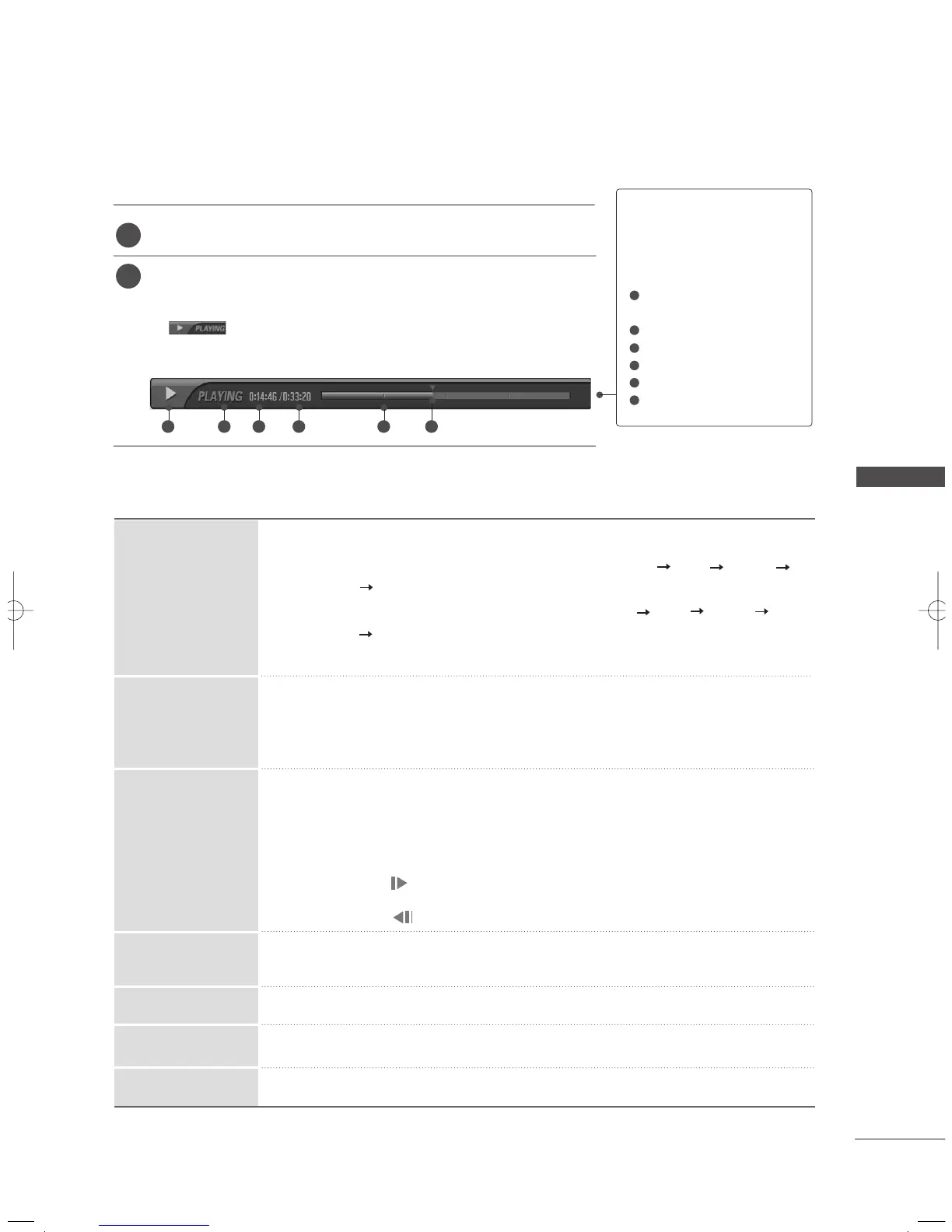
While playing, You will see a playback screen as shown below.
■
Initially, an icon showing the current playback mode is displayed
.
Press the
EENNTTEERR
button to display the progress bar
■
To stop displaying the recorded programs icon, press the
EEXXIITT
button.
TThhee ‘‘PPrrooggrreessss BBaarr’’??
This function indicates a possible TIME
MACHINE reshowing section ,a current
on-screen and real on-broadcasting posi-
tion, a section of section-recording.
Indicates movement of recorded pro-
gram.
Indicates status of recorded program.
Indicates elapsed playback time.
Indicates total playback time.
Indicates a quarter of program runtime.
Indicates current playback position.
2
1
1
2
3
4
5
6
1 2 3 4 5 6
MFL36546204en_2 12/31/07 2:05 PM Page 67



 To Next Page