19
ENG
ENGLISH
USING THE MONITOR
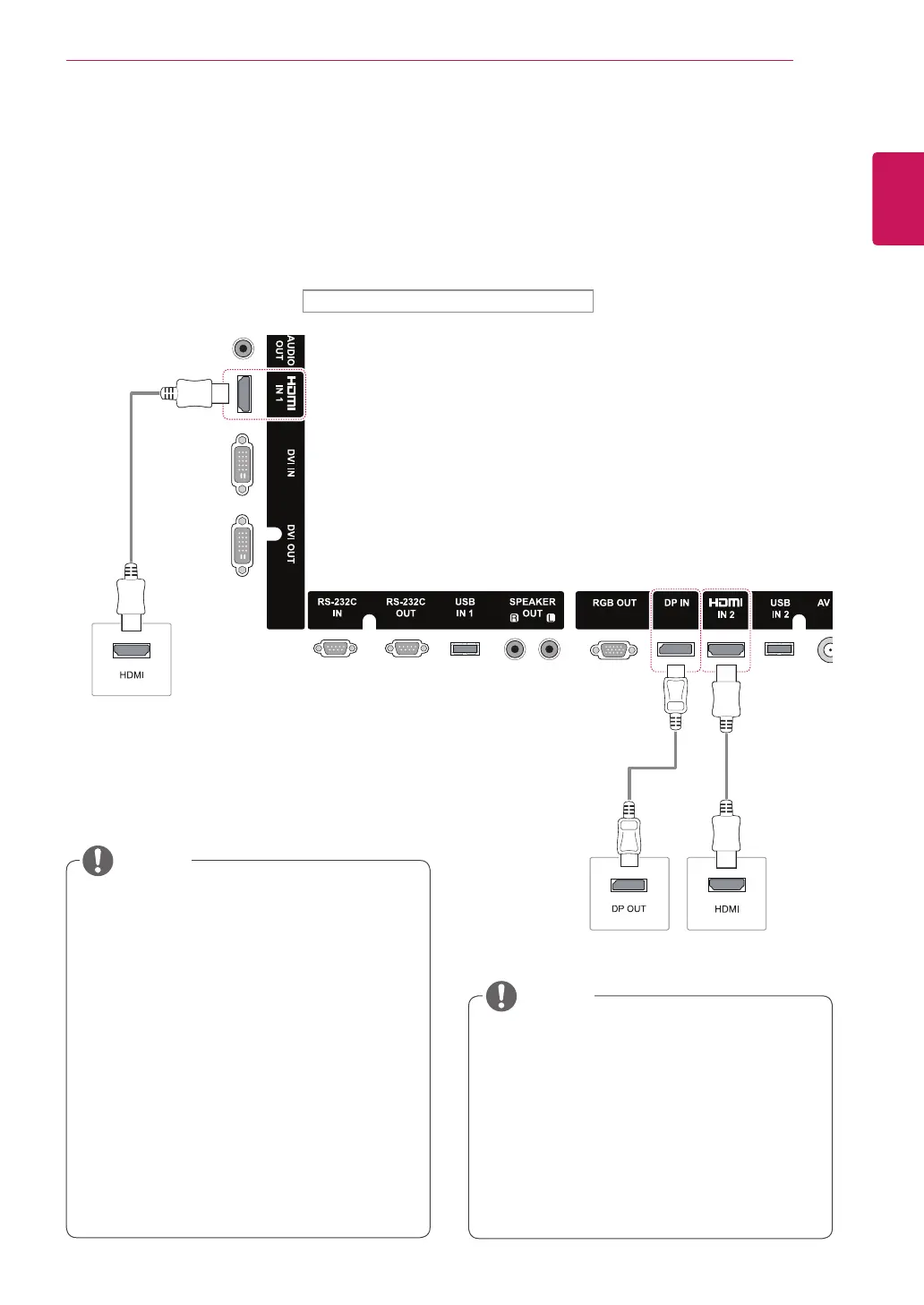
HDMI connection
Transmits the digital video and audio signals
from your PC to the Monitor. Connect the PC and
the Monitor with an HDMI cable as shown in the
following illustration.
Select HDMI input source.
Display Port connection
Transmits the digital video and audio signals from
your PC to the Monitor. Connect the PC and the
Monitor with a Display Port cable as shown in the
following illustrations.
Select Display Port input source.
It is recommended to use the following
specifications to play 3840 x 2160 video
seamlessly in HDMI or DP modes.
»
Recommended PC specifications - CPU:
Intel core i7 or higher, graphic card: NVIDIA
GTX TITAN or higher, AMD HD7000 series
or higher.
»
Recommended video - For H.264, 140
Mbps or lower data transmission rate.
NOTE
(not
included)
(not included)
PC
PC
Back of the product.
NOTE
Use a High Speed HDMI
®
/™ Cable.
Please check the PC environment if you
cannot hear the sound in HDMI mode. Some
PCs require you to manually change the
default audio output to HDMI.
If you want to use HDMI-PC mode, you must
set the input label to PC mode.
When HDMI PC is used, a compatiblity
problem could occur.
Use a certified cable with the HDMI logo
attached. If you do not use a certified HDMI
cable, the screen may not display or a
connection error may occur.
Recommended HDMI cable types
-High-Speed HDMI
®
/™ Cable
-High-Speed HDMI
®
/™ Cable with Ethernet


 To Next Page