43
ENG
ENGLISH
MAKING CONNECTIONS
Connecting to a HD receiver, DVD, Camcorder, Camera,
Gaming Device or VCR player
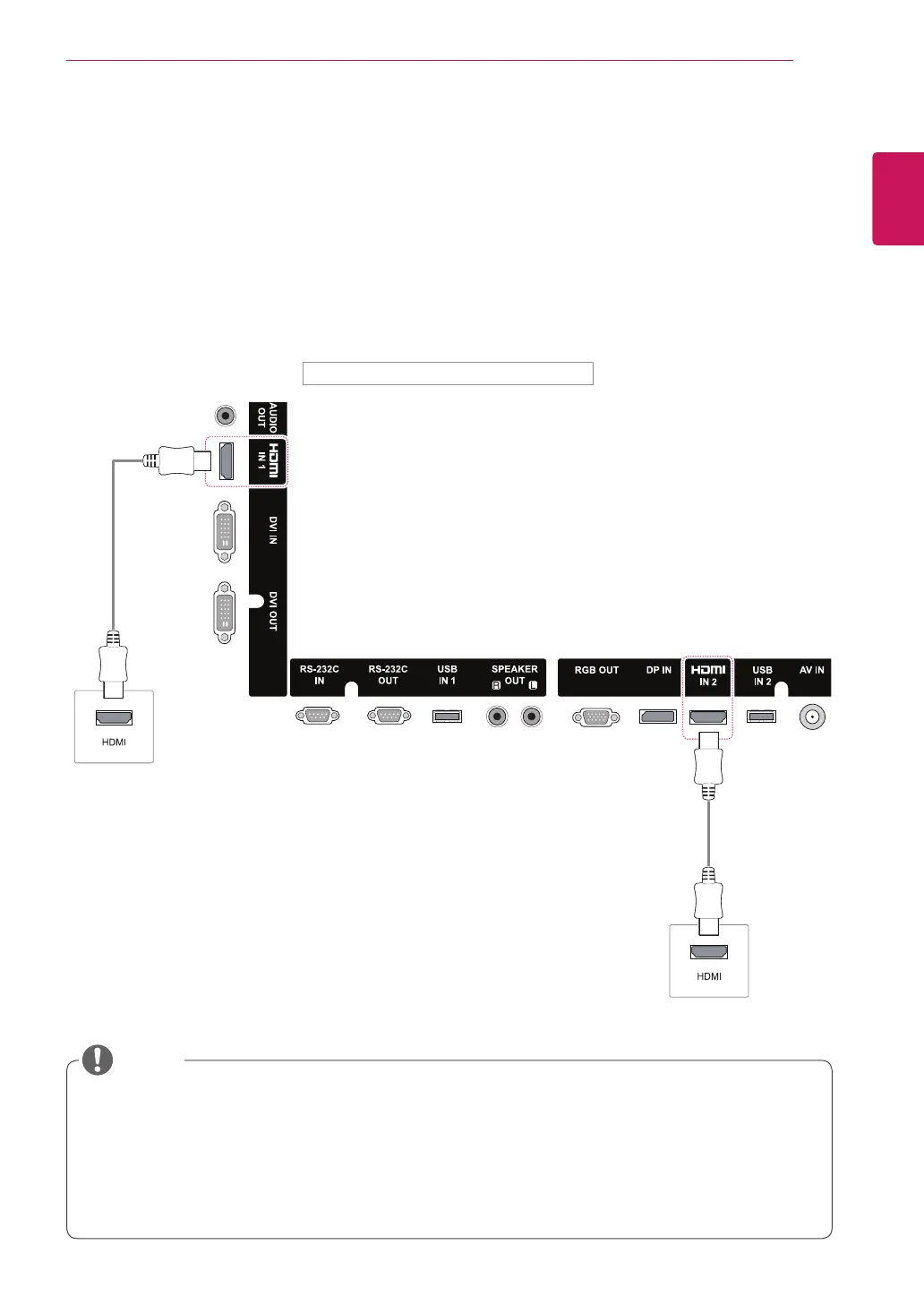
Connect a HD receiver, DVD, or VCR player to the Monitor and select an appropriate input mode.
HDMI connection
Transmits the digital video and audio signals from an external device to the Monitor.
Connect the external device and the Monitor with the HDMI cable as shown on the following illustration.
(not
included)
(not included)
Back of the product.
NOTE
Use a High Speed HDMI
®
/™ Cable.
High Speed HDMI
®
/™ Cables are tested to carry an HD signal up to 1080p and higher.
Use a certified cable with the HDMI logo attached. If you do not use a certified HDMI cable, the
screen may not display or a connection error may occur.
Recommended HDMI cable types
-High-Speed HDMI
®
/™ Cable
-High-Speed HDMI
®
/™ Cable with Ethernet


 To Next Page