23
ENG
ENGLISH
USING THE MONITOR
Connecting to a Pentray (KT-WT0)
Pentray (KT-WT0) Connection
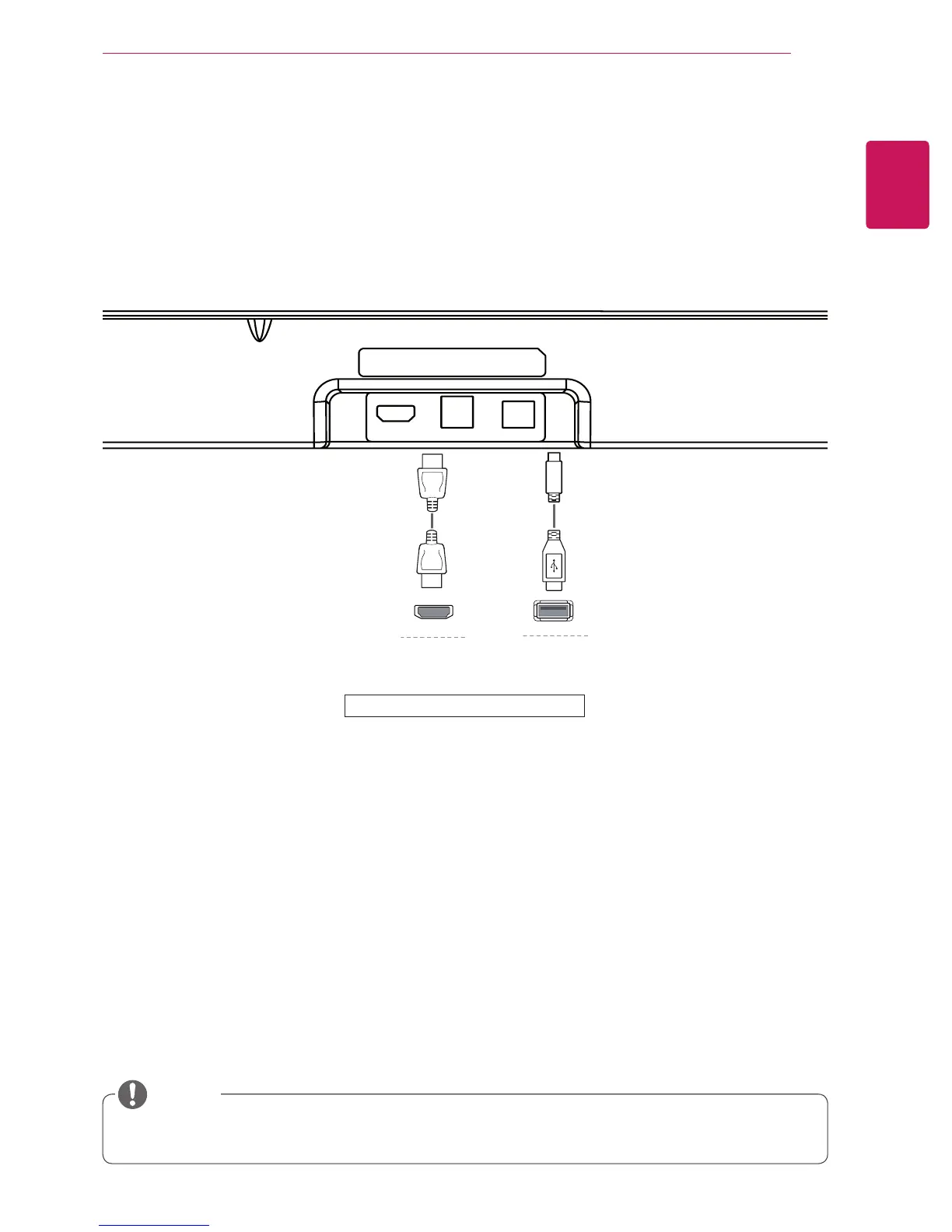
Connect the Pentray and the monitor with an HDMI cable as shown in the following illustration. Plug a USB
cable into a USB IN 1 port on the back of the monitor.
HDMI Out
USB 3.0 USB 2.0
(To PC)
(To Monitor)
HDMI In
USB IN 2
DP IN
HDMI IN 1
H/P
USB UP USB IN 1
HDMI IN 2
mDP IN
USB IN 3
USB IN 2
DP IN
HDMI IN 1
H/P
USB UP USB IN 1
HDMI IN 2
mDP IN
USB IN 3
HDMI IN 2
H/P
USB UP USB IN 1
HDMI
PC
mDP IN
USB IN 3
USB IN 2
DP IN
HDMI IN 1
H/P
USB UP USB IN 1
HDMI IN 2
mDP IN
USB IN 3
HDMI OUT
Back of the product.
y
For Display Sharing, it is recommended to connect to the USB IN 1 port on the product.
NOTE


 To Next Page