39
ENG
ENGLISH
CUSTOMIZING SETTINGS
Using the Additional Options
Adjusting Aspect Ratio
Resize the image to view the image at its optimal size by pressing
ARC
while you are watching content.
y
If a fixed image displays on the screen for a long period of time, it will be imprinted and become a
permanent disfigurement on the screen. This is image retention or burn-in and not covered by the
warranty.
y
If the aspect ratio is set to 4:3 for a long period of time, image burn may occur on the letterboxed area
of the screen.
y
When using the touch screen monitor, it is recommended to set the screen aspect ratio to Just Scan.
CAUTION
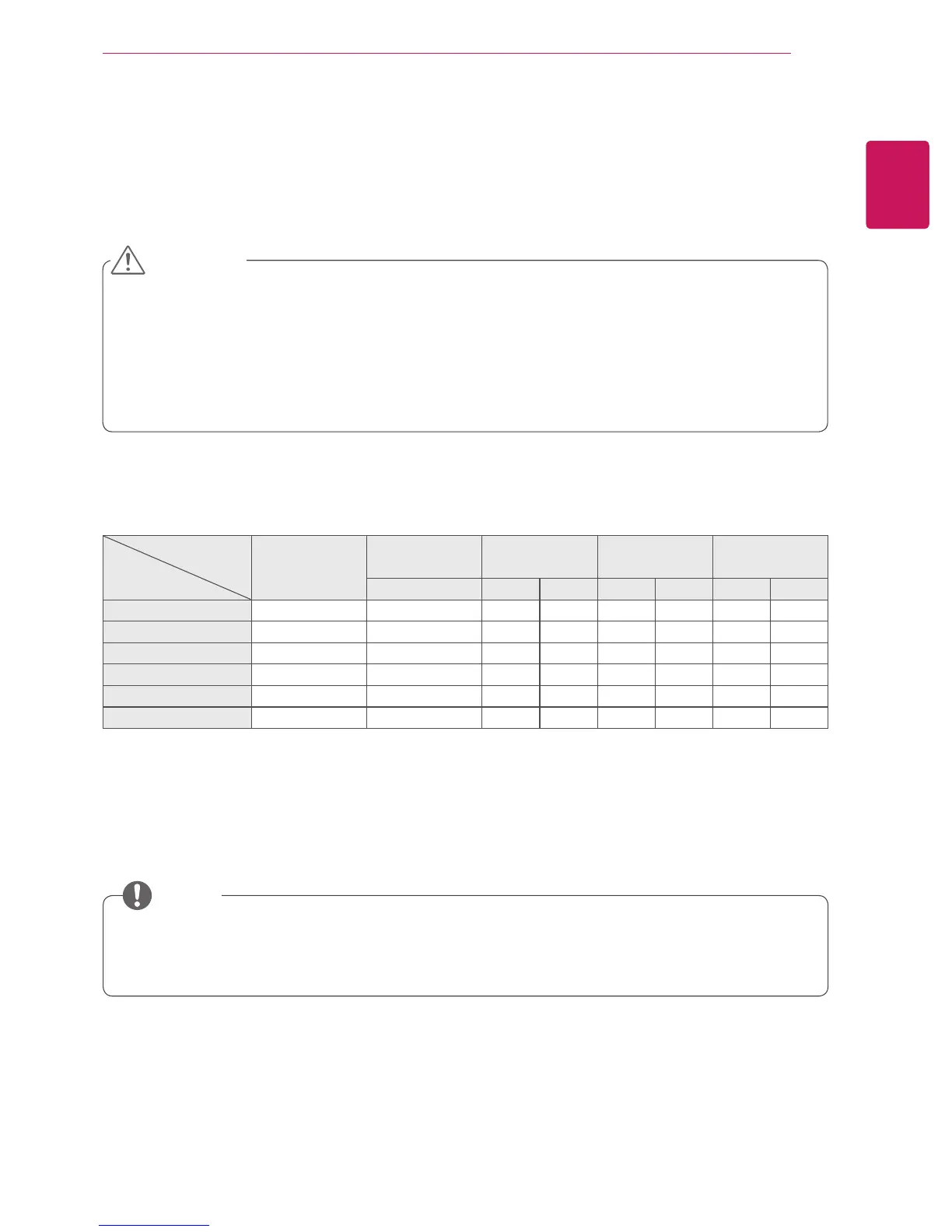
MODE
ARC
AV RGB Display
Port
DVI-D HDMI
PC DTV PC DTV PC DTV PC
16:9
o o o o o o o o
Just Scan
x x o x o x o x
Set By Program
o x o x o x o x
4:3
o o o o o o o o
Zoom
o x o x o x o x
Cinema Zoom 1 - 16
o x o x o x o x
y
DTV:
Blu-ray, DVD, VCR, Home theater, AV Receiver, Set-top Box, Cable Box, Satellite, IPTV, TV,
Smart Box, Smart phone, Camera,
and
Camcorder, Game.
y
PC:
PC, Notebook
NOTE


 To Next Page