ENGLISH
52
USING THE TOUCH SCREEN
To Use the Touch Screen on
Windows 7 / 8 (Enterprise)
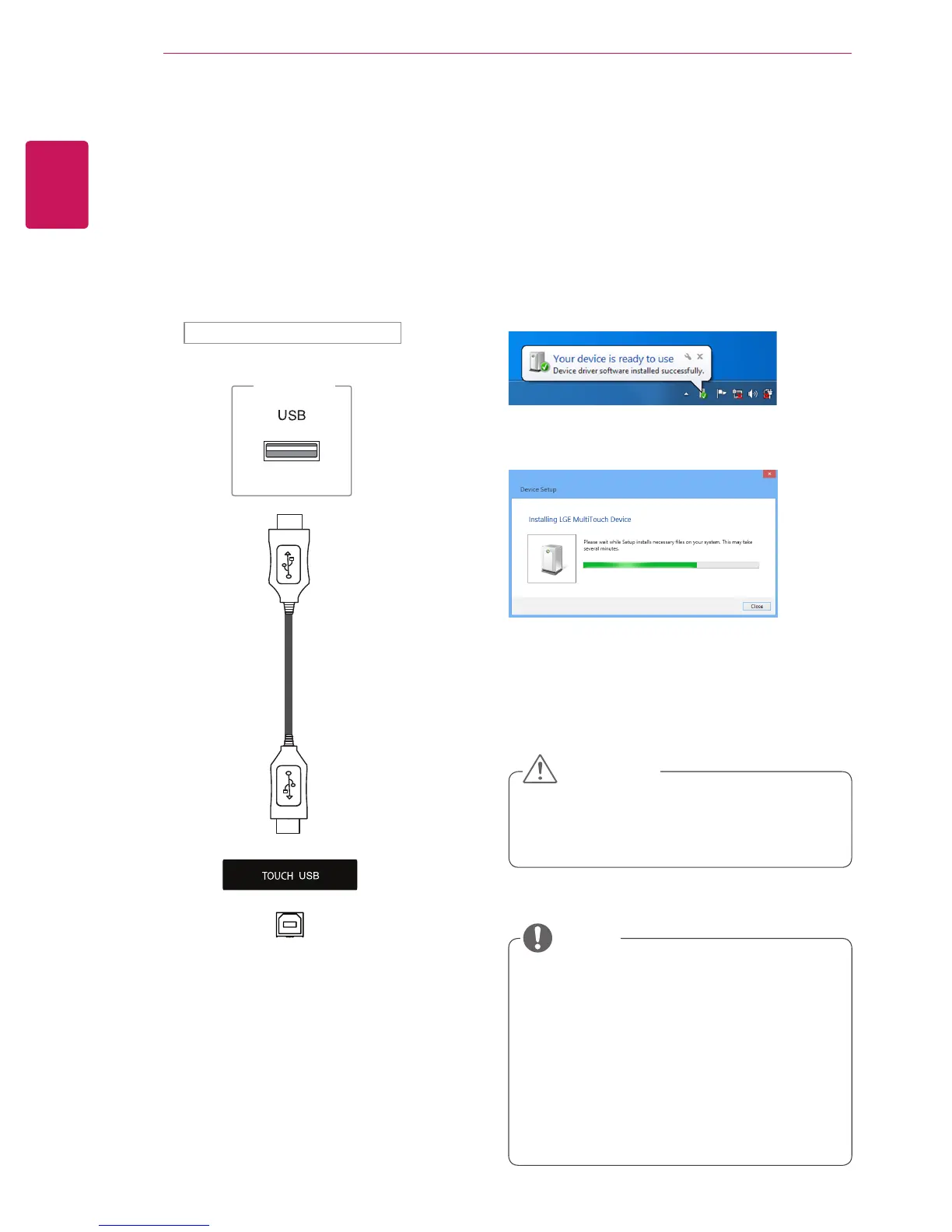
Plug a USB cable into a TOUCH USB port on the
back of the monitor.
Then, connect the USB cable to your PC so that it
automatically recognizes the touch screen monitor.
* Windows 7
* Windows 8 (Enterprise)
y
The monitor can respond to 10 Touch
Points when connected to a Windows 7 / 8
(Enterprise) computer.
y
When using the touch screen monitor, it is
recommended to set the screen aspect ratio
to Just Scan.
y
For more information about gestures and
settings on Windows 7 / 8 (Enterprise), refer
to Windows Help.
NOTE
Back of the product
PC
y
Once your PC recognizes the monitor, you
will be able to use the touch screen.
CAUTION
USING THE TOUCH SCREEN
Go to Control Panel > System and Security >
System. You will see the number of touch-points
supported under Pen and Touch.


 To Next Page