36
ENG
ENGLISH
CUSTOMIZING SETTINGS
y
If
Energy Saving
is set to
Maximum/ Screen off
the
Backlight
function is disabled.
y
Depending on the input signal, the available range of picture modes may differ.
y
Expert mode is for picture tuning professionals to control and fine-tune using a specific image. For
normal images, the effects may not be dramatic.
y
If the Picture Mode setting in the Picture menu is set to
Vivid
,
Standard
,
Cinema
,
Game
, or
Touch
the subsequent menus will be automatically set.
NOTE
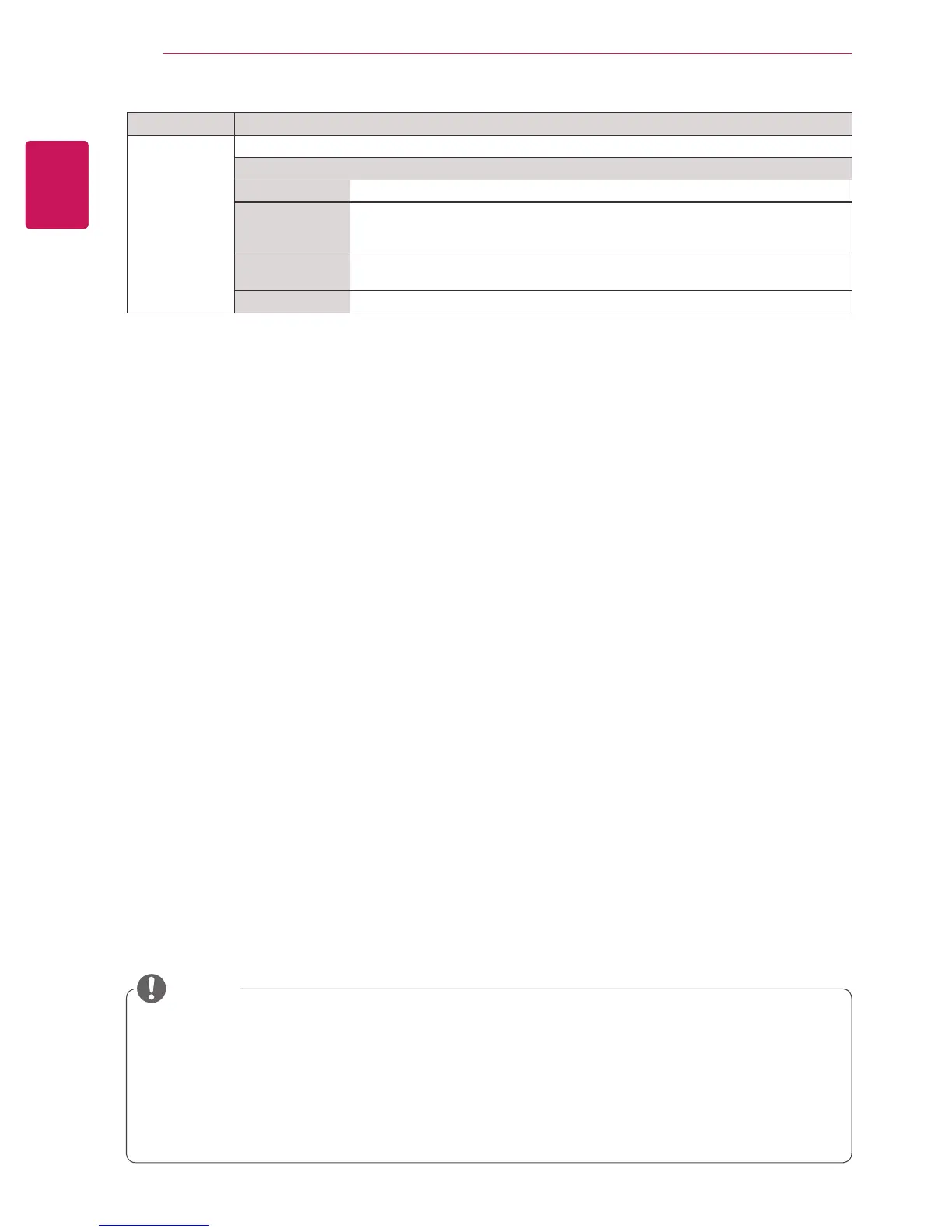
Setting Description
Screen
(In RGB
Mode Only)
Adjusts picture in RGB-PC mode.
Option
Resolution
Selects a proper resolution. See “Customizing PC display options”.
Auto Config.
Adjusts the screen position, clock, and phase automatically.
The displayed image may be unstable for a few seconds while the configuration is
in progress.
Position/ Size/
Phase
Adjusts the options when the picture is not clear, especially when characters are
shaky. Run Auto Config. before adjusting these.
Reset
Restores all options to the default setting.


 To Next Page