EasyManua.ls Logo

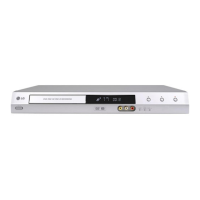
LG DR788 - User Manual

LG DR788
151 pages
Print Icon
To Next Page IconTo Next Page
Loading...
DVD êÖäéêÑÖê
ßçëíêìäñßü á
ÖäëèãìÄíÄñß∫
åéÑÖãú: DR788 / DR799
DRK789
èÂ¯ Ì¥Ê ‚ÏË͇ÚË, ‚ËÍÓËÒÚÓ‚Û‚‡ÚË ˜Ë ̇ÒÚÓ˛‚‡ÚË ˆÂÈ ÔËÒÚ¥È,
·Û‰¸ ·Ò͇, Û‚‡ÊÌÓ ÔÓ˜ËÚ‡ÈÚ ˆ˛ ¥ÌÒÚÛ͈¥˛.
DR289/99H-P2_HA8UKLS_Ukr
ßÌÚÂÌÂÚ ‡‰ÂÒ‡: http://ua.lge.com
ßÌÙÓχˆ¥È̇ ÒÎÛÊ·‡ LG: (380-44) 490-7777
ÅÂÁÍÓ¯Úӂ̇ ¥ÌÙÓχˆ¥È̇ Υ̥fl: 8-800-303-0000

Table of Contents

Questions and Answers

  • P
    pthomasSep 12, 2025
    Why is the broadcasting channel picture/sound weak on my LG DR788 DVD Recorder?
    • D
      Dale MillerSep 12, 2025
      If the picture or sound of a broadcasting channel is weak or missing on your LG DVD Recorder, it's possible that the aerial or cables are loose. Tighten the connections or replace the cable.
  • M
    Melissa VaughanSep 13, 2025
    Why is the camcorder image not showing on my LG DR788?
    • W
      William PattonSep 13, 2025
      If the camcorder image is not showing on your LG DVD Recorder, it could be due to: * The camcorder being off. Turn the camcorder on and operate it properly. * The recorder’s source being incorrect. Use AV/INPUT to select the correct input channel (AV1, AV2, DV, etc.).
  • M
    mkellySep 15, 2025
    Why are channels skipped on my LG DR788?
    • R
      Rick WatsonSep 15, 2025
      If some channels are being skipped when using PR/CH (+/-) on your LG DVD Recorder, it means those channels are not stored in the recorder. Restore channels.

LG DR788 Specifications

General IconGeneral
TypeDVD Recorder
Video InputComposite, S-Video
Video OutputComposite, S-Video, Component
Progressive ScanYes
Recording FormatsDVD-RW, DVD-R
Playback FormatsDVD-Video, DVD-R, DVD-RW, CD, CD-R, CD-RW
Audio InputStereo RCA
Audio OutputStereo RCA
Video SystemPAL, NTSC
Recording ModesSP, LP, EP
Video Recording SystemMPEG-2
Audio Recording SystemDolby Digital
InputsComposite, S-Video, Stereo RCA
OutputsComposite, S-Video, Component, Stereo RCA
Disc CompatibilityCD-R, CD-RW

Related product manuals