31
User Interface Guide
Due to our policy of continuous product innovation, some specifications may change without notification.
©LG Electronics U.S.A., Inc., Englewood Cliffs, NJ. All rights reserved. “LG” is a registered trademark of LG Corp.
CONFIGURATION SCREENS
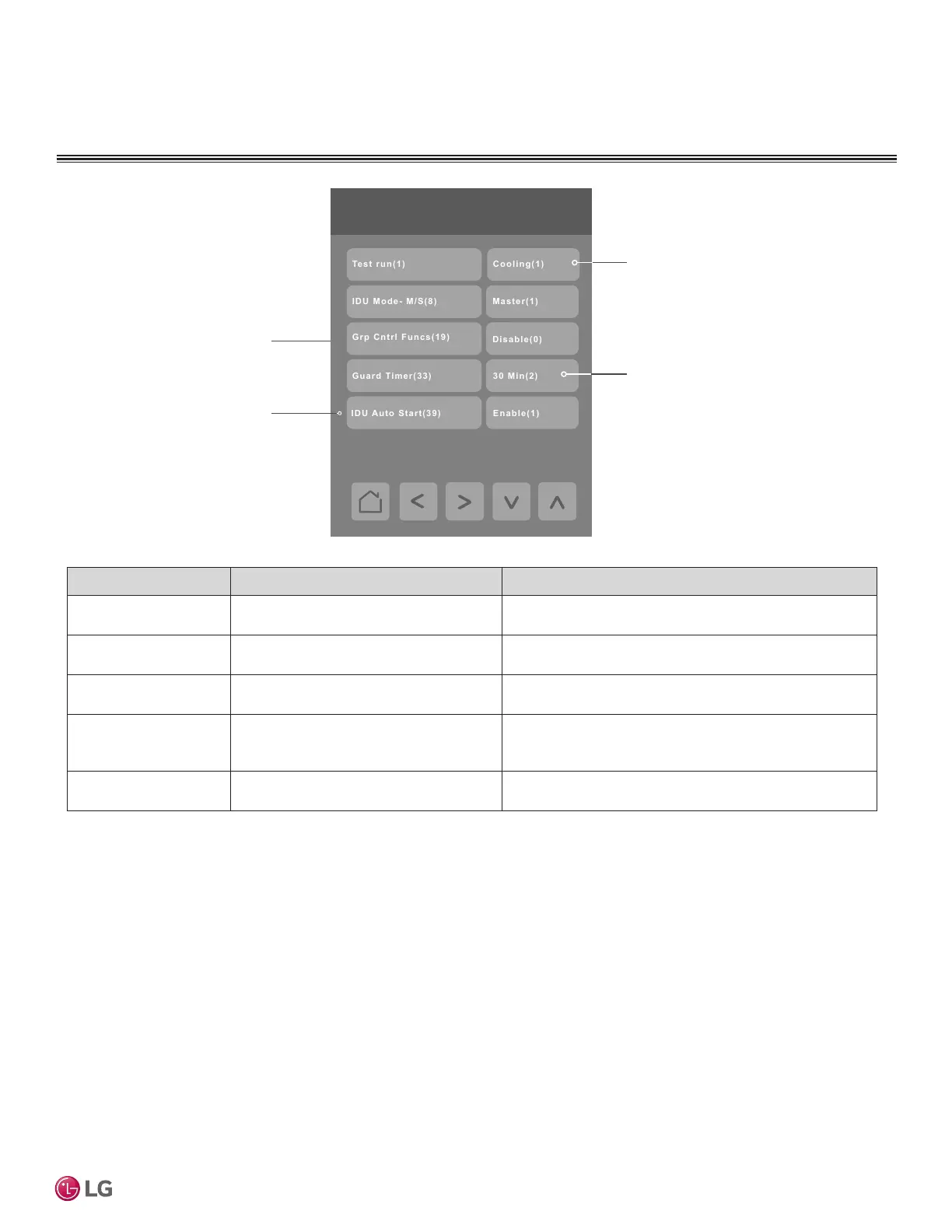
Using the Up and Down arrows select
between Heating, Cooling or O
modes. The Test run will end after 18
minutes and then turn system o. Test
mode can be interrupted by changing
fan speed, set point, or turning o the
IDU from the home screen.
Use this function to enable or
disable Group Control for the
system.
Using the Up and Down arrows select
a guard time of 0, 15, 30, 45 or 60
minutes.
Use this function to enable or
disable Indoor Unit Auto Start.
3/4 Installer / General
Parameter Parameter Settings Denition
Test run(1) Choices: O(0), Cooling(1), Heating(2)
Default value = O
Initiates an IDU test mode
IDU Mode - M/S(8) Choices: Slave(0), Master(1)
Default value = Slave(0)
Sets the IDU as a master or slave unit
Grp Cntrl Funcs(19) Choices: Disable(0), Enable(1)
Default value = Disable(0)
Enables additional common functions across IDUs when
congured in group control
Guard Timer(33) Choices in minutes: 0 min(0), 15 min(1),
30 min(2), 45 min(3), 60 min(4)
Default value = 15 min(1)
Protects the compressor against repetitive and short
duration changes in system mode
IDU Auto Start(39) Choices: Enable(0), Disable(1)
Default value = Enable(0)
Turns on the IDU automatically after power is restored to
the IDU


 To Next Page